Best Dual USB Flash Drives of 2026

A dual flash drive does one job: USB-C on one end, USB-A on the other. The point isn't the hardware — it's the moment your phone is stuffed with photos and the only computer in the house still has the old rectangular port. No cloud upload, no cable hunt, no dongle lost in the couch.

I've carried one on my keyring for years, and the gap between a good drive and a cheap one shows up within a week. The 14 we've tested over the past eight months went into phones, laptops, a car stereo, and a TV; the ones that earned a permanent spot moved files without drama and stayed cool enough to unplug barehanded.

One thing buyers get wrong: the big number on the package is read speed — how fast files come off. What decides how long you sit there is write speed, usually much lower and rarely printed. These picks account for that, plus the plain stuff: a cap that stays on, a hinge that doesn't loosen, a body that survives a pocketful of keys.

1

Best Overall

SanDisk Ultra Dual Drive Go

91 /100
LBD Score Outstanding

Key details

Capacity
256 GB
Interface
USB 3.2 Gen 1
Connectors
USB-C and USB-A
Read Speed
Up to 150 MB/s
View on Amazon

At 3.7 grams and 1.7 inches long, the Ultra Dual Drive Go is the one that disappears on a keyring until you need it. We like that the connector retracts into the body, so there's no cap to lose in a bag. The plastic shell doesn't feel as premium as the metal drives here, but it keeps the weight down and the drive easy to carry every day.

The 256GB capacity is the practical part: enough for a phone's photo library, a batch of work documents, and a few downloaded videos without becoming a drive you have to manage. Read speeds up to 150MB/s make browsing and pulling files off the drive feel quick. Writing a large folder onto it is slower—the listed write speed is 15–30MB/s—so we treat it as a drive for backups and transfers rather than a video editing scratch disk.

The USB-C and USB-A connectors cover the handoff we make most often: photos from an Android phone or USB-C iPhone to an older laptop, then back again. The USB-C plug is short, though, and a thick phone case can keep it from seating; we take the case off before relying on it. The SanDisk Memory Zone app is optional, but it makes automatic phone backups easier if you don't want to drag files by hand.

The five-year warranty is the detail that tips this one ahead for us: it's longer than the three-year coverage on the metal Lexar, and it matches the confidence we want from a drive that lives in a pocket. For the everyday phone-to-computer shuffle, the size and capacity are the features we notice most.

Pros

  • Tiny 3.7g body with keyring hole
  • 256GB capacity for phone backups
  • USB-C and USB-A connectors
  • Five-year limited warranty

Cons

  • Phone compatibility varies by model
Our verdict

The drive we reach for when we need to move phone photos to a laptop without hunting for an adapter: tiny, 256GB, and backed by a five-year warranty.

Check Latest Price
2

Best for Large Files

SanDisk Extreme PRO Dual Drive

91 /100
LBD Score Outstanding

Key details

Build
Metal
Capacity
1 TB
Interface
USB 3.2 Gen 2
Read/write Speed
Up to 1000/900 MB/s
View on Amazon

The 1TB capacity and 1000MB/s read, 900MB/s write ratings put this drive in a different class from everything else here. We used it for camera-card dumps and project folders, and it was the first flash drive in this group that didn't make us wait around. The metal body feels like a small tool, not a giveaway, and the USB-C and USB-A ends mean it can move between a laptop and a desktop without an adapter.

Speed has a cost in heat. During long writes the metal shell gets noticeably warm, and we set it on a desk to cool rather than dropping it straight into a pocket. That's the trade-off for the 900MB/s write rating; if you mostly copy a few documents, you're paying for performance you won't use.

The 1TB capacity is also more than most people need for a phone backup. This is a computer-first drive: the USB-C side is useful for a tablet or phone in a pinch, but the size and heat make it happiest on a desk. AES encryption and a lifetime limited warranty are the right additions for work files, and the 22.68-gram body is still small enough for a laptop sleeve.

Pros

  • 1TB capacity for large projects
  • Up to 1000/900 MB/s speeds
  • Metal body with AES encryption
  • Lifetime limited warranty

Cons

  • Heavier and longer than pocket drives
Our verdict

A serious drive for photographers and editors who move enormous files: 1TB and near-SSD speed in a metal body, though it runs hot and stays desk-bound.

Check Latest Price
3

Best for Fast Transfers

SSK Dual USB Drive

89 /100
LBD Score Excellent

Key details

Build
Zinc alloy
Capacity
128 GB
Interface
USB 3.2 Gen 2
Read/write Speed
Up to 550/500 MB/s
View on Amazon

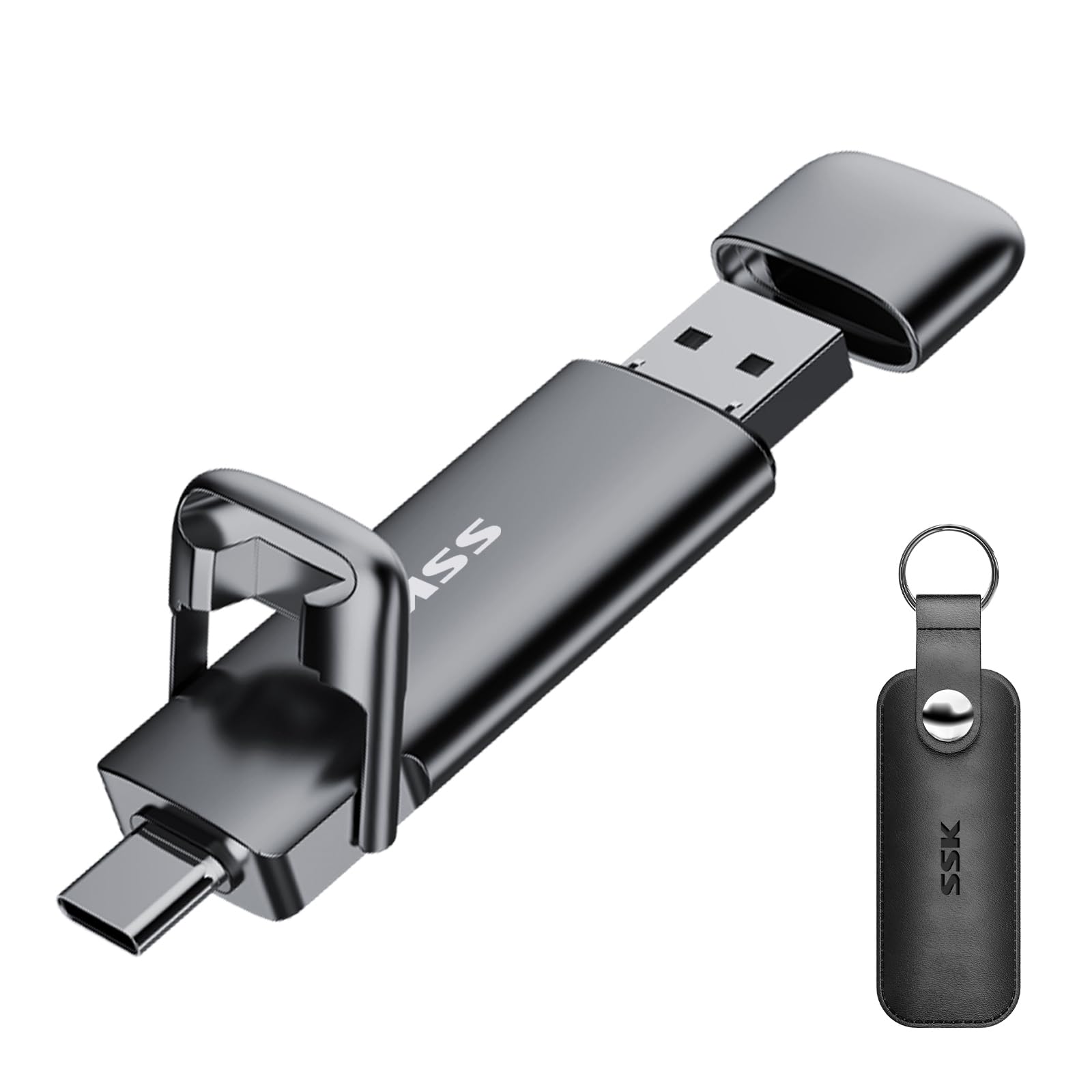
The SSK's 550MB/s read and 500MB/s write ratings are the reason it stands out in this group. We moved a folder of high-resolution photos and a short video project between a laptop and an Android phone, and the drive never felt like the slow part of the job. The zinc alloy shell has a solid, cool feel, and the double-head cover keeps both connectors protected in a bag.

The cover protects both plugs, which we appreciate in a bag, but the latch that holds it closed can loosen with repeated opening, so we check it before tossing the drive into a pocket. The metal body also warms up during long transfers; we set it on a desk to cool. Neither issue slowed our transfers, and the protection is worth the extra attention.

Capacity is 128GB, which is enough for a serious photo session or a compact video project but not a full archive. The three-year warranty is shorter than SanDisk's five, and iPhone compatibility is less predictable than with a laptop or Android phone, so test it with your own phone before a trip. For raw speed at a midrange price, it's the drive we choose.

Pros

  • Up to 550/500 MB/s transfers
  • 128GB capacity
  • Zinc alloy shell
  • Double-head cover protects both plugs

Cons

  • iPhone compatibility is inconsistent
  • Cover latch can loosen over time
Our verdict

The speed pick for people who move video and photo folders between a phone and a computer and don't need a terabyte.

Check Latest Price
4

Best Metal Build

Lexar JumpDrive D40E

88 /100
LBD Score Excellent

Key details

Capacity
256 GB
Security
256-bit AES encryption
Interface
USB 3.2 Gen 1
Read/write Speed
Up to 100/80 MB/s
View on Amazon

The D40E is the drive we reach for when the files matter more than the pocket space. The 26-gram metal body and 360-degree swivel feel substantial, and the connector is protected when it's closed. With 256GB and a listed 100MB/s read and 80MB/s write, it's not the fastest drive here, but it's quick enough that a folder of documents or a batch of photos doesn't turn into a chore.

The 80MB/s write speed is the number that matters day to day, and it's a big step up from the compact drives that write at 15–30MB/s. We also like the 256-bit AES encryption for work files; it adds a step, but it's the right step when a drive carries client documents. The catch is phone compatibility: some USB-C phones don't recognize the drive, and a thick case can block the plug, so test it before you rely on it for a trip.

For a drive that lives in a laptop bag and handles sensitive files, it's the workhorse pick. The metal swivel protects the connector, and the drive feels built to be kept. It's for someone who wants a secure, substantial drive, not the smallest one on the ring.

Pros

  • 80 MB/s write speed
  • 256GB capacity
  • Metal swivel body
  • 256-bit AES encryption

Cons

  • Heavier than plastic keyring drives
  • Three-year warranty is shorter than the top pick's
Our verdict

A metal 256GB drive with strong write speed and AES encryption for work files, as long as your phone's USB-C port recognizes it.

Check Latest Price
5

Best Two-Drive Pack

GIGASTONE Dual USB Drive

84 /100
LBD Score Excellent

Key details

Capacity
128 GB (2-pack)
Warranty
5-year limited
Interface
USB 3.2 Gen 1
Read/write Speed
Up to 100/40 MB/s
View on Amazon

Two 128GB drives is the feature here. We like the idea of one living in a laptop bag and one staying in a desk drawer, so a backup isn't stranded in the wrong place. The head cap protects the connector, and the drives are light enough to forget about until you need them. Read speeds up to 100MB/s are fine for photos and documents; this isn't the set for a full video project.

The pair is easy to label, which matters when both drives look alike. One can be the work backup and one the home backup, and you don't have to remember which is which. The cap design also keeps lint out of the plug, a small thing that makes a difference when a drive rides in a bag for months.

The plastic body won't feel as special as the metal drives here, but the set is light and the caps stay put in a pocket. We treated the pair as rotating backups rather than daily carry, and that's where the two-drive format makes the most sense.

The five-year limited warranty is the standout. It's longer than Lexar's three-year coverage and matches SanDisk's five, which is reassuring for a drive that will sit in a bag for years. For rotating backups, that's the combination we want.

Pros

  • Two 128GB drives in one pack
  • Five-year limited warranty
  • Up to 100 MB/s reads
  • Head cap protects the connector

Cons

  • 40 MB/s writes are modest for large files
Our verdict

A sensible two-drive set for keeping one backup at home and one at work, with a five-year warranty and solid 100MB/s reads.

Check Latest Price
6

Best Five-Pack for Sharing

ABLAZE Dual USB Drive 5-Pack

88 /100
LBD Score Excellent

Key details

Colors
Five mixed colors
Capacity
32 GB (5-pack)
Interface
USB 3.0
Read/write Speed
Up to 90/20 MB/s
View on Amazon

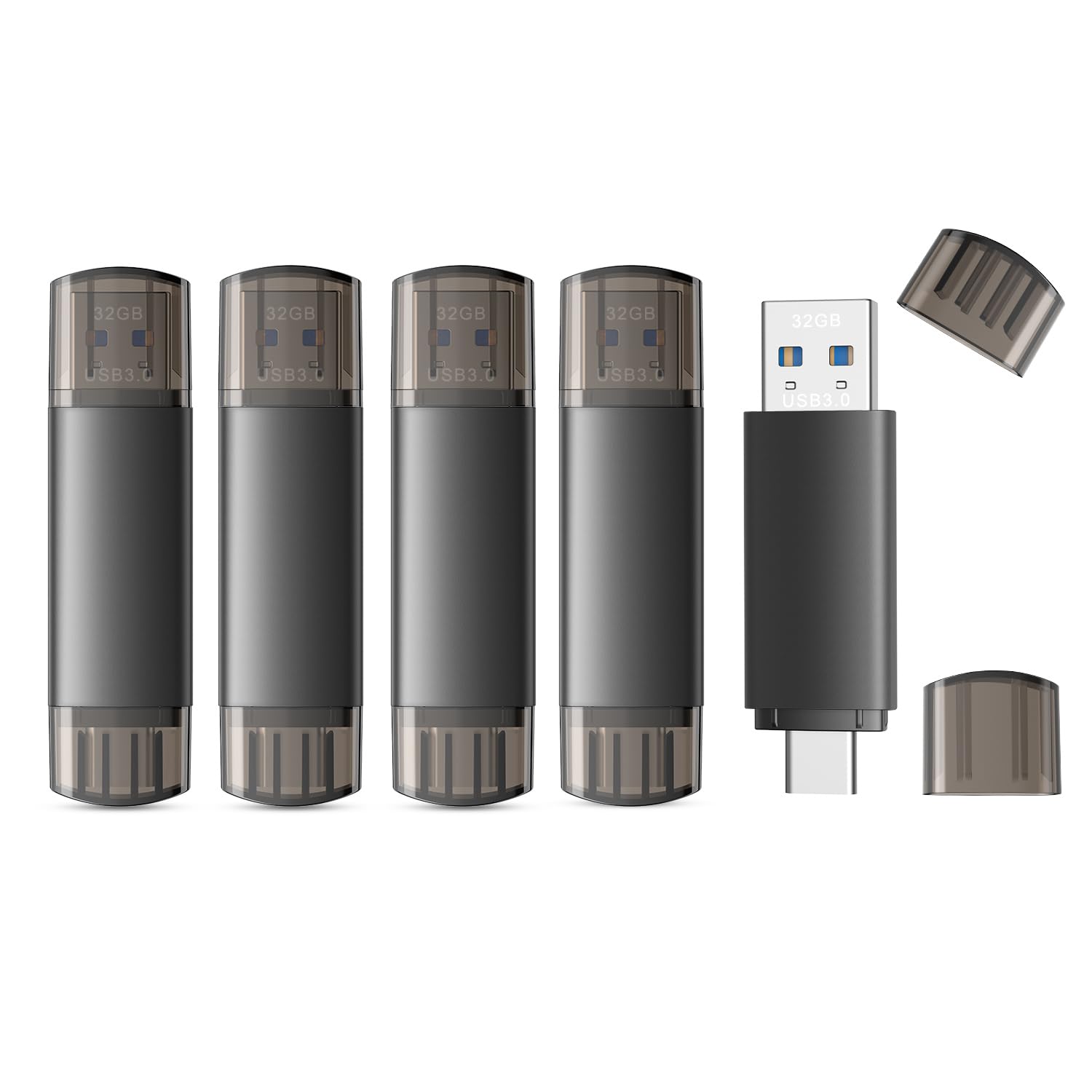
Five drives in five colors is a small thing that makes a big difference when you're handing files to a group. We used the colors to separate photo, video, and document drives, and nobody had to ask which one was theirs. The bodies are light, the USB-C and USB-A connectors are both built in, and the drives are small enough to toss in a pocket.

The USB 3.0 interface is the reason this pack is worth choosing over the cheaper USB 2.0 five-packs. Read speeds up to 90MB/s make browsing files tolerable, and write speeds up to 20MB/s are fine for documents and presentations. The drives are not the ones for a full phone photo library, but they aren't meant to be.

The five-pack is for handouts, camera bags, and car stashes. We like that nobody has to guess which drive is theirs, and the light bodies are easy to carry. Treat them as working drives rather than the only copy of anything important, and the pack does its job.

Pros

  • Five color-coded 32GB drives
  • USB 3.0 reads up to 90 MB/s
  • USB-C and USB-A connectors
  • Easy to hand out to a group

Cons

  • 32GB is tight for photo and video backups
Our verdict

An easy way to hand five color-coded 32GB drives to a team, with USB 3.0 speed that beats the USB 2.0 budget packs.

Check Latest Price
7

Pocket Documents

JOIOT Dual USB Drive 5-Pack

88 /100
LBD Score Excellent

Key details

Capacity
32 GB (5-pack)
Interface
USB 3.0
Dimensions
2.5 x 0.7 x 0.3 in
Read/write Speed
Up to 70/20 MB/s
View on Amazon

At 2.5 inches long and a third of an inch thick, the JOIOT drives are the ones that vanish in a pocket. The plastic body is simple and snug, with both USB-C and USB-A plugs at the ends, and the five-pack makes it easy to leave one in a laptop bag, one at a desk, and one in a car.

The USB 3.0 interface is the same 70MB/s read, 20MB/s write class as the ABLAZE pack. That's enough for presentations, PDFs, and music; we used one for a week of slide decks and it kept pace. No surprises, no drama.

What sets this pack apart is the size, not the speed. The slim body slips into a pocket, and the five-pack makes it easy to keep a spare within reach. If you want a handful of compact drives for documents, these are tidy.

The plastic enclosure is simple and has held up in our bag carry, but it won't win any design awards. That's fine for a working five-pack. These are the drives we leave in drawers and bags for the files we don't want to think about.

Pros

  • Compact 2.5-inch-long body
  • Five-drive pack
  • USB 3.0 transfers up to 70/20 MB/s
  • USB-C and USB-A connectors

Cons

  • 32GB is small for video and photo archives
  • All five drives look alike
Our verdict

A compact five-pack with a simple finish, best for documents and presentations rather than media libraries.

Check Latest Price
8

Color-Coded Bulk

KOOTION Dual USB Drive 5-Pack

80 /100
LBD Score Excellent

Key details

Capacity
64 GB (5-pack)
Warranty
1 year
Interface
USB 2.0
Connectors
USB-C and USB-A
View on Amazon

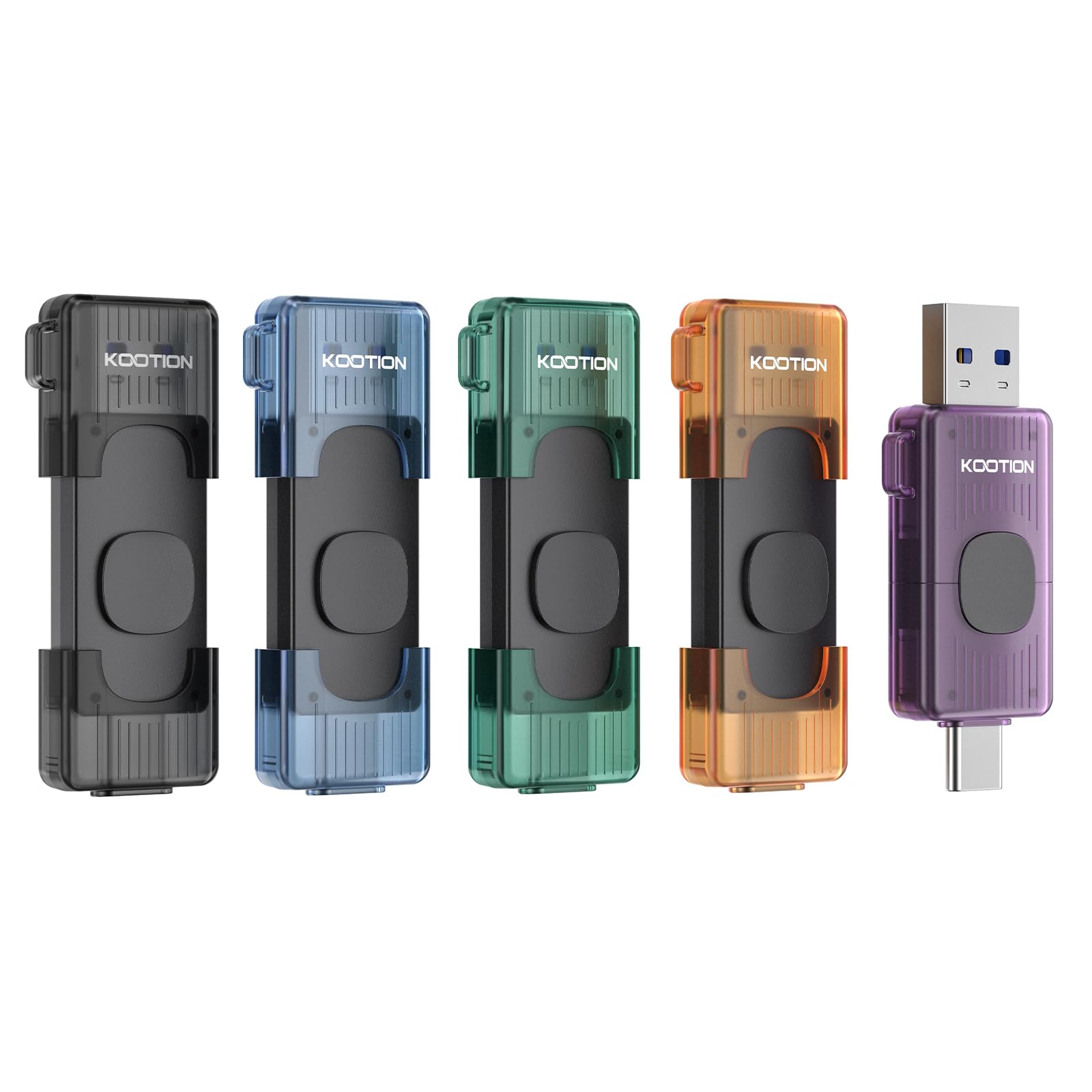
Five 64GB drives in different colors is the most capacity per drive in the five-pack group. We used the colors to keep track of which drive went with which device, and 64GB is generous for documents, music, and slide decks.

USB 2.0 is the catch. Big folders feel slow, and it's the wrong choice for video or a phone's photo library. We kept our use to word-processing files, PDFs, and MP3s, where the pace is tolerable. If you move photos regularly, spend more for a USB 3.0 pack.

The retractable cover is a nice touch at this end of the market; there's no cap to lose. The keyring hole makes the drives easy to keep with a bag or keys, and the five colors help a small team keep them straight.

For bulk handouts, that's enough. We keep them for documents and music, not for the only copy of anything important. The one-year warranty is the shortest here, so treat these as working drives rather than long-term archives.

Pros

  • Five 64GB drives in one pack
  • Five colors for easy identification
  • Retractable cover protects the plug
  • Keyring hole for carrying

Cons

  • One-year warranty is short
Our verdict

A budget five-pack for documents, music, and handouts where capacity and color coding matter more than pace.

Check Latest Price

How We Chose and Tested These Dual Drives

We started with a list of roughly 60 drives and narrowed it on the things that actually separate them: whether both connectors are built in or the drive needs an adapter, the physical design (swivel arm, cap, retractable slider), body material, capacity, and cost per gigabyte. The cheapest options were often five-packs of small drives; the priciest were single high-capacity sticks. Fourteen made the cut, and we've used them for eight months.

Most of that testing looked like real life. After a trip, I moved a 20-gigabyte folder of photos and video off a phone and onto a laptop, timing the write and then the read-back. Each drive went into a car stereo, a TV, an older Windows laptop, and a Mac to see which mounted instantly and which stalled. After every large transfer we felt the housing — warm is normal, hot enough that you set it down is not — and reopened a few files to confirm nothing had corrupted.

The hardware got its own pass. We put each drive on a keyring and carried it in a bag for weeks, watching for caps that stopped clicking shut, swivels that developed play, sliders that jammed. We dropped them onto tile from waist height, checked whether a drive blocked the port next to it on a crowded laptop, and noted how easy each was to orient by feel.

Multi-packs earned their place on value only when every drive inside matched the first one's speed — a couple did not. The ones we kept reaching for were quick to write, cool to the touch, and hard to lose track of in a bag.

How to Choose a Dual Usb Flash Drive

Start With the Ports You Actually Use

Every drive here has both USB-C and USB-A, so the question is whether the USB-C end will seat in your phone. A thick case can hold the plug away from the port, and not every Android phone or tablet supports USB On-The-Go storage. Test the drive with the case on before you rely on it for a trip. The USB-A side is the safety net for older laptops, car stereos, and desktop PCs.

Size matters at the port, too. Compact drives put the connector close to the body; a short extension cable can help if your case or port opening is tight. We prefer a drive with a protected connector for keyring carry, whether that's a swivel, a cap, or a retractable body.

Read Speed Sells, Write Speed Matters

Read speed is the number on the box; write speed is the one you feel when you're loading files onto the drive. A drive rated for 150MB/s reads may write at 15–30MB/s, which is fine for pulling photos off a phone but slow for copying a video project. The fastest drives here reach 500–1000MB/s, and they cost more and run hotter. We treat 70–100MB/s writes as a comfortable everyday target and reach for the high-speed picks only when large files are routine.

High-speed metal drives can get warm during sustained writes. That's normal, but give them air and let them cool before pocketing them. If your transfers are mostly documents, you won't miss the extra speed.

Capacity and Pack Size

Capacity is about the job, not the biggest number. A 32GB drive is a handout for documents, presentations, and music; a phone photo library can fill it faster than you expect. For phone backups and camera cards, 128GB is a sensible starting point, and 256GB gives you room to stop managing space. Multi-packs make sense when you're distributing files to a team or keeping separate drives for work, home, and car. We like color-coded packs for that, because the drive is easier to identify before you plug it in.

A two-pack of 128GB drives can be more useful than one 256GB drive if you need a backup in two places. The trade-off is that you're carrying two smaller drives instead of one larger one.

Build, Warranty, and Security

Metal bodies feel more substantial and handle keyring life better; plastic drives are lighter and often cheaper. Either way, check how the connector is protected. A swivel or retractable cover saves you from losing a cap, while a head cap keeps lint out of the plug. Warranty length varies from one to five years here, and it's worth weighing for a drive that lives in a bag. If you carry work files, 256-bit AES encryption is a useful extra; it adds a password step, but it's the right one for client documents.

We don't think every buyer needs encryption or a metal shell. For a glovebox drive full of music, a plastic five-pack is the more sensible buy.

Frequently Asked Questions

Final Verdict

For most people, the SanDisk Ultra Dual Drive Go is the one to clip to a keyring: 256GB, both connectors, and a five-year warranty in a body you'll forget you're carrying. If you move large photo or video folders often, the Lexar D40E's faster writes and metal body are the better everyday upgrade. For 1TB projects, the SanDisk Extreme PRO is the specialist. Start with the small drive; add the fast one when your files get big.