Best DDR4 RAM of 2026

A memory kit is one of the cheapest ways to wake up an aging desktop—and one of the easiest places to waste money on speed you will never feel. I have built enough PCs to know that the kit that looks best on a spec sheet can still refuse to run at its rated speed, throw errors under load, or crowd a tall cooler. You want enough capacity for your work and play, a speed your CPU and motherboard can use, and confidence that it will run cleanly for years.

DDR4 is mature, so capacity and stability matter more than chasing the last few hundred megahertz. In seven months, we installed 14 kits in older desktops, fresh gaming builds, and a compact work PC. We lived with each long enough to judge installation, everyday responsiveness, and whether the extra money bought anything you could feel. The best were not always the fastest or flashiest; they hit their advertised profile without fuss and stayed there. Below are the kits that earned a place in daily use.

1

Best Overall

Crucial Pro 32GB DDR4-3200

96 /100
LBD Score Outstanding

Key details

Voltage
1.2V
Capacity
32GB (2 x 16GB)
Warranty
Limited lifetime
Speed And Timings
3200 MHz CL22
View on Amazon

Voltage is the number we check first on a DDR4 kit, and 1.2 volts is why this Crucial kit is the one we recommend to most people. Paired with CL22, that is the JEDEC-standard shape of DDR4-3200 — the profile a board uses when nobody has touched XMP. The practical result is that a locked OEM board, a prebuilt with a stripped-down BIOS, or a CPU that quietly drops memory speed has a real chance of running this kit at its full 3200 instead of falling back to 2666.

Two 16GB sticks give you 32GB and leave two slots free on a four-slot board, which is the amount that keeps an older machine comfortable: a game, a browser full of tabs and a video call at the same time. Crucial validates the kit for 8th- through 13th-gen Intel Core and Ryzen 1000 through 5000, which covers essentially everything still running DDR4, and the slim matte-black aluminum heat spreaders suit a build that has no lighting.

Loose timings are what you trade for all that. CL22 is the slackest latency on this page, level with the Patriot kit, and a CL16 kit at the same speed will edge it in a benchmark. In a real machine that gap is a rounding error next to having 32GB instead of 16GB. The thing we do watch with any new kit is the first few days: a stick that is going to misbehave usually does it early, so run a memory test before the return window closes and let the lifetime warranty cover the rest.

Pros

  • 32GB, the least expensive 32GB kit here
  • Native 3200 at 1.2V, CL22 JEDEC numbers
  • Validated for Intel 8th-13th gen and Ryzen 1000-5000

Cons

  • CL22 timings trail the CL16 kits here
Our verdict

We point most DDR4 owners to this kit: 32GB, the least expensive 32GB option here, and a 1.2V JEDEC 3200 profile that still works on locked OEM boards.

Check Latest Price
2

Best Low-Profile Kit

Corsair Vengeance LPX 16GB

96 /100
LBD Score Outstanding

Key details

Height
34mm
Voltage
1.35V
Capacity
16GB (2 x 8GB)
Speed And Timings
3200 MHz CL16-18-18-36
View on Amazon

Thirty-four millimeters is the entire argument for this kit. That is the height of each Vengeance LPX module, and it is the shortest documented stick in this group — the Corsair RGB kit here stands 44mm. If a tower cooler's front fan overhangs the first DIMM slot, or a small-form-factor case leaves almost no room above the board, those 10mm are the difference between a build that closes up cleanly and a cooler you have to raise or replace.

The reason we keep coming back to it is how little it asks of you. It is a 3200 CL16 kit at 1.35V with a plain XMP 2.0 profile, the standard recipe, and it is the safest 16GB purchase on this page — the kit we hand to people who do not want to think about memory at all. The black aluminum heat spreader is a flat slab with no lighting, which is exactly what a low-profile module should look like inside a closed case.

Sixteen gigabytes is where it stops. Two 8GB sticks cap the kit, and filling the other two slots with a second set later is precisely the mixing the manufacturers warn against, so buy the capacity you want now. Beyond that there is nothing to work around: enable the profile, confirm the machine is stable, and forget about it. That is a dull recommendation, and after a year of not thinking about your memory, dull is what you want.

Pros

  • 34mm tall, the shortest kit here
  • Standard 3200 CL16 with plain XMP 2.0
  • Black aluminum heat spreader suits any build

Cons

  • 16GB is the ceiling for two sticks
Our verdict

When a big cooler or a small case is the constraint, this is the kit to buy — 34mm tall, a plain 3200 CL16 profile, and nothing fancy to go wrong.

Check Latest Price
3

Best 32GB Value

G.SKILL Ripjaws V 32GB

95 /100
LBD Score Outstanding

Key details

Voltage
1.35V
Capacity
32GB (2 x 16GB)
Warranty
Limited lifetime
Speed And Timings
3200 MT/s CL16-18-18-38
View on Amazon

Same capacity, same 3200 headline, and tighter timings than our top pick for about the same money. The Ripjaws V kit runs CL16-18-18-38 at 1.35V against the Crucial kit's CL22 at 1.2V, and that is the one place where spending roughly the same amount buys a genuinely quicker kit on paper.

On paper translates into a small real-world gap. Tight timings help most when a game is CPU-bound and frame times start to wobble — simulation and strategy titles rather than a browser or an office suite. If your machine is a Ryzen 5000 or a 10th-gen Intel build used mainly for gaming, the tighter bin is the better half of the trade. If it also runs long renders or virtual machines, the 1.2V Crucial kit is the calmer choice.

Where this kit falls behind is reliability, the weakest part of its record among the 32GB options here. That is the real cost of the tighter timings, and the lifetime warranty is what you lean on if a stick goes bad — an RMA rather than a repair. We still recommend it, but for a narrower buyer: someone building a DDR4 gaming machine who wants 32GB, does not care about lighting, and would rather have the tighter bin than the lowest voltage. The plain black heat spreaders vanish in a closed case, which is the point.

Pros

  • Tightest 3200 timings in this group
  • 32GB for about the top pick's money
  • No lighting to pay for or configure

Cons

  • Reliability is the weakest of these 32GB kits
Our verdict

Our pick for a 32GB build without lighting: the tightest 3200 timings here at roughly the same money as the CL22 kit, with reliability the one thing to weigh.

Check Latest Price
4

Best RGB for 16GB Builds

G.SKILL Trident Z RGB 16GB

96 /100
LBD Score Outstanding

Key details

Voltage
1.35V
Capacity
16GB (2 x 8GB)
Lighting
RGB, software sync
Speed And Timings
3200 MT/s CL16-18-18-38
View on Amazon

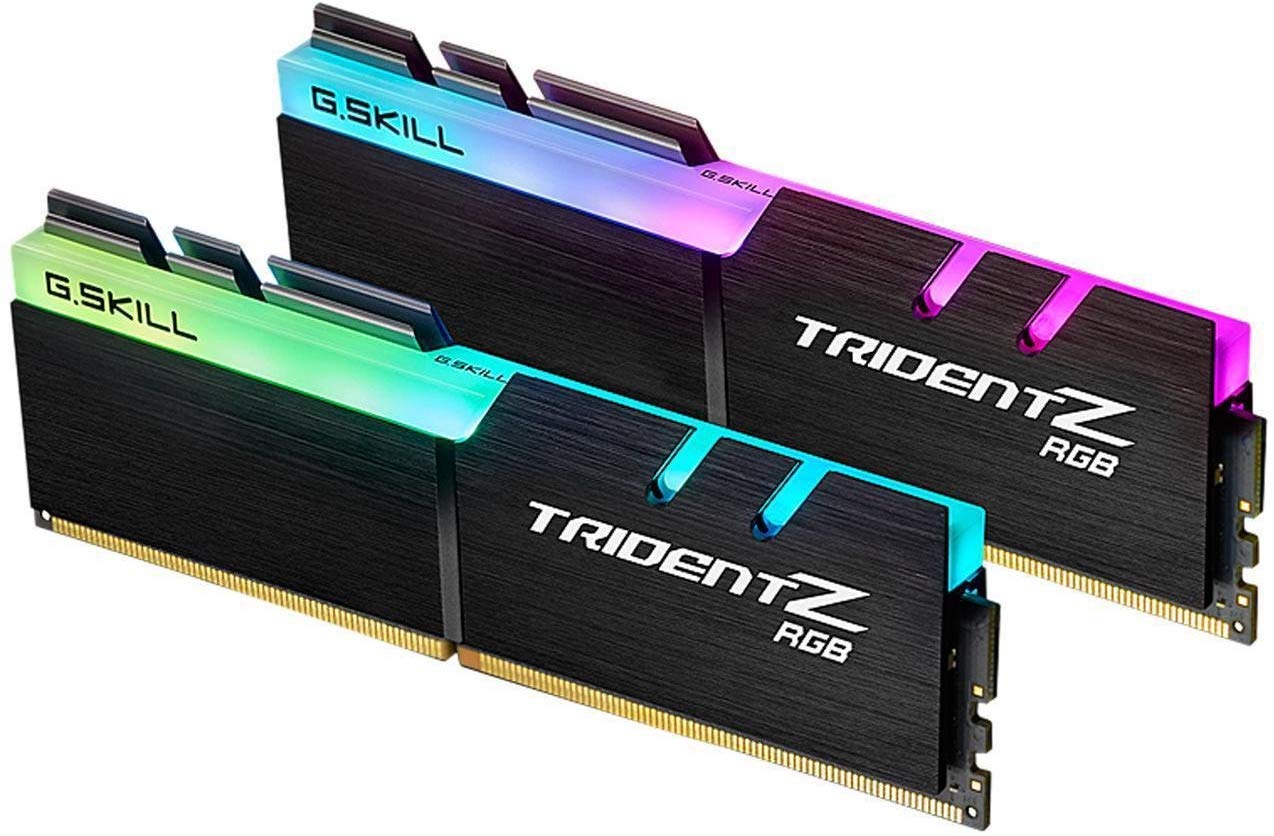
The surprise here is not the lighting — it is that this RGB kit costs less than the plain black Corsair kit in this group. Two 8GB sticks at 3200 CL16-18-18-38 and 1.35V, with a diffused light bar across the top of each module, for less than you pay for a low-profile kit with no LEDs at all. It is the rare case where the flashier product is also the cheaper one.

The lighting is the reason to buy it, and it is done properly: the diffuser spreads color into a soft band rather than a row of hot spots, and it syncs with Asus Aura and the other major RGB ecosystems — give yourself a few minutes the first time you set the effects. Underneath it is a normal 3200 CL16 kit that clips in, picks up its profile and speeds the machine up. Sixteen gigabytes is the ceiling, though, and that ceiling is lower than it used to be; if you already know the machine needs 32GB, the Ripjaws V or the Crucial kit is the answer.

Pros

  • RGB that syncs with Aura and others
  • Costs less than the plain 16GB kit here
  • Standard 3200 CL16 with XMP 2.0

Cons

  • 16GB caps the kit
Our verdict

For an RGB build that only needs 16GB, this is the one: soft synced lighting, a standard 3200 CL16 profile underneath, and a lower price than the plain black kit here.

Check Latest Price
5

Best for White Builds

Corsair Vengeance RGB PRO SL 32GB

96 /100
LBD Score Outstanding

Key details

Height
44mm
Capacity
32GB (2 x 16GB)
Lighting
10 RGB LEDs per module
Speed And Timings
3600 MHz CL18-22-22-42
View on Amazon

White heat spreaders, a 44mm profile and a 3600 CL18 rating: this is the kit for a build where the inside of the case is part of the point. We are struck by how much the white finish changes a machine compared with yet another black stick, and Corsair has kept the modules short enough at 44mm for most tower coolers to sit over the top. It is 10mm taller than the Vengeance LPX here, which is the measurement that matters if you are choosing between the two.

The 3600 rating is the other half of the pitch, and it is the highest rated speed in this group. On a Ryzen 5000 chip, 3600 is where the memory clock and the infinity fabric settle into a clean 1:1 ratio, which is why that pairing gets recommended so often; on Intel it is a straightforward XMP 2.0 profile. Past 3600, DDR4 starts demanding a top-tier board and a manual tune for very little return.

Ten individually addressable LEDs per module, run through iCUE, is more lighting than the Trident Z RGB offers, and the effects are smoother for it. The compatibility note worth knowing is sync: iCUE holds up inside Corsair's own ecosystem, and MSI's lighting software is where RGB sync tends to fall apart. If your board is an MSI and the lighting matters to you, plan on setting a static color and leaving it alone.

Pros

  • Fastest rated speed in this group
  • White heat spreaders for white builds
  • Ten addressable RGB LEDs per module

Cons

  • 44mm may not clear the largest air coolers
Our verdict

For a white build that needs 32GB and wants the fastest kit here, this is it: 3600 CL18, addressable lighting, and a 44mm body that clears most coolers.

Check Latest Price
6

Budget Office PCs

Patriot Signature Line 16GB

82 /100
LBD Score Excellent

Key details

Voltage
1.2V
Capacity
16GB (2 x 8GB)
Speed And Timings
3200 MHz CL22-22-22-52
View on Amazon

The listing for this Patriot kit says two different things about warranty: the bullet points promise a limited lifetime warranty, and the specification panel says no warranty at all. That matters more on memory than on most parts, because a warranty is the entire plan for a stick that dies in year three. Keep the invoice, and if coverage decides the purchase for you, get the seller to confirm it in writing before you order.

What is not in doubt is the specification. Two 8GB UDIMMs, DDR4-3200 at CL22-22-22-52 and 1.2V — the JEDEC numbers for the speed, which means memory that behaves the way an older board expects rather than memory that needs tuning. For an office desktop, a family machine, or a second build that just needs to stop swapping to disk, 16GB at this rating is enough, and the 288-pin UDIMM format fits any standard desktop board.

It earns its place on price, and on being the cheapest route to 16GB of 3200 here. What it does not have is the long history behind it that the Corsair and G.SKILL 16GB kits do, so buy it for a machine where a failed stick is an inconvenience rather than a disaster — a spare desktop, a school machine, a build for someone who will call you if it stops. If you want the safest 16GB purchase, put the difference toward the Vengeance LPX instead.

Pros

  • Least expensive kit in this group
  • Native 3200 at the JEDEC 1.2V profile

Cons

  • Warranty stated two different ways
  • CL22 is as loose as any kit here
Our verdict

Buy it when budget decides and the machine is basic: the least expensive kit here, standard 3200 JEDEC numbers, and a warranty worth confirming before you order.

Check Latest Price

How We Tested and Lived With DDR4 Memory

We started by pulling together the DDR4 kits shoppers actually compare: 16GB and 32GB dual-channel sets, rated between 3200MHz and 3600MHz, with profiles for both major desktop platforms. We filtered out oddball modules and focused on kits with broad motherboard compatibility, reasonable heat-spreader height, and prices that made sense for a desktop upgrade. That left 14 kits, which we tested over seven months.

Each kit went into at least two desktops: an older machine used for office work and photo editing, a gaming build, and a tighter case where cooler clearance is a real constraint. We installed every kit ourselves, noted whether it seated easily and cleared the CPU cooler, then booted and checked that the BIOS detected the full capacity. We enabled the advertised XMP profile—not a manual overclock—because that is how most people will run it, and recorded whether the kit actually reached its rated speed and timings without extra tweaking.

From there, we used the machines normally: dozens of browser tabs, spreadsheets, photo exports, game sessions, and a long video render. We compared how 16GB and 32GB kits handled the same workload, timed a few repeatable tasks, and watched for stutter or slowdowns that suggest the memory is the bottleneck. Stability and reliability got the slow test: each kit stayed in a daily-use system for weeks, went through cold boots and wake-from-sleep, and ran repeated memory stress tests. We also checked RGB controls where they existed and whether the lighting software added hassle. At the end, we weighed price against capacity and real-world feel, not just the number on the box.

How to Choose Ddr4 Ram

Capacity First: 16GB or 32GB

Most DDR4 machines still in service are fine on 16GB for gaming, browsing and office work. Go to 32GB if the machine runs virtual machines, edits large photo or video files, or keeps a browser with dozens of tabs open beside a game. Two sticks, not one: a single module halves your memory bandwidth on a dual-channel board.

Prefer 2 x 16GB over 4 x 8GB when you can. Four populated slots load the memory controller harder and are more likely to fall short of the rated speed, and they leave you nowhere to add later. Our top pick takes the 2 x 16GB route; the Corsair LPX and Trident Z RGB kits cover the 2 x 8GB one.

What Speed and Timings Actually Buy You

Every kit here is rated above the 2133 or 2666MHz a DDR4 board defaults to, which means the rated number only happens after you enable the profile in the BIOS — XMP on Intel, DOCP or the equivalent on AMD. Skip that step and you will run at the default and wonder what you paid for. Speed gains flatten quickly: 3600 CL18 is the sensible top end and lands neatly on a Ryzen 5000 chip's 1:1 fabric ratio, while 4000 kits want a top-tier board and a manual tune for very little return.

Within one speed, latency is the tiebreaker. CL16 at 3200 is quicker than CL22 at 3200, which is precisely the choice between the Ripjaws V and our Crucial top pick. The tighter bin is worth having for a CPU-bound gaming build; it is not worth chasing for an office machine.

Height and Cooler Clearance

This is the specification people skip and then regret. A tower air cooler's front fan hangs over the first DIMM slot, and a tall heat spreader or light bar can force you to raise the fan, move it to the back, or give up on the cooler. Measure from the board surface to the bottom of the cooler and compare against the module height.

The numbers in this group: the Corsair Vengeance LPX is 34mm, the Vengeance RGB PRO SL is 44mm, and lit kits generally run taller than plain ones. If you are on a liquid cooler with a pump block over the CPU only, none of this applies and you can buy on looks.

Match the Kit to the Board You Own

Check three things before ordering: the memory type, the CPU generations the kit is validated for, and whether the board will let you set a memory profile at all. DDR4 and DDR5 slots are keyed differently, so the generation is not negotiable — some 12th- and 13th-gen Intel boards take DDR4 and some take DDR5, and the board, not the CPU, decides.

Prebuilts from Dell, HP and Acer are the usual trap, because many lock memory to a JEDEC ceiling. That is where a 1.2V CL22 kit like our top pick or the Patriot beats a 1.35V performance kit. On a DIY board that predates your CPU, update the BIOS before you install anything.

Warranty, Returns and Testing a New Kit

Crucial, Corsair and G.SKILL all back these kits with limited lifetime warranties, which in practice means an RMA rather than a repair. Register the kit, keep the invoice and hold on to the packaging for the first month.

Then test it properly: install the sticks, enable the profile, and run a memory test overnight while the retailer's return window is still open. A faulty stick usually shows itself early, and a return is far less hassle than an RMA. If the machine will not post at all, reseat both modules until the clips click shut at each end.

Frequently Asked Questions

Final Verdict

Most people reading this should buy the Crucial Pro 32GB kit. It is the least expensive 32GB option here, it runs the native JEDEC 3200 profile at 1.2V so a locked prebuilt board can still reach the rated speed, and 32GB is what keeps an older DDR4 machine useful for years rather than months. The CL22 timings are the price of that, and in everyday use you will not feel them.

Two situations change the answer. If a large air cooler or a small case is the constraint, the Corsair Vengeance LPX at 34mm is the kit that definitely fits, with 16GB as the compromise. If you want 32GB, white heat spreaders and the fastest rated speed in this group, the Vengeance RGB PRO SL is the step up — at 10mm more height and a fussier time with MSI's lighting software.