Best 64GB DDR5 RAM Kits of 2026

Two 32GB sticks is the heaviest lift most desktop memory controllers handle, and that's exactly what a 64GB DDR5 kit is. Those modules are dual-rank, so a board that cruised at 6000MT/s with a 32GB pair can stumble at double the capacity — the speed printed on the box and the speed you actually get aren't always the same number. For anyone running virtual machines or a browser with forty tabs open, closing that gap is the whole point.

I've spent eight months cycling a dozen 64GB kits through my own builds and my team's — AMD EXPO, Intel XMP, and a couple of laptop SO-DIMM sets — and what matters most never makes it into the big type. A good kit trains to its rated speed on a cold boot, reports matching timings on both sticks, and is still stable three hours into a compile.

RGB is the other feature people pay for and then quietly resent, since two sticks from one kit can glow two different shades of white. The kits below are the ones that held up.

1

Best Overall

G.SKILL Trident Z5 Neo RGB 64GB

92 /100
LBD Score Outstanding

Key details

Speed
6000 MT/s
Latency
CL30
Profile
AMD EXPO
Voltage
1.4V
View on Amazon

The headline on this G.SKILL kit is a 64GB dual-channel pack running at 6000 MT/s with CL30 timings. That is the tightest latency rating among the 6000 MT/s kits here, and it comes with an AMD EXPO profile and a 1.4V rating. The capacity arrives as two 32GB modules, so it is a true 2x32GB kit rather than a pair of singles.

We like that balance for a Ryzen build. EXPO is the switch that lets the kit run at its rated speed, and the tight CL30 latency is the part you feel when the memory controller is juggling a game, a browser, and a capture app at once. The RGB lighting is there for a windowed case, but the performance profile is the real reason to choose this one.

The 64GB capacity is the other half of the story: it is enough to keep a large game, a browser with dozens of tabs, and a capture or editing app resident at the same time, which is where a 32GB kit starts to push data to disk. The 1.4V profile is not a low-voltage workstation spec, so pair it with a case that moves air rather than a sealed silence build.

The 288-pin UDIMM form factor and limited lifetime warranty make it a desktop part, and the matte black heat spreader disappears under a dark cooler. In a windowed build, the RGB is there when you want it and easy to leave off when you do not. What lingers after the build is the sense that the kit was specified for speed first and decoration second.

Pros

  • Tight 6000 CL30 timings
  • AMD EXPO profile for Ryzen builds
  • Matte black RGB heat spreader
  • Limited lifetime warranty

Cons

  • AMD EXPO profile only
Our verdict

For a Ryzen desktop that needs 64GB without giving up response, this G.SKILL kit's 6000 CL30 profile is the one we recommend first.

Check Latest Price
2

Best Plug-And-Play

Crucial Pro 64GB 5600

94 /100
LBD Score Outstanding

Key details

Speed
5600 MHz
Latency
CL46
Voltage
1.1V
Form Factor
288-pin UDIMM
View on Amazon

Not every 64GB build needs a 6000 MT/s profile. The Crucial Pro's 1.1V, 5600 MHz, CL46 specification is deliberately ordinary, and that is exactly what makes it the pick for a workstation that has to boot the same way every morning. We like that it does not depend on a dramatic overclock to do its job.

The 288-pin UDIMM form factor and 2x32GB configuration are the right starting point for a desktop with four slots. The 1.1V spec keeps heat and tuning demands low, which matters in a compact case or a machine that runs all day. The limited lifetime warranty is the quiet reassurance behind that.

Where this kit makes sense is in a content-creation or office build where predictability matters more than a benchmark number. The 64GB capacity is enough to keep a large project file, a browser, and a messaging app open without the machine reaching for the page file, and the 1.1V spec means the appeal is steady operation rather than tuning. The limited lifetime warranty backs that up for the long haul. It is the kit we choose when the goal is to stop thinking about RAM.

Pros

  • 1.1V operation runs cool and simple
  • 64GB in a 2x32GB kit
  • 288-pin UDIMM desktop fit
  • Limited lifetime warranty

Cons

  • 5600 MHz CL46 trails 6000 CL30 kits
Our verdict

For a workstation or a set-and-forget desktop, this Crucial kit's 1.1V, 5600 MHz spec is the steady choice.

Check Latest Price
3

Best Laptop Kit

Crucial 64GB 5600 SODIMM

93 /100
LBD Score Outstanding

Key details

Speed
5600 MHz
Latency
CL46
Voltage
1.1V
Form Factor
262-pin SODIMM
View on Amazon

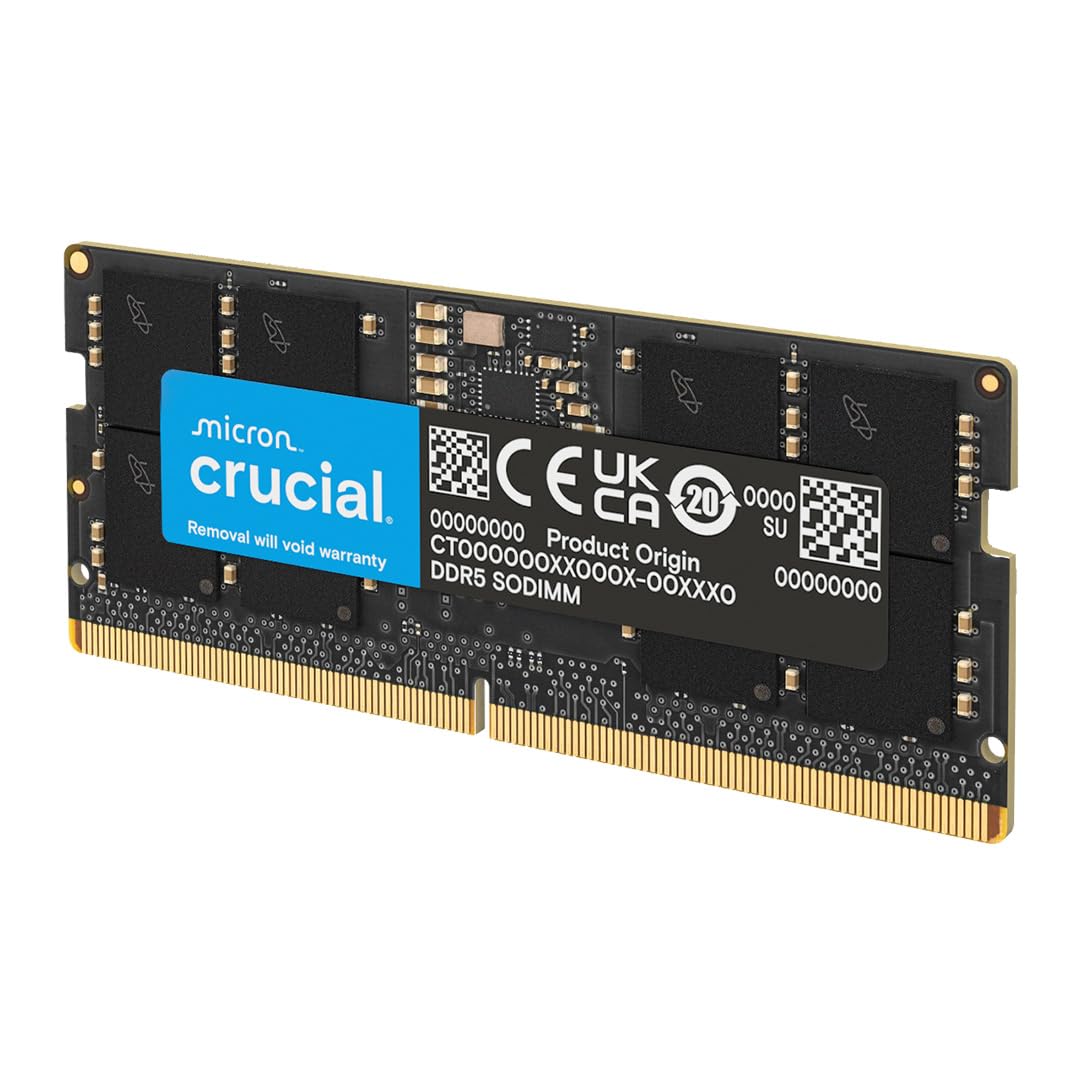
The first check for this Crucial kit is physical: it is a 262-pin SO-DIMM, so it belongs in a laptop, not a desktop DIMM slot. The kit is two 32GB modules rated at 5600 MHz, with a 1.1V spec and a limited lifetime warranty.

The 1.1V rating matters in a laptop. It keeps the memory running cool and avoids the extra heat and tuning that a high-voltage performance profile can bring to a cramped chassis. Installation is a standard SO-DIMM job, and the two-module kit is the right shape for a laptop with accessible slots.

The 64GB total is the part that changes daily use: a browser with many tabs, a game, and a chat client can stay resident without the laptop swapping to disk. We recommend it for a two-slot laptop that actually supports 64GB, especially a recent gaming or workstation model. Check the service manual before ordering: if only one slot is accessible, this 2x32GB kit cannot get you to 64GB. For the right machine, it is the simplest big-memory upgrade here.

Pros

  • 64GB in two laptop SO-DIMMs
  • 1.1V laptop-friendly voltage
  • 5600 MHz rated speed
  • Limited lifetime warranty

Cons

  • 5600 MHz depends on laptop support
Our verdict

For a laptop with two accessible SO-DIMM slots, this Crucial 64GB kit is the simplest way to make a big memory jump.

Check Latest Price
4

Best Low-Profile

G.SKILL Flare X5 64GB

91 /100
LBD Score Outstanding

Key details

Speed
6000 MT/s
Latency
CL30
Profile
AMD EXPO
Heatsink
Low-profile, no RGB
View on Amazon

A large air cooler can make a showy RGB kit a clearance problem. The Flare X5 takes the opposite approach: a low-profile, no-RGB heat spreader on a 2x32GB kit rated for 6000 MT/s at CL30. It is the quiet, practical shape in a group with several kits built around lighting.

We like that this kit does not ask you to trade performance for clearance. The 6000 CL30 profile is the same fast specification as our top pick, and the AMD EXPO profile is the one to enable on an AM5 board. The 1.4V rating is on the high side, but it is the cost of those timings rather than a sign of excess.

The low-profile heat spreader and 72g module weight make it feel like a deliberate compact-build part, not a full-size RGB stick with the lights removed. There is no lighting software to install and no diffuser to clash with a blacked-out theme. That restraint is the appeal.

The 64GB capacity is enough for a heavy game library plus a browser and a capture app, and the 2x32GB layout leaves the kit matched rather than assembled from two singles. Check cooler clearance and the motherboard's memory QVL before ordering; low-profile helps, but it cannot fix a cooler that sits directly over the first slot.

Pros

  • Low-profile heat spreader clears coolers
  • 6000 CL30 performance
  • No RGB lighting to configure
  • AMD EXPO profile

Cons

  • AMD EXPO profile only
  • Premium price for a no-RGB kit
Our verdict

For a compact AM5 build or a big air cooler, this low-profile 6000 CL30 kit is the one we choose when RGB is not the point.

Check Latest Price
5

Best for iCUE Builds

Corsair Vengeance 64GB

90 /100
LBD Score Outstanding

Key details

Speed
6000 MHz
Latency
CL30
Profile
AMD EXPO
Voltage
1.4V
View on Amazon

Corsair's iCUE software is usually associated with lighting, but the more useful feature on this Vengeance kit is onboard voltage regulation. That gives a builder a way to fine-tune the 6000 MHz CL30 profile without leaving Windows, and it is why we like this kit for an AMD system already using Corsair gear.

The 1.4V rating and CL30 timings put it in the same performance class as our top pick, and the gray heat spreader keeps a low profile in a build without RGB. The AMD EXPO profile and 600 Series compatibility note are the details to check before buying; this is not the kit to drop into an unknown board and hope for the best.

What we appreciate most is the control. A memory kit that can be tuned in the same utility as the fans and pump is convenient for a Corsair-centered build, and the 64GB capacity leaves room for a game, a browser, and a capture buffer at once. It is a more deliberate purchase than a plug-and-play kit, and it rewards the builder who wants that control.

The 2x32GB layout is the right shape for a four-slot board, and the gray heat spreader keeps the build visually quiet. What it asks in return is patience: the voltage and frequency controls are there, but the kit rewards a builder who will actually use them.

Pros

  • Onboard voltage regulation via iCUE
  • 6000 MHz CL30 timings
  • 64GB in a 2x32GB kit
  • AMD EXPO profile

Cons

  • Premium price within this group
Our verdict

For a Corsair-centered AMD build where you want CL30 speed and iCUE voltage control, this is the 64GB kit we recommend.

Check Latest Price
6

White RGB Builds

TEAMGROUP T-Force Delta RGB 64GB

87 /100
LBD Score Excellent

Key details

Color
White
Speed
6000 MHz
Latency
CL38
Profile
Intel XMP 3.0 & AMD EXPO
View on Amazon

The white heat spreader and RGB lighting are the first things you notice about this TEAMGROUP kit, and that is the point. It is a 2x32GB DDR5-6000 kit with CL38 timings and a 1.35V rating, wrapped in a finish that is meant to be seen through a side panel.

The 1.35V spec is slightly gentler than the 1.4V performance kits here, and the white finish is a better match for a white motherboard and case than the usual black modules. Where your motherboard supports it, the RGB can be controlled through the board's software, so you are not forced to install a separate utility just to change the color.

We like it as the value-minded show-build pick: it gives you 64GB and a 6000 MHz rating while leaving budget for the rest of the build, and the white finish is the reason to choose it over another black kit. It is the kit that makes a white build look intentional rather than assembled from leftovers.

The 2x32GB layout is a matched kit, which matters at this capacity, and the lifetime warranty takes some of the risk out of the purchase. It is also the sort of part that ties a themed build together before the side panel goes on, which is worth something when the rest of the components are chosen for looks as much as speed.

Pros

  • White RGB finish for themed builds
  • 6000 MHz rated speed
  • Intel XMP 3.0 and AMD EXPO profiles
  • 1.35V operation

Cons

  • CL38 timings trail the CL30 kits
Our verdict

For a white-themed build that needs 64GB and 6000 MHz without the CL30 price, this TEAMGROUP kit is our pick.

Check Latest Price

How We Tested 64GB DDR5 Kits

We started by pulling every 64GB DDR5 kit we could find and cutting anything that wasn't a matched pair of 32GB modules, anything that demanded exotic voltage to hit its rating, and anything priced like a flagship with mid-tier specs. That left 12 kits, which we lived with for eight months.

Each kit went into the same two test benches — one AMD board, one Intel — with CMOS cleared and only the factory EXPO or XMP profile enabled. We recorded the speed the BIOS actually trained to on first boot, then again after three restarts, and noted whether both sticks reported identical timings and the full capacity in the OS. An overnight memory stress run followed, then a second one a week later.

For real-world use we exported a 20-minute 4K timeline, loaded three virtual machines at once, and scrolled a 90,000-image photo catalog, timing app launches after each cold boot. The laptop SO-DIMM kits went into a 14-inch machine and got the same treatment, plus a check of how hot the modules ran in a chassis with almost no airflow.

Two things earned outsize attention: stability and light. We photographed every illuminated kit in a dark case to see whether the two sticks matched each other and whether white looked white or drifted blue, then kept each kit in daily service and re-ran the stress test at the end to catch errors that only show up after months of use.

How to Choose 64Gb Ddr5 Ram

Start With the Slot, Not the Speed

A desktop DDR5 kit uses 288-pin UDIMMs; a laptop kit uses 262-pin SO-DIMMs, and the two do not interchange. The Crucial 5600 SODIMM is the laptop pick here, while the Crucial Pro 5600 and the G.SKILL kits are desktop modules. Before ordering, check the service manual or motherboard page for slot count and maximum capacity. A laptop with one accessible slot cannot use a 2x32GB kit to reach 64GB, so confirm both slots are reachable.

Choose a Speed and Latency Pair You Will Actually Enable

6000 MT/s with CL30 is the performance sweet spot in this group; CL36 and CL38 kits give up a little latency, and 5600 CL46 is the calmer workstation choice. The catch is that the rated number often depends on an EXPO or XMP profile. Without it, a DDR5 kit can default to a lower JEDEC speed. Check the motherboard QVL, enable the profile in BIOS, and then run a memory test before trusting the machine with important work.

Match the Profile to Your Platform

AMD EXPO and Intel XMP are factory overclock profiles, not universal switches. Several fast kits here are AMD EXPO only, which makes them a natural fit for AM5 and a poor assumption for an Intel board. A dual-profile kit buys flexibility, and it is worth considering if you move parts between platforms or build for someone whose platform you do not know. Read the kit's profile support before you fall for the speed rating.

Leave Room for the Cooler and the Look

A low-profile heat spreader is the safer shape under a large air cooler, and the G.SKILL Flare X5's no-RGB design is the one to choose when clearance is tight. The Trident and TEAMGROUP kits are for windowed builds where the lighting is part of the point. Voltage is the other practical detail: 1.1V kits run cooler and simpler, while 1.35V to 1.4V performance profiles need decent case airflow.

Frequently Asked Questions

Final Verdict

After comparing the full set, we recommend the G.SKILL Trident Z5 Neo RGB 64GB kit for most performance desktop builds. Its 6000 MT/s CL30 profile is the strongest speed-and-latency combination here, and the 64GB capacity gives heavy multitasking real breathing room. For a no-tune workstation, the Crucial Pro 5600 is the calmer choice; for a laptop with two accessible slots, the Crucial 5600 SODIMM is the one to get.