Best CPU Coolers of 2026

A CPU cooler has one job: pull heat off the chip and get rid of it before the chip slows itself down. What separates a good one from a forgettable one rarely shows up on the spec sheet — whether the fans stay hushed twenty minutes into a game, whether the tower clears your RAM, whether the bracket lines up on the first try.

My team and I spent the past seven months installing 12 coolers — dual-tower air units, single-tower value picks, and a handful of 360mm all-in-ones — across two bench rigs and a few everyday builds. Air or liquid, the performance ceiling is closer than the marketing suggests; the mistake first-time buyers make is shopping the socket list and ignoring the tape measure.

The picks below are the ones that stayed quiet under a long load and went on without a fight. Some lean on silence, some on lighting and looks, and a couple are simply the best dollar-per-degree you can spend right now.

1

Best Overall

Thermalright Peerless Assassin 120 SE

94 /100
LBD Score Outstanding

Key details

Fans
2 x 120 mm PWM, 1,550 rpm
Height
155 mm (6.1 in)
Claimed Noise
25.6 dBA
Socket Support
Intel 115x/1200/1700/1851; AMD AM4/AM5
View on Amazon

Two towers, six heat pipes and two 120 mm fans, for less than anything else here that performs at the same level. That arithmetic is why the Peerless Assassin 120 SE is the cooler we tell most people to buy first. We ran it on a mainstream Intel build and it held its temperatures without the fans turning shrill, which is more than we expected from this bracket. It helps that it stands 155 mm tall, which is short for a dual tower.

Both fans are the same TL-C12C model, rated to 1,550 rpm, 66 CFM and a claimed 25.6 dBA, and a splitter lets them share one motherboard header, so there is one cable and one fan curve to manage. In practice that means a cooler that stays in the background until the CPU is actually loaded, and then stays civil about it. The six heat pipes use Thermalright's anti-gravity wick design, so vertical or horizontal mounting does not change how it behaves.

Mounting is where it shows its price. The bracket covers AM4, AM5, LGA 1700 and 1851, but the fixing comes down to two screws on some sockets and the parts bag is worth checking against the list before you start. Fit the backplate with the board out of the case and the rest is routine; skip that and you will be doing it twice. The plain black towers and unlit fans will not win a build competition, and nothing about the thing announces itself through a side panel, which is exactly what we want at this end of the market.

Pros

  • Dual-tower cooling for the least money here
  • Quiet fans that only ramp under load
  • Short 155 mm body for a dual tower
  • AM4, AM5, LGA 1700 and 1851 out of the box

Cons

  • Too tall for most compact cases
Our verdict

We recommend it as the default for a mainstream gaming build: dual-tower cooling that stays quiet, in a 155 mm frame most mid-towers will take.

Check Latest Price
2

Best Budget

Thermalright Assassin X120 Refined SE

93 /100
LBD Score Outstanding

Key details

Fan
120 mm PWM, 1,550 rpm
Height
148 mm (5.83 in)
Weight
1.42 lb
Heat Pipes
4 x 6 mm
View on Amazon

At 148 mm tall and 71 mm wide, the Assassin X120 Refined SE is the cooler for the build with no room to spare: a compact chassis, a prebuilt with a tight CPU cutout, or an older case with a side fan worth keeping. One 120 mm fan, four heat pipes, and about 640 g of aluminium.

We like it best in the machines nobody upgrades twice: a Ryzen 5 or a 65 W Intel chip, a living-room PC, a first build where a bigger cooler would eat the whole budget. On that kind of load the fan stays quiet, because it is the same TL-C12C as its bigger brother, giving 66 CFM and a 25.6 dBA ceiling from a single tower. The narrow frame also keeps the memory slots completely clear, which matters more than an extra heat pipe if you run tall heat spreaders or plan to add sticks later.

Installation is among the easiest here. On AM4 and AM5 the bracket is a crossbar over the stock backplate, the hardware covers Intel 115x through 1851, and the contact base arrives mirror-smooth. The instructions are close to useless, so look up the socket sequence before you start rather than halfway through. Our real gripe is the fan clips: thin wire hooks that grip the tower instead of screws. They hold fine, but they feel cheaper than everything around them.

Pros

  • Fits cases that turn away bigger towers
  • Quiet on a modest CPU
  • Leaves memory slots unobstructed
  • Cheapest cooler in this guide

Cons

  • Runs out of headroom on high-wattage CPUs
Our verdict

Our pick for a tight budget or a small case: a 148 mm tower that quietly handles a modest CPU and leaves your memory slots clear.

Check Latest Price
3

Best 360 AIO

Corsair Nautilus 360 RS ARGB

94 /100
LBD Score Outstanding

Key details

Fans
3 x RS120 ARGB
Radiator
360 mm
Warranty
5 years
Max Noise
36 dBA
View on Amazon

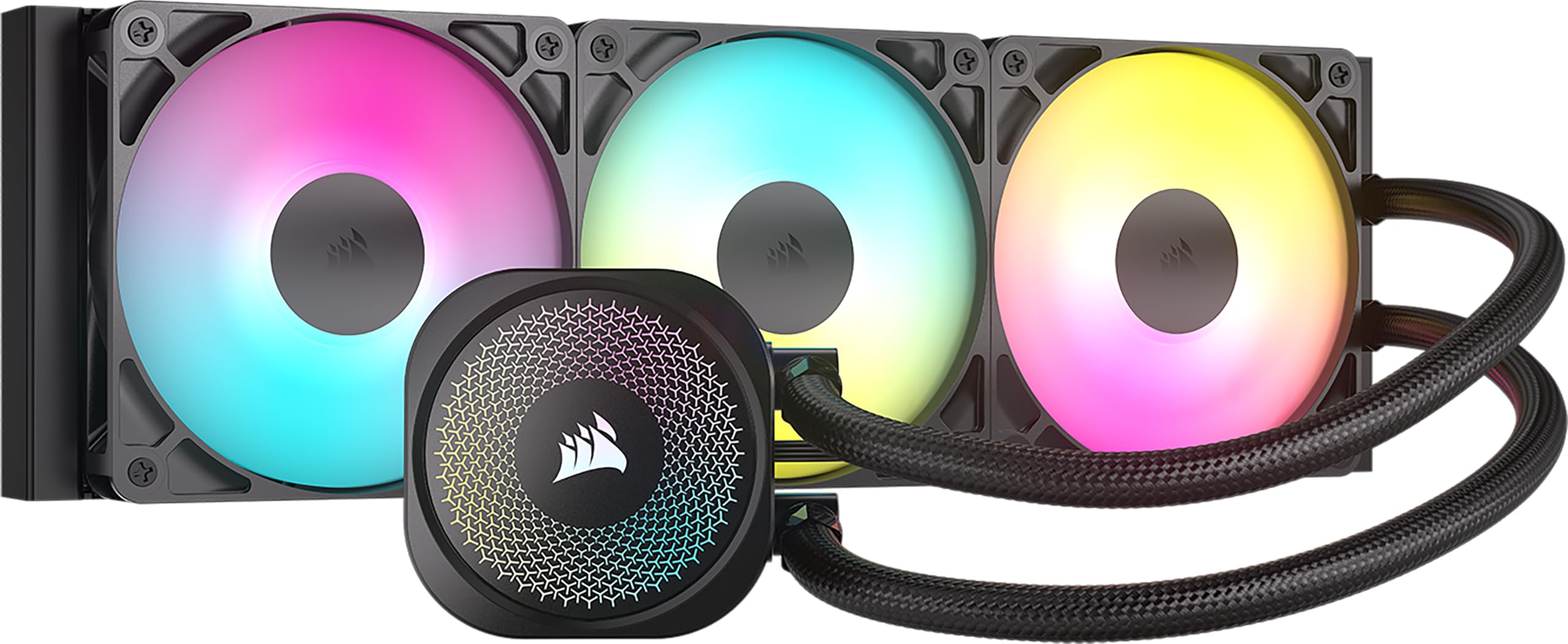
Corsair quotes 20 dBA for the Nautilus 360 RS's pump, and that figure is what makes it the liquid cooler we suggest first. A 360 mm radiator gives you the thermal headroom; the pump is what usually spoils the quiet, humming at the bottom of the case long after the fans have spun down. Here the noise you notice is the fans doing their job, and that only happens under load.

The rest of the package is put together for a first AIO. The cold plate is slightly convex with paste already applied, the three RS120 ARGB fans daisy-chain down to a single PWM header and a single ARGB header, and the logo ring on the block rotates so the wordmark sits level whatever orientation you mount it in. We noticed the wiring more than the lighting: one fan cable and one ARGB cable is a real advantage in a glass-sided case with nowhere to hide a bundle.

There is no printed manual in the box, and the daisy-chain connections are exactly the part a first-timer needs explained, so download the PDF before you start. Do that and the build is straightforward. On a 7800X3D-class gaming chip it does everything a 360 should, and it does it for well under what the display coolers here ask, with a five-year warranty behind it.

Pros

  • Pump runs quietly under a 360 mm radiator
  • Three fans need one PWM and one ARGB header
  • Paste applied and a slightly convex cold plate
  • Five-year manufacturer warranty

Cons

  • Ships without a printed manual
Our verdict

We suggest it as a first liquid cooler: a quiet pump, three fans on two headers, and a five-year warranty make 360 mm cooling easy to live with.

Check Latest Price
4

Best Quiet AIO

Noctua NL-LC1-36

91 /100
LBD Score Outstanding

Key details

Fans
3 x NF-A12x25 G2 120 mm
Radiator
360 mm, 30 mm thick
Warranty
6 years
Claimed Noise
22.5 dBA
View on Amazon

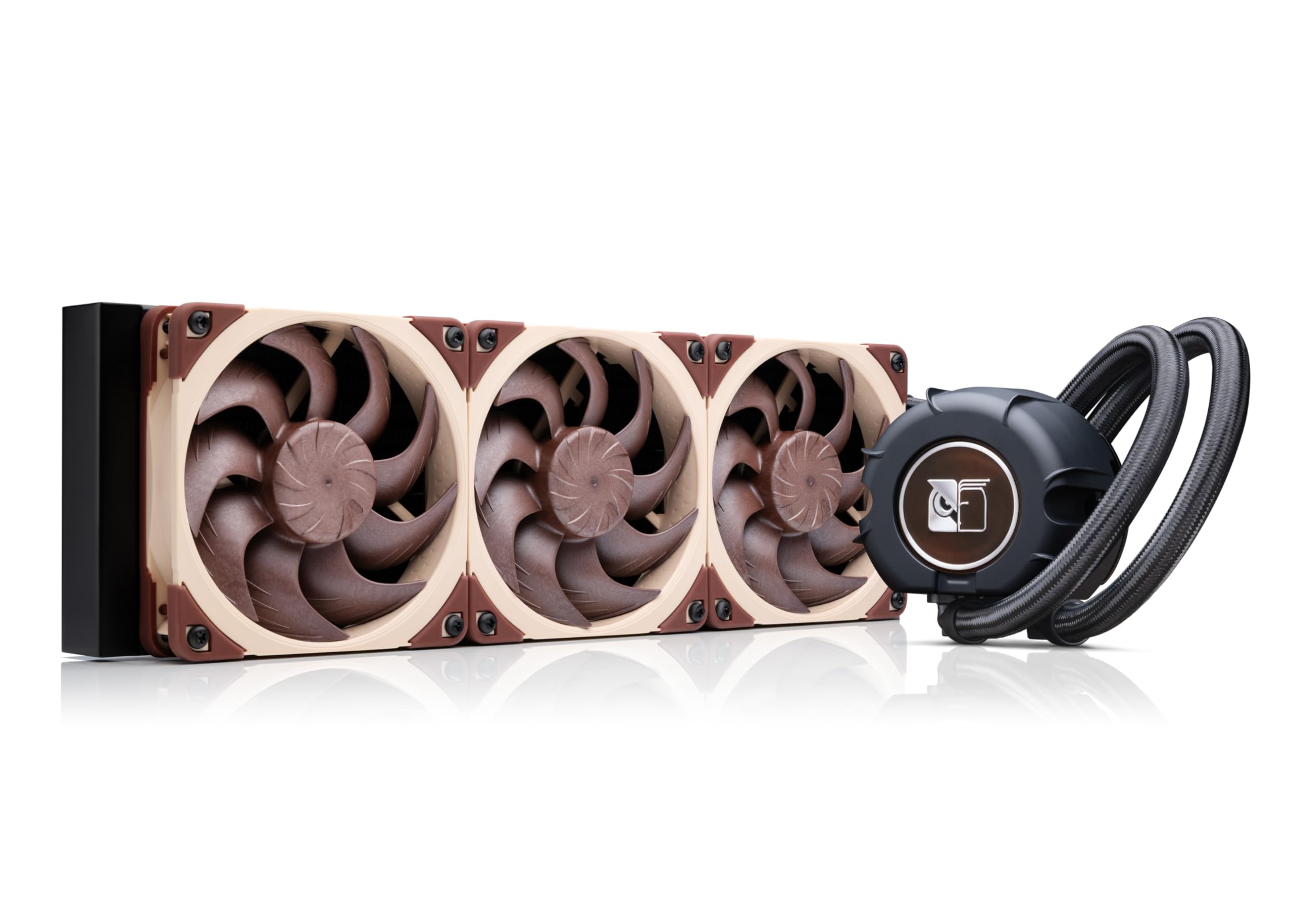
Noctua's answer to pump noise is a three-layer acoustic absorber and a tuned-mass damper built into the pump housing, and it is the reason the NL-LC1-36 exists as a premium product instead of another 360 mm radiator with a badge on it. The quoted figures are 22.5 dBA and 1,800 rpm; the effect is an AIO that does not announce itself when the room goes quiet.

The fans carry the other half. Three NF-A12x25 G2s run with a speed offset, so one spins slightly slower than its neighbours to smooth the noise as they ramp. We were pleasantly surprised by how much that matters in a quiet room; it is the difference between a fan curve you notice and one you do not. Around them you get SecuFirm2 mounting with offset positions for AM5 and LGA 1851 hotspots, a tube of NT-H2 paste and a paste guard for AM5, a kit that assumes you are installing it yourself and would like it to go well.

The 30 mm radiator earns its place too. In a top mount under a chunky VRM heatsink, that slimmer core often decides whether the side panel goes back on. None of the quiet comes out of the cooling budget either: this is a full 360 mm loop with high-static-pressure fans behind it, which is why it is the cooler we reach for when a build has to be inaudible from across the room.

What you do not get is any theatre. No screen, no lighting, and nothing to look at through the panel. The finish is functional and the money went into the parts you cannot see. Buy it for the room, not the window.

Pros

  • Pump noise absorber and damper built in
  • Three NF-A12x25 G2 fans with speed offset
  • 30 mm radiator suits tight top mounts
  • Six-year warranty with paste and AM5 guard

Cons

  • Premium money with no display or lighting
Our verdict

This is the AIO we choose when the room has to stay quiet: pump damping and Noctua fans take the whine out of 360 mm liquid cooling.

Check Latest Price
5

Best Premium Air

Noctua NH-D15 G2 chromax.Black

89 /100
LBD Score Excellent

Key details

Fans
2 x NF-A14x25r G2 140 mm
Height
168 mm
Warranty
6 years
RAM Clearance
32 mm with both fans
View on Amazon

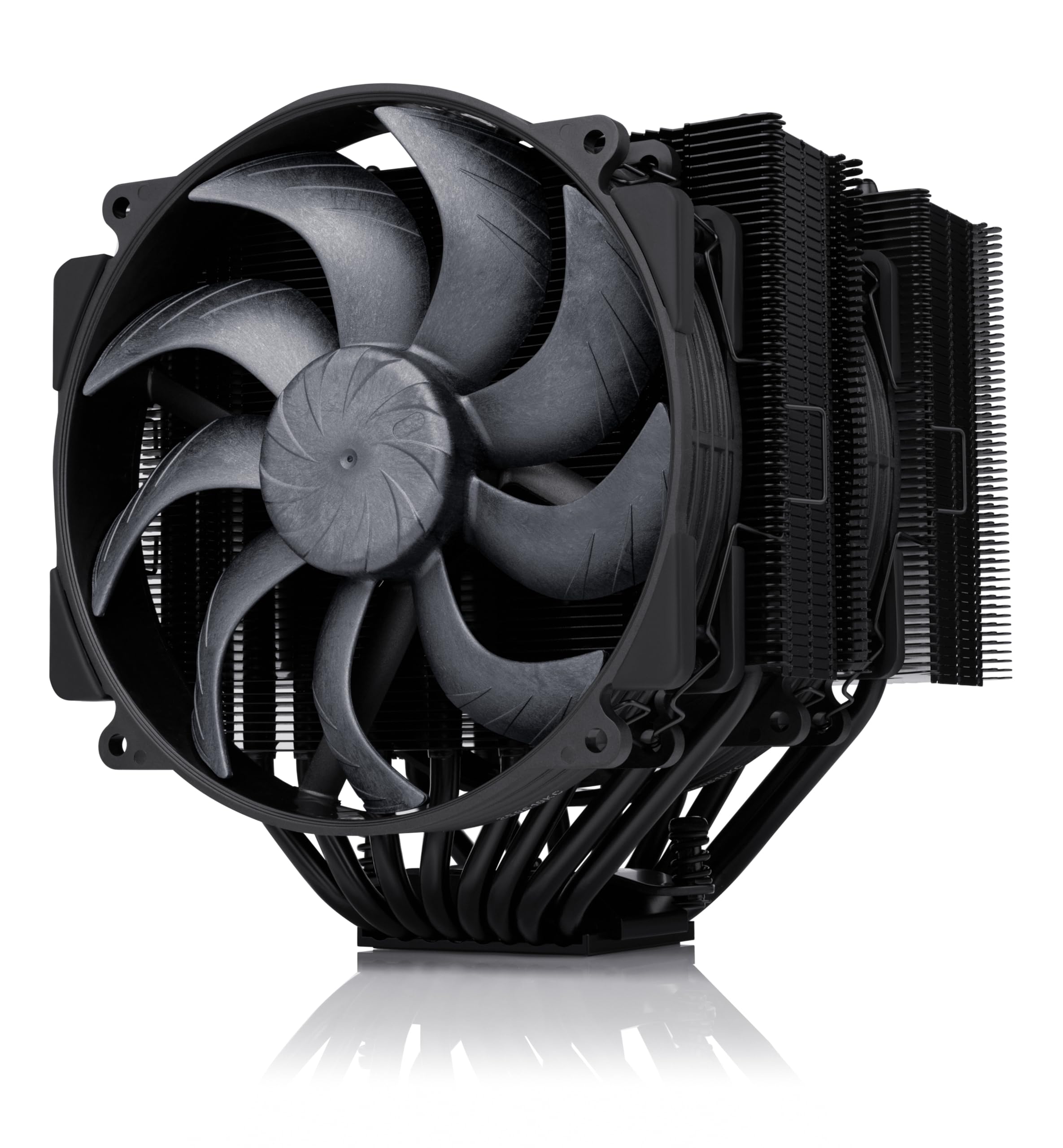
168 mm tall, 1.8 kg, and two 140 mm fans hanging off the front: the NH-D15 G2 is not a cooler you buy by accident. It is one you measure for, twice, and then live with for years. Eight heat pipes, 20 percent more fin surface than the previous generation, and Noctua's NF-A14x25r G2 fans.

The offset design is the practical part. The lower fins are recessed to clear the top PCIe x16 slot on most current boards, and the towers sit back far enough to leave 32 mm of memory clearance with both fans fitted, or 59 mm if you run a single fan. Tall heat-spreader RAM pushes you into raising the front fan, which adds height on top of the 168 mm, so plan the whole stack before the board goes into the case.

We fit this where noise matters more than anything else and there is room to spare: a workstation, a studio machine, a big case that lives with its panel on. Against the AIOs here it wins on simplicity rather than on peak temperature. There is no pump to hum, no coolant and no hoses, and the only moving parts are two fans you can swap yourself in five minutes. The SecuFirm2+ mount, the included Torx screwdriver and the tube of NT-H2 are the difference between a kit and a box of parts.

It costs premium money for air, and it is genuinely enormous: mid-towers take it, small ones do not, and neither does a board with VRM heatsinks crowding the socket. If your case is tight, the Peerless Assassin delivers most of the cooling in 155 mm. If it is not, this is the quietest air cooler in this guide and the one we keep coming back to.

Pros

  • Eight heat pipes and two 140 mm fans
  • Very quiet under sustained load
  • Paste, screwdriver and six-year warranty included
  • Recessed lower fins clear the top PCIe slot

Cons

  • 168 mm height rules out compact cases
  • Only 32 mm RAM clearance with both fans
Our verdict

We recommend it for premium, low-noise builds with the space for it: eight heat pipes and two 140 mm fans cool quietly with no pump to fail.

Check Latest Price
6

Budget 360 AIO

ARCTIC Liquid Freezer III Pro 360

87 /100
LBD Score Excellent

Key details

Fans
3 x P12 PRO 120 mm
Radiator
360 mm
Warranty
6 years
Max Fan Speed
3,000 rpm
View on Amazon

The Liquid Freezer III Pro 360 is the least expensive way to get serious 360 mm cooling here, and the mounting hardware is where that saving shows up. The radiator, the three P12 PRO fans and an offset cold plate that shifts toward the CPU hotspot are all sound; the bracket and screws are where a build can stall.

The design work is real. The radiator fans' PWM cables run through the hose sleeving, so only one cable reaches the motherboard, and a small PWM fan on the block pushes air across the voltage converters. The P12 PRO fans are rated to 3,000 rpm and 77 CFM, numbers that tell you this cooler can shift a lot of heat when you ask it to.

Asking is the caveat. At the top of the range it is loud, and noise is the least predictable thing about it: the same cooler that runs quietly in one build can develop a motor hum or a fan squeal in another. Under a desk and behind a headset that is an easy trade for the cooling and the money. In a bedroom or a recording setup, it is not.

We rate it as a high-load cooler for people who care about temperatures first and decibels second. The contact frame for LGA 1700 and 1851, the offset mounts for AM5 and the six-year warranty are all things you would normally pay more for. Just plan the install: dry-fit the bracket, check the bag for the right standoffs, and do not tighten anything until every screw is started.

Pros

  • Strong 360 mm cooling for the money
  • Offset cold plate targets the CPU hotspot
  • Fan cables routed through the hose sleeving
  • Six-year warranty

Cons

  • Mounting hardware is fiddly to align
  • Loud at maximum fan speed
Our verdict

For a hot CPU, a big case and a tight budget, this is the 360 we point to, as long as you are patient with the bracket and with the noise at full tilt.

Check Latest Price
7

Quiet Mid-Tower Air

be quiet! Pure Rock Pro 3 Black

90 /100
LBD Score Outstanding

Key details

Fans
2 x 120 mm Pure Wings 3
Height
155 mm (6.1 in)
Weight
1,400 g
Claimed TDP
250 W
View on Amazon

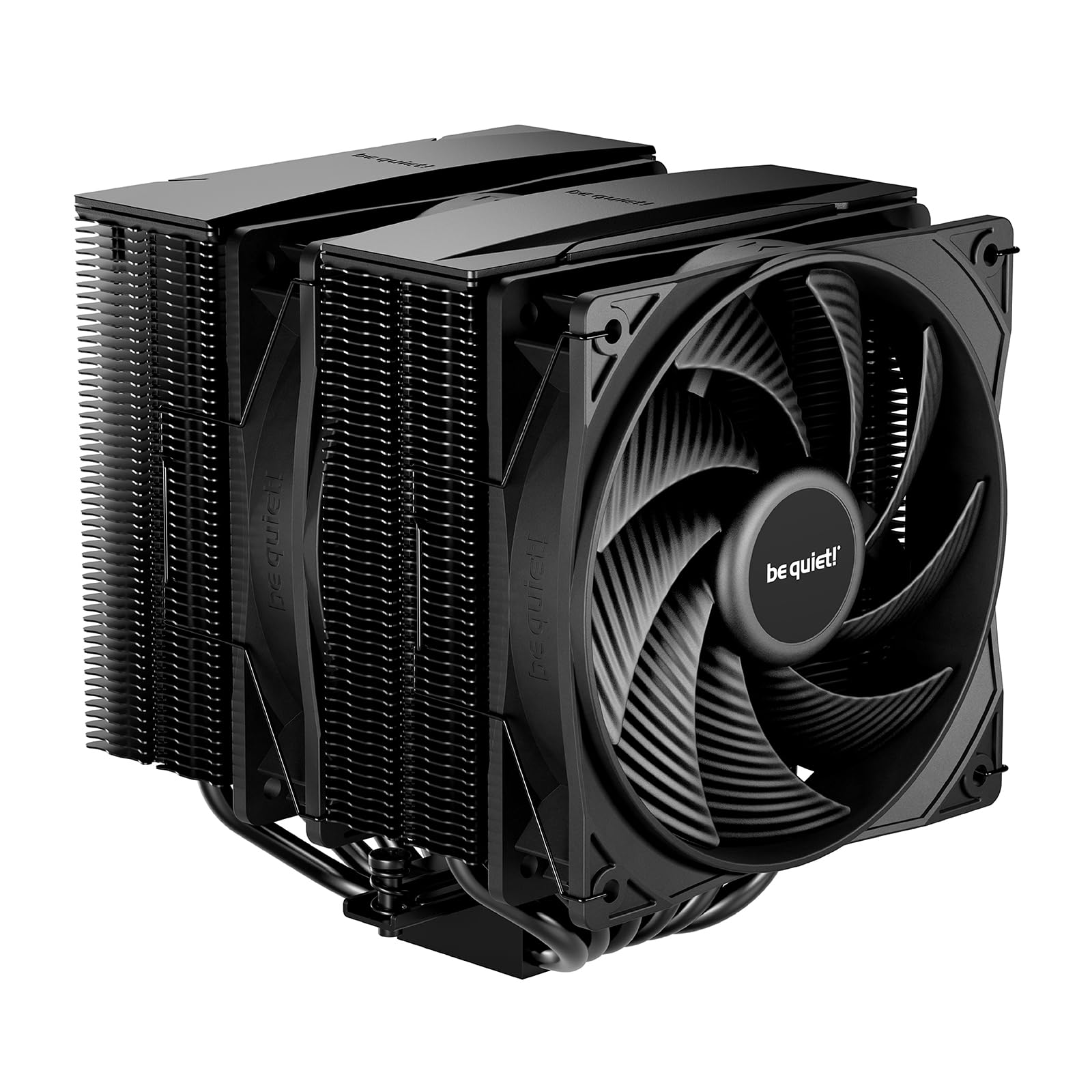
A 250 W TDP rating on a compact dual tower is the headline, and it is not marketing arithmetic: six nickel-plated heat pipes, two 120 mm Pure Wings 3 fans and 1.4 kg of fin stack. The Pure Rock Pro 3 Black sits between the budget singles and the flagship towers, and it is the one we suggest when a case has room for 155 mm but not 168.

The offset is the detail that makes it work. The towers are shifted so the front fan can be raised or lowered and the assembly sits clear of the memory and the VRM heatsinks, the difference between a dual tower that fits and one that fouls the first RAM slot. The Pure Wings 3 fans are the quiet end of be quiet!'s range, and the all-black finish on the nickel-plated base looks more considered than the rest of the mid-range.

For a mid-tower gaming build with a 170 W-class CPU, this is the sensible middle of the guide: more headroom than a single tower, less height than the flagships, and quiet enough that the graphics card becomes the loudest thing in the case. At 1.4 kg it puts real weight on the socket, so fit the backplate properly and move the case rather than the cooler when you shift it. The hardware is fine; it is the paperwork that lets it down.

Pros

  • Compact offset towers clear RAM and VRMs
  • Quiet 120 mm Pure Wings 3 fans
  • 250 W TDP rating in a 155 mm tower

Cons

  • AM5 bracket instructions are unclear
  • 1.4 kg puts weight on the socket
Our verdict

We like it as the quiet middle ground: 250 W of dual-tower cooling in 155 mm, with the fans staying calm under a gaming load.

Check Latest Price
8

Show Builds

Lian Li HydroShift II OLED 360

91 /100
LBD Score Outstanding

Key details

Fans
3 x UNI FAN TL Flex 120 mm
Display
6.67 in curved OLED
Radiator
360 mm, 24 mm thick
Claimed Noise
33 dBA
View on Amazon

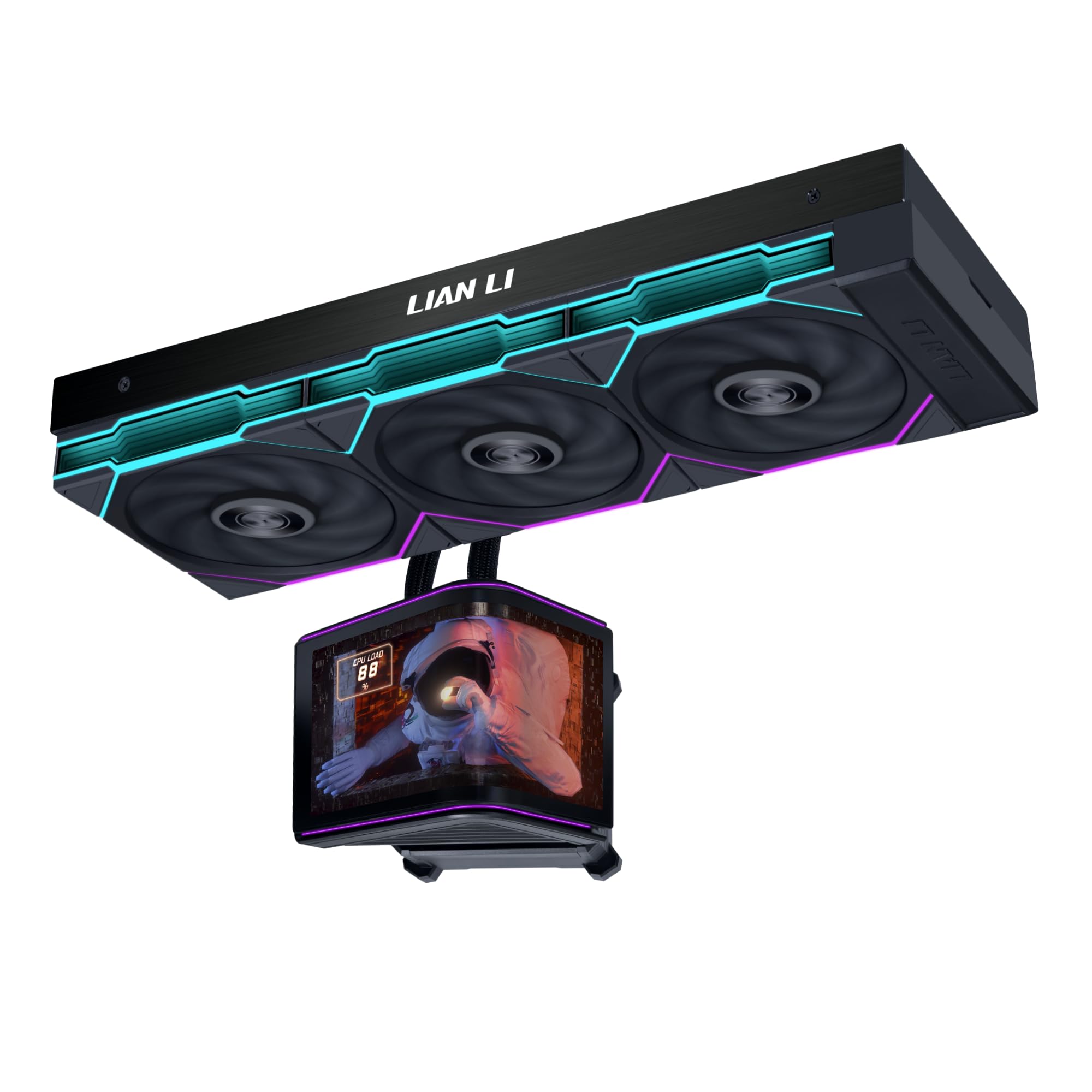
The reason to look at this cooler is the top of the pump: a curved 6.67-inch 2K OLED that lifts, rotates and tilts on a motorized mount. It is the most theatrical thing in this guide, and it is bolted to a proper 360 mm AIO, a 24 mm radiator and three UNI FAN TL Flex 120s with a claimed 33 dBA ceiling.

The display module is magnetic and hot-swappable on spring pins, which is more useful than it sounds: you can build, route and cable-manage with the block bare and clip the screen on at the end. The 24 mm radiator is the other practical detail. It is slimmer than the other 360s here, which buys clearance in a top mount where a thicker core would foul the VRM heatsink or the board's top edge.

Cooling is where a 360 should be. It will hold a current high-end gaming chip, and the 90 CFM fans have headroom in reserve. The screen is the part with a caveat, because a display is only as good as the app driving it, and that is where a showpiece cooler earns its keep or loses it. Set the software up before you commit to a theme.

So this is the pick for the build that gets photographed, and the money goes into the display rather than into degrees you do not need. Want 360 mm of quiet cooling and nothing to configure? The Corsair and the Noctua do it for much less. Want a centerpiece that also keeps a 9800X3D in check? Nothing else here looks like it.

Pros

  • Curved 6.67-inch OLED on a motorized mount
  • Magnetic hot-swap display module
  • Slim 24 mm radiator for top mounts

Cons

  • You pay for the screen, not extra cooling
Our verdict

We pick it for builds meant to be looked at: a 360 mm cooler that keeps a high-end chip in check and puts a curved OLED in the middle of it.

Check Latest Price

How We Tested CPU Coolers

We started by shortlisting every cooler with a current mounting kit for AMD's AM5 and Intel's LGA 1700/1851 sockets, then filtered by price, height, radiator size, and how easy it is to get a bracket for a new socket later on. That left 12 units, from compact single-tower air coolers to 360mm liquid kits, and we spent seven months with them.

Each one got installed twice: once on an open bench, once inside a mid-tower with the motherboard still screwed down, which is how most people actually do it. We timed the install, checked whether the backplate lined up without a fight, noted how legible the instructions were, and measured clearance over tall RGB memory and under the side panel. A couple of towers we liked on paper lost real points there.

For cooling we ran a 30-minute all-core render and a two-hour gaming session, logging peak temperatures and how fast each cooler dropped back to idle. Noise got judged at night in a quiet room from three feet away, listening for fan rush under load and pump whine at idle. Build quality came down to fin alignment, blade wobble, and whether the brackets flexed when we tightened them.

Looks we judged inside a glass-sided case with the lights on and off, watching how the ARGB read and how much cable clutter the fans and pump left behind. Value was what came in the box — spare fan clips, a hub, decent paste — weighed against what it costs to add those separately.

How to Choose a Cpu Cooler

Match the cooler to the heat your CPU makes

A 65 W chip is comfortable under a single 120 mm tower like the Assassin X120, while a 250 W part wants a dual tower or a 360 mm radiator. The trap is assuming a bigger cooler makes a modest CPU run cooler. At the same fan speed it mostly just runs quieter, which is a good reason to buy one, but a different reason than most shoppers have in mind. Work out what your processor dissipates under a sustained load, then buy one step above it and let the fans idle.

Measure height and memory clearance first

Air coolers live or die by their height: 148 mm clears almost anything, 155 mm suits a normal mid-tower, and 168 mm rules out a lot of compact cases. Then check memory clearance, because a dual tower with both fans fitted can leave as little as 32 mm for RAM, and tall heat spreaders force you to raise a fan, which adds height you may not have. For a 360 mm AIO, measure the radiator bay and its thickness allowance, not just the fan spacing.

Read the noise spec, then discount it

Decibel ratings are quoted at different loads and distances, so they compare only loosely between brands. What transfers better is fan size and count: a 140 mm fan shifts the same air as a 120 mm at lower rpm, and a 360 mm radiator lets three fans run slower than a 240 mm can. On liquid coolers the pump matters as much as the fans, since it is the constant in the background. If silence drives the decision, spend on the pump and the fans rather than on lighting.

Air or liquid: choose your failure modes

Air is a heatsink and two fans: nothing to leak, nothing to hum, and a tower that hangs 1.4 to 1.8 kg off the socket. Liquid moves the heat to a radiator at the case edge, which suits small chassis and very hot CPUs at the cost of a pump and hoses. A good dual tower matches a 240 mm AIO and usually beats it, so 360 mm is where liquid starts to pay. Check the warranty either way; the premium picks here run five to six years.

The box matters as much as the bracket list

Every cooler here ships with mounts for current AMD and Intel sockets, but how clearly the packaging explains itself varies a lot. A crossbar over the stock backplate is a short job; a multi-part bracket with no printed guide can eat an evening, and one missing screw ends it. Before you buy, download the installation PDF and read the page for your socket. It is the fastest way to tell a cooler that suits a first build from one that suits a patient builder.

Frequently Asked Questions

Final Verdict

We start most builds with the Thermalright Peerless Assassin 120 SE. It does a big cooler's job in a 155 mm frame, and what you save there goes into the graphics card. If 155 mm will not clear, the Assassin X120 handles a modest chip in 148 mm.

If the machine has to be inaudible, the Noctua NL-LC1-36 is the one we choose. The rest of this list is for buying a screen, a slim radiator or a finish, and those are perfectly good reasons when they are your reasons.