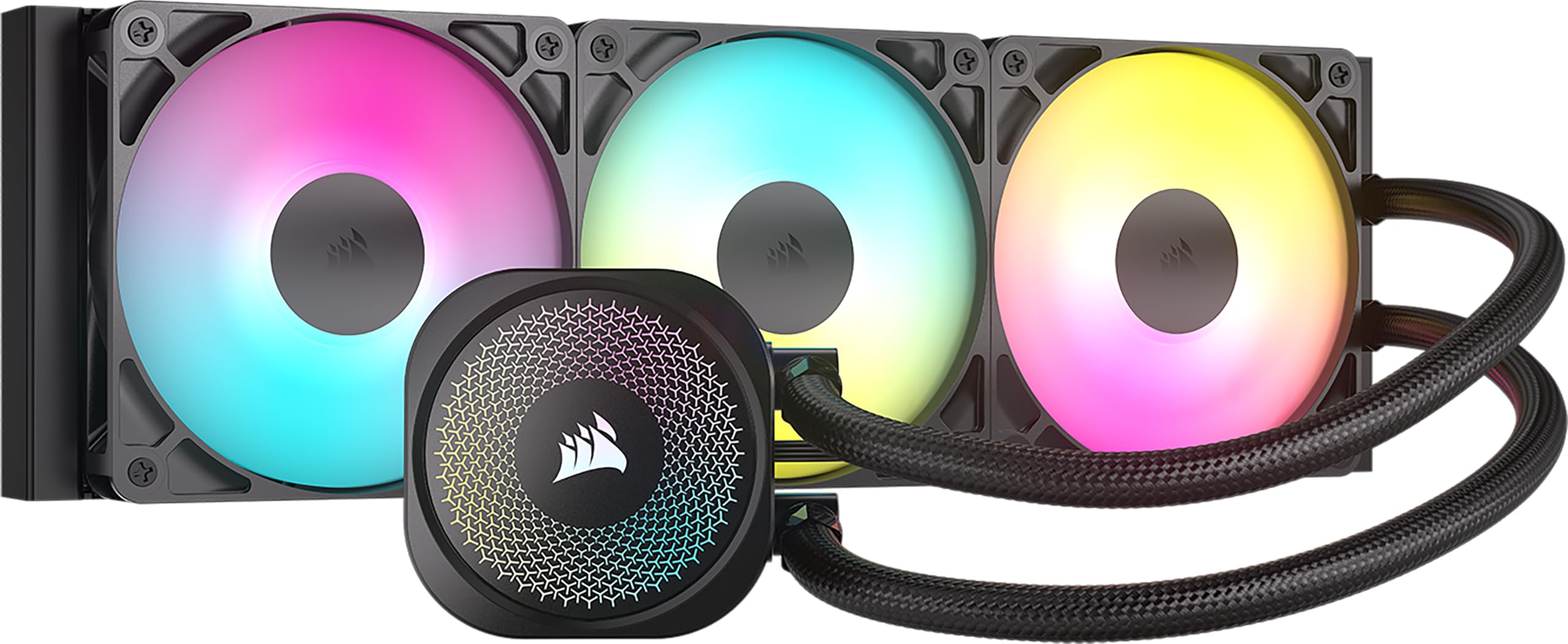
Best 360Mm AIO Coolers of 2026

The first time I watched a temperature readout march past 90 degrees in the middle of a render, I stopped blaming my case fans. A 360mm all-in-one is the honest fix: three fans' worth of radiator surface, a pump that carries heat off the CPU and dumps it at the top of the case, and enough headroom that a modern chip boosts without throttling itself.

The catch is that it's also the fussiest size to install. A 360 wants clearance above the motherboard, around the RAM, and past the video card, and plenty of cases that claim to support one make you work for it. Over the past seven months we ran 12 of them through the same builds, and the gaps in noise, fit, and install time were wider than the spec sheets admit.

The one thing shoppers tend to overrate is the screen on the pump cap. Half the field here has one, and they're fun, but they don't shed a degree — radiator thickness and fan static pressure decide whether your build actually closes up. The price spread, meanwhile, is far wider than the performance spread, so the picks below run from bare-bones to display piece.

1

Best Overall

Corsair Nautilus 360 RS ARGB

94 /100
LBD Score Outstanding

Key details

Warranty
5 years
Noise Level
36 dB
Max Fan Speed
2100 rpm
Radiator Dimensions
15.59 x 4.72 x 1.06 in
View on Amazon

Five years of cover and a pump rated at 20 dBA is the pairing that puts the Nautilus 360 RS at the top of our list. Those are the two things that decide whether a liquid cooler still earns its place in your case once the novelty wears off, and Corsair gets both right while holding thermals where they need to be under sustained load. If you want one 360mm AIO to buy without a spreadsheet, this is it.

Wiring is where it quietly beats most of the group. The three RS120 ARGB fans daisy-chain into one 4-pin PWM header and one +5V ARGB header, so there are two leads running to the board instead of six, and the cold plate arrives with paste already applied in a patch that spreads under pressure. We have spent enough evenings zip-tying fan splitters to appreciate a cooler that doesn't ask.

Cooling is steady rather than spectacular. It handles a high-heat chip through long gaming sessions without the fans turning into a turbine, and the pump stays out of the way at idle and light load. Where the ARCTIC makes the stronger case is cooling per dollar on the hottest silicon; where the Corsair leads is the experience of getting it installed and the length of the cover behind it.

If you want a display on the pump, the Thermalright and the NZXT cover that ground, and the Lian Li does it spectacularly. The Nautilus is the one we fit when the plan is to close the case and forget about it.

Pros

  • Five-year warranty, among the longest here
  • 20 dBA pump stays quiet at idle
  • Fans run off one PWM and one ARGB header
  • Convex cold plate with paste already applied

Cons

  • No printed manual in the box
  • Lighting and fan control live in motherboard software, not iCUE
Our verdict

Our pick for most 360mm builds: quiet, backed for five years, easy to wire, and steady on high-heat CPUs.

Check Latest Price
2

Best Value

ARCTIC Liquid Freezer III Pro 360

87 /100
LBD Score Excellent

Key details

Airflow
77 cfm
Warranty
6 years
Max Fan Speed
3000 rpm
Radiator Dimensions
15.7 x 4.7 x 2.9 in
View on Amazon

The Liquid Freezer III Pro 360 costs within a few dollars of the cheapest cooler here and sits at the front of this group on cooling, which is an awkward combination to argue with. Add six years of warranty and you have the value pick of the roundup.

What earns our recommendation is the engineering aimed at the socket rather than at the show. The cold plate is offset toward the CPU hotspot on both Intel and AMD mounts, an Intel contact frame is included for LGA1851 and LGA1700, and a small PWM fan on the pump housing blows across the voltage converters. On a board with a modest VRM heatsink, that little fan is doing work nothing else here does, and the P12 Pro fans hold their composure at low speed instead of hunting.

The bracket is the part to budget time for. Threading the mounting screws takes patience, and holes that don't line up on the first attempt are a real part of owning this cooler; dry-fit the hardware before you commit to paste, and plan on an evening rather than twenty minutes.

Then there's size. ARCTIC lists 2.9 inches of height for the radiator-and-fan stack, the tallest figure in this group, and that depth is where the thermal headroom comes from. It also means measuring top clearance against your VRM heatsinks and your RAM before you order. Clearance and patience are the entry fee; the cooling you get back is the best per dollar on this page.

Pros

  • Front-of-group cooling for the money
  • Offset cold plate and Intel contact frame
  • Integrated VRM fan cools the socket area
  • Six-year warranty, the longest here

Cons

  • Mounting screws can fail to line up
  • Tallest radiator stack here; check top clearance
Our verdict

The value pick: front-of-group cooling, socket-level design that looks after the VRM, and six years of cover, if you'll forgive the bracket.

Check Latest Price
3

Best Quiet All-Rounder

MSI MAG Coreliquid A13 360

91 /100
LBD Score Outstanding

Key details

Warranty
3 years
Pump Speed
3800 rpm
Noise Level
14.4 dB
Tubing Length
390 mm
View on Amazon

Three fans already bolted to the radiator, a pump built into the radiator housing, and 390 mm of tubing: MSI has removed most of the ways an AIO install goes sideways. There is no fan bracket to balance while you start a screw, and the wiring arrives routed on the radiator.

Noise is where it earns its place. MSI quotes 14.4 dB for the pump, the lowest figure in this group, and nothing in our time with it argued: at idle it is inaudible from outside a closed case, and the fans only join in under a long all-core load. Cooling is not the headline and doesn't need to be — it holds a high-heat chip steady under sustained load, which is all a 360 mm radiator has to do.

The compromises are small and specific. Three years of cover is the shortest warranty among the picks that state one, and 390 mm of tubing is generous in a mid-tower but needs somewhere to loop in a compact case. Neither changes the recommendation for a normal ATX build.

Pros

  • Fans pre-installed on the radiator
  • Pump integrated into the radiator housing
  • Lowest quoted pump noise in the group
  • 390 mm tubing suits mid-tower routing

Cons

  • Three-year warranty is short for the group
Our verdict

The quiet all-rounder: pre-installed fans, tidy wiring, and steady temperatures on high-heat CPUs, with a shorter warranty than the leaders.

Check Latest Price
4

Best for a Stealth Build

ID-COOLING FX360 PRO

90 /100
LBD Score Outstanding

Key details

Airflow
82.5 CFM
Rated TDP
350 W
Max Fan Speed
2900 rpm
Static Pressure
2.55 mmH2O
View on Amazon

No lighting, no display, no software to install: the FX360 PRO is the cooler for a build where the hardware should disappear behind a mesh front. We like it for exactly that, and for the fact that nothing about it asks for a second app running in the background.

The numbers are honest for the money. ID-COOLING rates it to 350 W, the pump runs at 2900 rpm, and the three 120 mm fans push 82.5 CFM at 2.55 mmH2O of static pressure — the sort of pressure figure that gets air through a radiator with a dust filter in the way. The fans daisy-chain, the assembly is black from the pump cap to the fan frames, and it is the least expensive cooler on this page.

The pump cap is deliberately plain, a black disc with a CD-style pattern, so a glass-sided build gets its focal point from somewhere else. That is the whole idea, and it is why this one belongs in the cases where lighting would just be noise.

Pros

  • Lowest price of any pick here
  • 350 W rating with high static pressure fans
  • Daisy-chain fans simplify cable runs
  • All-black finish with nothing to configure

Cons

  • Audible fan ramp under sustained load
Our verdict

The stealth pick: an all-black 350 W cooler with no lighting and no software, holding its own against hardware that costs more.

Check Latest Price
5

Best Budget Screen

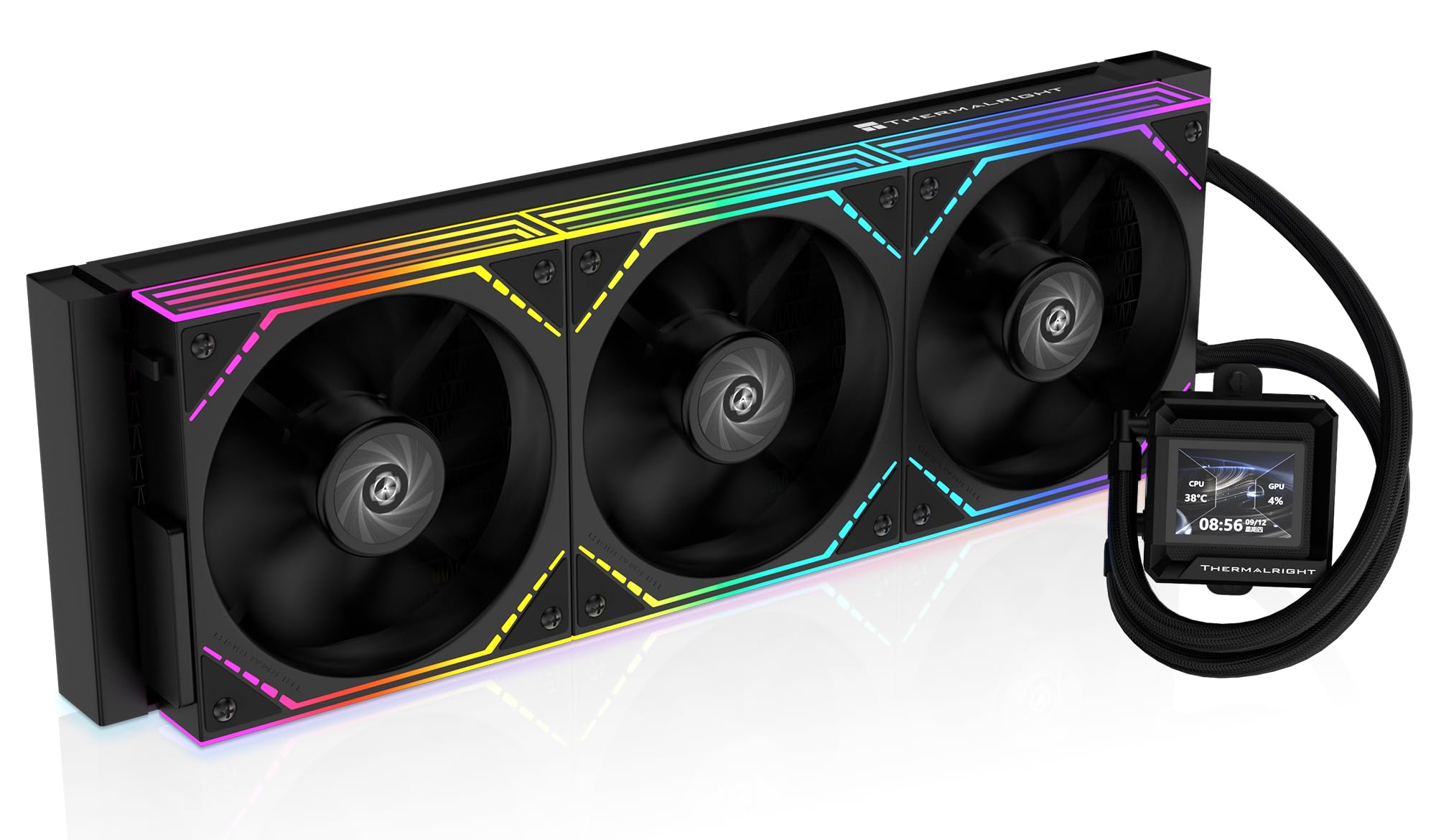
Thermalright FW360 SE ARGB V2

89 /100
LBD Score Excellent

Key details

Display
2-inch LCD
Warranty
3 years
Pump Speed
3000 rpm
Radiator Size
397 × 120 × 27 mm
View on Amazon

A screen on a 360mm AIO usually means premium money — the NZXT and the Lian Li both sit at the top of this list. The FW360 SE puts a 2-inch LCD on the pump at midrange money and cools properly while it does it.

Underneath the display it is a sensible assembly: a 397 × 120 × 27 mm radiator, three TL-M12Q fans that daisy-chain and top out at 2000 rpm, and a pump rated for 3000 rpm. Thermalright covers AM5, AM4, LGA1851, LGA1700, and the older 115X sockets, so it fits most of what people are actually building.

The cooling is what earns this one a place, not the screen. We found the fans stay quiet at their standard profile, the mount is solid on both AM5 and LGA1851, and the daisy-chain wiring keeps the back of the case tidy. The display is a bonus: readable, easy to fill with system stats, and small enough not to dominate the build — though the preloaded animations are the least polished part of the package.

Compare it with the PCCOOLER if you want white or a bigger panel, and with the Corsair if the screen doesn't matter and the longer warranty does. For a first build with a glass side panel, this is the least expensive way into a display without giving up cooling.

Pros

  • 2-inch LCD at a midrange price
  • 3000 rpm pump and daisy-chain fans
  • Quiet at the standard fan profile
  • Wide socket support including LGA1851 and AM5

Cons

  • Three-year warranty is short for the group
Our verdict

The value screen pick: a 2-inch LCD, a 3000 rpm pump, and cooling that stands up, for far less than the premium display coolers.

Check Latest Price
6

Best Showpiece

Lian Li HydroShift II OLED 360

91 /100
LBD Score Outstanding

Key details

Airflow
90.1 cfm
Display
6.67-inch 2K OLED
Max Fan Speed
2600 rpm
Radiator Size
400 × 122 × 24 mm
View on Amazon

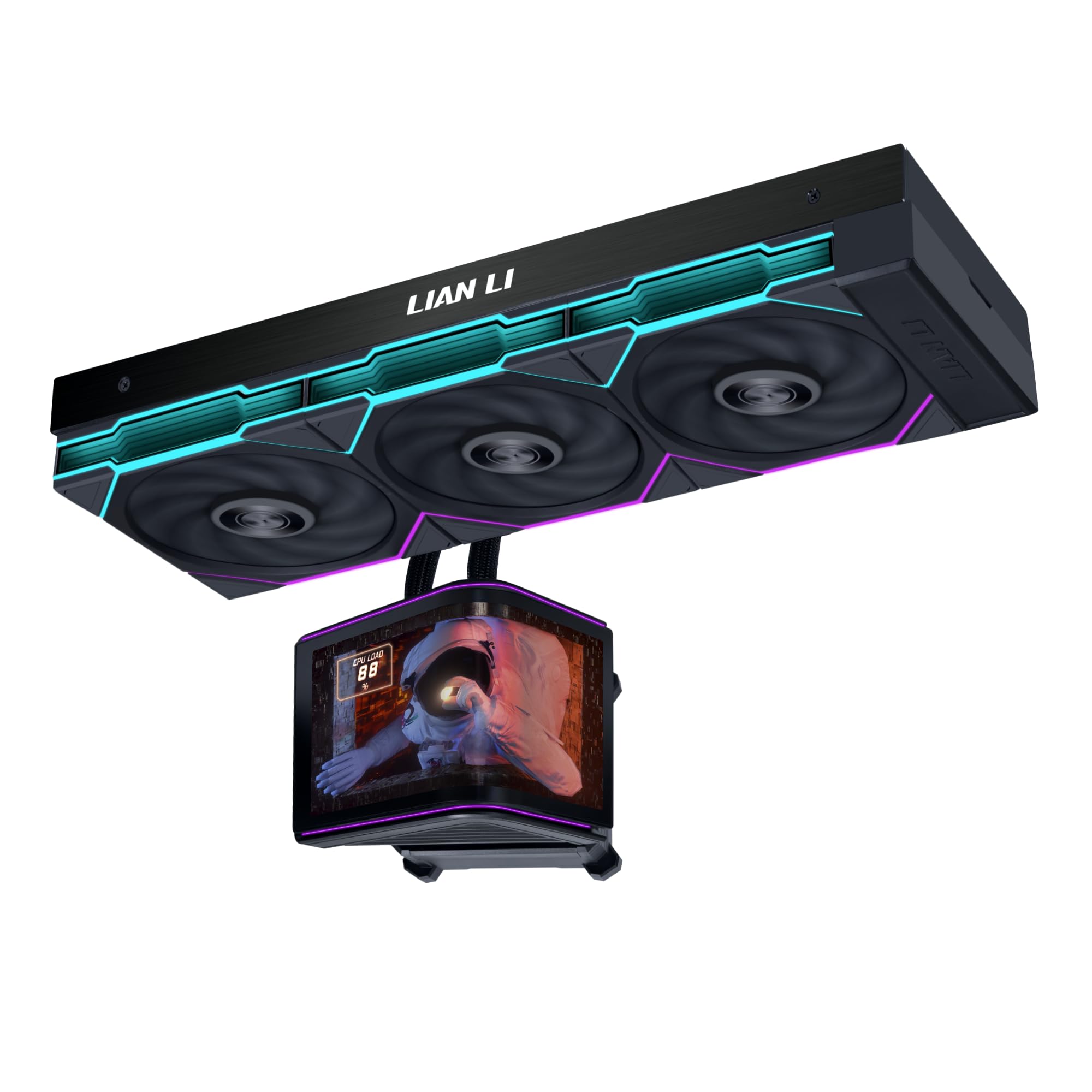
Six and a half inches of curved OLED rises out of the pump housing, rotates, and settles at whatever angle your case wants. It is the most striking display in this roundup and the most expensive way to cool a CPU here.

The radiator is the other half of the argument. At 24 mm it is the thinnest in this group, in a 400 × 122 mm footprint the company says fits around 90% of mainstream cases, which matters in a mid-tower where a deeper stack fouls the VRM heatsinks. The UNI FAN TL Flex set moves 90.1 CFM up to 2600 rpm, and the display module is magnetic and hot-swappable, so it lifts off without disturbing the loop.

We treat the motorized mount as a real feature rather than a gimmick: it angles the panel out of a top-mounted radiator's shadow, and the spring-pin connector means no cable running to the pump head. The trade is that the display connection is the fussy part — when the screen misbehaves, a firm reseat is where to start.

Buy it because the build is the point. If you want a display and a long warranty in the same box, the NZXT answers the screen question for a fraction of the money, with a much smaller panel.

Pros

  • 6.67-inch 2K curved OLED panel
  • Motorized, hot-swappable display module
  • 24 mm radiator eases clearance
  • High-airflow TL Flex fans

Cons

  • No warranty listed for this model
  • Display connection can need reseating
Our verdict

For show builds: the best display here, a 24 mm radiator that fits where others don't, and cooling that keeps a high-end chip in check.

Check Latest Price
7

CAM Users

NZXT Kraken Plus 360

82 /100
LBD Score Excellent

Key details

Display
1.54-inch LCD
Warranty
6 years
Noise Level
30 dB
Max Fan Speed
2800 rpm
View on Amazon

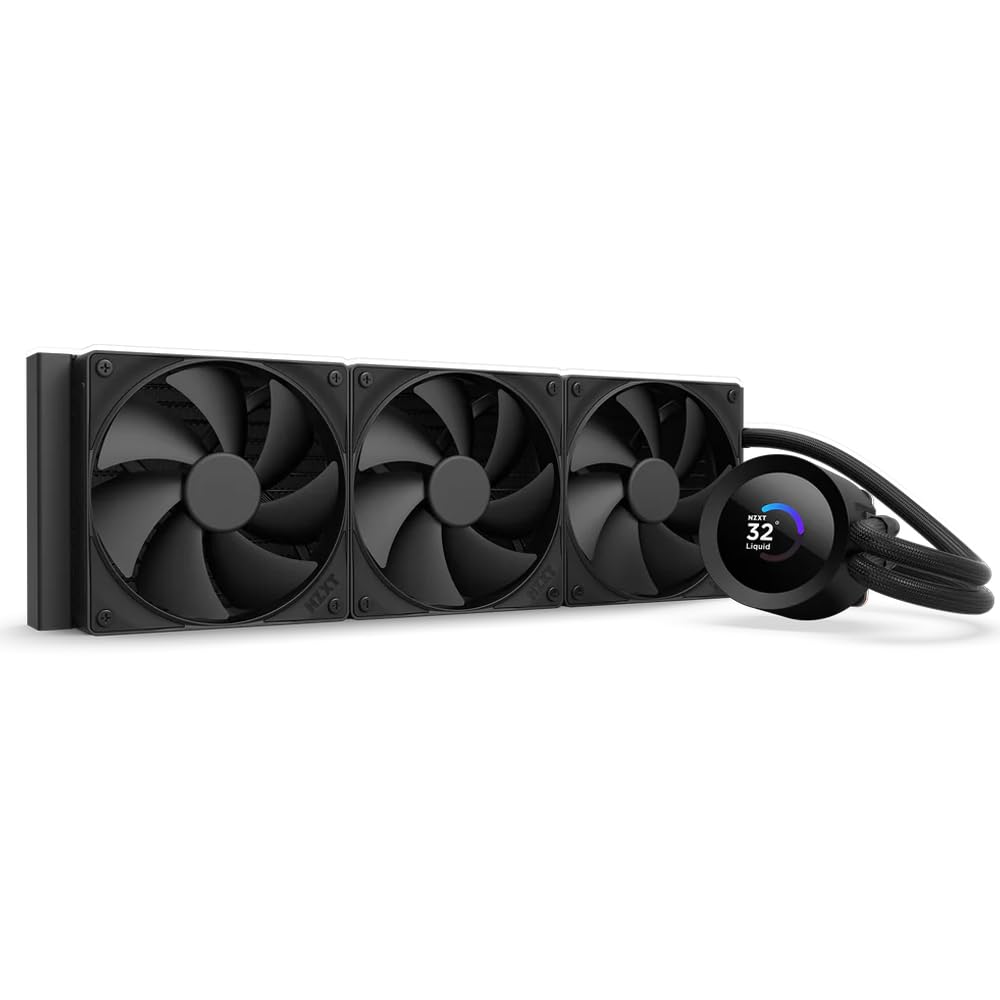
NZXT's Turbine pump is the first thing you notice about the Kraken Plus 360, and not in a good way: at full speed it is audible in a way the pumps in the Corsair and the MSI are not, and the fan curve that keeps a hot chip in check pushes it there.

Everything else about it is tidy. The 1.54-inch square LCD shows temperatures, GIFs, or a Spotify panel through CAM, the pump cap runs a single breakout cable, the brackets are tool-free for AM5 and LGA1851, and the paste is pre-applied. Six years of cover is the longest here alongside the ARCTIC.

Installation is the least dramatic part of the process, which is what you want: the F120P fans stay out of the way, Zero RPM mode stops them entirely at low load, and the breakout cable keeps the pump header count down to one.

Our reservation is value. The screen and the CAM ecosystem are what you are paying for, and the cooling does not outrun cheaper picks here. If you already run NZXT fans and lighting in CAM, the convenience is real; if you don't, the Corsair does the same job with less pump noise.

Pros

  • 1.54-inch LCD with CAM integrations
  • Tool-free brackets and pre-applied paste
  • Six-year warranty
  • Zero RPM mode stops fans at low load

Cons

  • Pump noise at full speed
Our verdict

The CAM pick: a tidy 1.54-inch LCD and six-year cover, provided a little pump noise at full tilt doesn't bother you.

Check Latest Price
8

White RGB Builds

PCCOOLER DC360

87 /100
LBD Score Excellent

Key details

Display
2.4-inch IPS (240×320)
Warranty
5 years
Rated TDP
310 W
Max Fan Speed
2500 rpm
View on Amazon

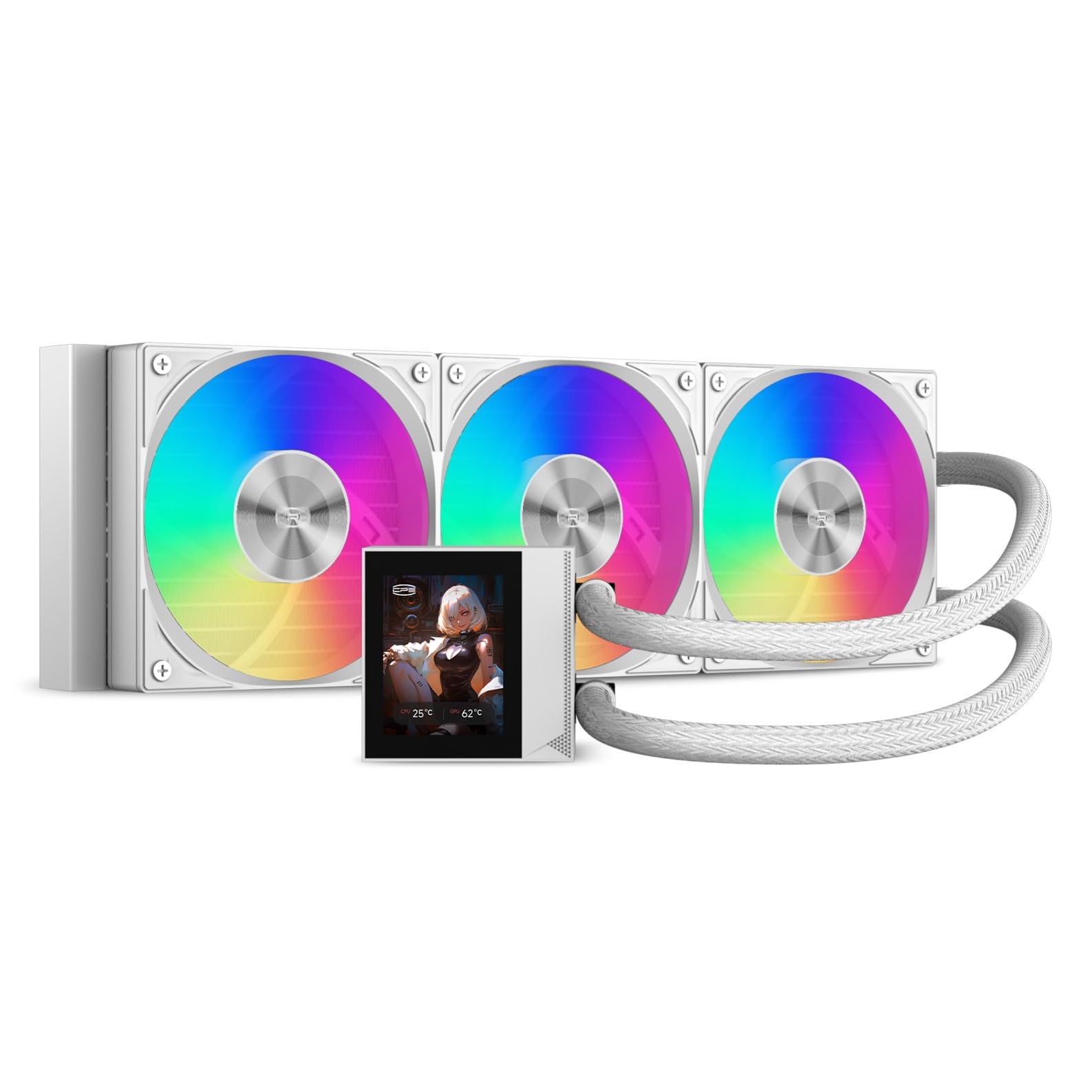
White AIO coolers tend to be either plain or pricey; the DC360 is neither. It puts a 2.4-inch IPS panel on the pump, finishes the assembly in white, and rates the loop for 310 W of CPU heat.

The hardware underneath is more interesting than the display. A ceramic pump runs at 2600 rpm and is quoted at 15 dBA, the three 120 mm FDB fans cover 500 to 2500 rpm with 90.56 CFM and 4.07 mmH2O of pressure, and the whole thing carries five years of cover — longer than either of the other midrange picks. The white finish carries through from the fan frames to the tubing braid, which we don't take for granted at this price.

Nothing about the assembly feels like a cost-down: fluid-dynamic bearings in the fans, a ceramic pump, and mounting hardware that is conventional rather than clever. The 240 × 320 panel is bright enough to read through a tinted side panel, and the airflow figure is high enough that the fans don't have to sit at full speed to keep a hot chip in check.

That is the case for it: white, a screen, and five years of cover in one box, at midrange money. In a black case the Thermalright does the same job for less; if the panel is the point, this is the one that doesn't make you choose between a white interior and a display.

Pros

  • 2.4-inch IPS display
  • Five-year warranty
  • High-pressure fans with strong airflow
  • Consistent white finish

Cons

  • Loud at full fan speed
  • Display software is the weak link
Our verdict

The white-build answer: a bright 2.4-inch panel, five-year cover, and strong fan specs in a finish that matches the rest of the case.

Check Latest Price

How We Tested 360mm AIO Coolers

The shortlist started with what was actually on shelves: current 360mm models with Intel LGA1851/1700 and AMD AM5/AM4 brackets in the box, and nothing extra required to mount them. Radiator thickness, fan type, and whether there was a screen on the pump we treated as differences to test rather than reasons to exclude. Each cooler went into two machines — a mid-tower with the radiator up top and a mesh case with it front-mounted — running the same 30-minute all-core encode plus a long evening of gaming.

I installed every one solo, from the box documentation alone, and timed it from opening the packaging to the first temperature reading. That's where the practical differences showed up: whether the AM5 offset bracket was labeled or guessable, whether the backplate stayed put when I flipped the board over, how much room the tubes left around the RAM and the VRM heatsink, and whether the pump cap ended up square once the last screw was snug. I noted every point where the manual left us guessing, then redid those steps to check whether it was the instructions or me.

Under load we logged CPU temperatures against fan speed, then dropped the fans to their floor so I could sit a foot from the case with a meter and hear the pump on its own — listening for whine, bearing chatter at start-up, and bubbling after a cold boot. Each unit stayed in a working machine for weeks at a time to see whether pump settings survived a reboot and whether anything loosened. We photographed every pump cap through a side panel, and on the models with a display, counted the steps it took to get one image onto it.

How to Choose a 360Mm Aio Cooler

Measure the radiator, then add the fans

360 mm describes the fan span, not the radiator length: the coolers here run from 397 to 400 mm long. Thickness varies far more, from the Lian Li's 24 mm to the deep ARCTIC stack, and that is the figure that decides whether a top mount clears your VRM heatsinks and RAM.

Add roughly 25 mm for fans before you commit. A front mount buys space but feeds the case pre-warmed air, and a listing that says a case supports a 360 often means with a thin radiator. Check the supported thickness as well as the length, and dry-fit before you fill the loop.

How much cooling headroom you actually need

On a midrange chip, none of these coolers is a mistake — a 360 mm radiator has enough surface area that the differences land at the margins. They show up on a high-heat CPU under a long all-core load, or in a case with restricted intake.

If you are building on a hot chip and want low fan speeds, pay for radiator thickness and fan static pressure. If you are not, spend the difference on case airflow and a quieter fan curve instead; it buys more than another degree of peak temperature.

Noise: listen to the pump first

Published decibel figures are not comparable across brands. Some quote the pump, some the fans at full tilt, some an average of the two. What matters more is character: a pump that hums at idle is worse than fans that ramp under load, because idle is where the machine spends its day.

Look for a zero-RPM fan mode if the PC lives in a bedroom, and plan on ten minutes in your motherboard's fan software whatever you buy. The quietest cooler on paper is only quiet once the curve is set properly.

The mount is the part you remember

Bracket quality separates these coolers more than thermal performance does. Pre-installed fans and daisy-chain wiring cut build time; an offset cold plate and a contact frame help on Intel's rectangular dies; a backplate that fits without pulling the motherboard is a genuine luxury.

For a first liquid cooler, pay for a simple mount. If you have built before and want the last few degrees, a fussier bracket is worth the saving — just do not discover that on a weeknight with the case half apart.

Screens, software, and warranty

A display adds a cable, an app, and a failure point. Decide whether you want one before you shop: the display coolers here cost more than the plain ones that cool just as well, and the panel is the least repairable part of the package.

Warranty is the other half of that decision. Cover ranges from three years to six across this group, and one premium model lists none at all. On a part with a pump in it, that is worth weighing against a brighter screen.

Frequently Asked Questions

Final Verdict

The Corsair Nautilus 360 RS ARGB is the cooler we point most people toward. It holds a high-heat CPU steady without drama, the pump stays quiet at idle, the fans wire to two headers instead of six, and five years of cover is a long time in a category where the pump is the part that fails.

If you will trade an evening of patience for the best cooling per dollar on this page, the ARCTIC Liquid Freezer III Pro 360 is the better buy — measure your top clearance first. And if the build is meant to be looked at, the Lian Li's curved OLED is the best display here by a wide margin.