Best Bluetooth Transmitters for TV

Route TV audio through a little Bluetooth box and you learn fast what matters: half a second of lag turns every on-screen conversation into a badly dubbed movie. I've set these up on a bedroom TV, a basement relic, and a plane seatback, and the deciding detail is rarely the codec — it's whether the box can talk to your TV's ports. A transmitter takes the audio your set already sends out, optical or aux or RCA, and hands it to one or two pairs of headphones so you can watch loud without waking anyone.

The catch is that many newer TVs send sound out through HDMI only, and these boxes don't take HDMI, so look at your TV's output panel before you buy. We spent five months with 14 of them, pairing two sets of headphones at once, walking from room to room to find where the signal quit, and replaying the same scene to judge lip-sync. Range claims held up least often, and the fussiest setups had the worst instructions.

1

Best Overall

1Mii B06TX Bluetooth Transmitter

84 /100
LBD Score Excellent

Key details

Power
USB power, corded
Codecs
aptX Low Latency & HD
Audio Inputs
Optical, coaxial, RCA, 3.5mm
Headphones At Once
2
View on Amazon

Four jacks on the back — optical, coaxial, RCA, and a 3.5mm aux — are the reason we start here. Almost any television made in the past fifteen years will hand audio to one of them, from a set whose only digital output is a Toslink port to a hand-me-down with nothing but a headphone socket.

That reach is what makes it our default recommendation for a living-room TV. Two Bluetooth buttons on the front pair two sets of headphones at once, volume buttons sit on top within reach of the couch, and it draws power from a USB cord, so there is no battery to remember. It weighs 60 grams and sits on the stand without drawing attention to itself.

Lip-sync is the caveat, and it's worth understanding before you buy. The aptX Low Latency support only engages when your headphones speak the same codec; pair basic SBC earbuds and you may see a mouth move before you hear the word. Try aptX-capable headphones, and the TV's own audio delay setting, before you decide the box is at fault. Delay is the most common shortfall here, and it follows the headphones more often than the transmitter.

An external antenna gives it a better shot at a bedroom or a kitchen than the pocket-sized units, though no Bluetooth signal enjoys a masonry wall. One wiring note that catches people out: connect optical or RCA, never both at once.

Pros

  • Four input types fit almost any TV
  • Pairs two headphones at once
  • USB-powered, so nothing to recharge
  • Volume buttons within reach of the couch

Cons

  • Delay with headphones that lack aptX Low Latency
  • Transmitter only, with no receiver mode
Our verdict

For most TVs this is the transmitter to buy: four input types, two headphones at once, and no battery to charge.

Check Latest Price
2

Best for Lip-Sync Accuracy

Avantree Audikast 3

81 /100
LBD Score Excellent

Key details

Power
USB power, corded
Codecs
aptX Adaptive, Bluetooth 5.3
Audio Inputs
Optical (TOSLINK), 3.5mm AUX
Headphones At Once
2
View on Amazon

If delay is what has kept you from trying one of these, the Audikast 3 is the one we point to first. It runs aptX Adaptive, the codec that trades bitrate for latency depending on what is on screen, and with a matching pair of headphones it's the transmitter here we trust most to keep dialogue on the lips.

The ports are the limit. There's optical and a 3.5mm aux, and that's the lot — no coaxial, no RCA, and no help for an HDMI-only television without an extractor in between. Optical also has to be set to PCM in the TV's sound menu or you get silence. Avantree prints both warnings on the box, which is more candor than most packaging manages.

Setup is a cable and a couple of button presses, two headphones can connect together, and the volume rocker on the unit saves a reach for the TV remote when one viewer wants it louder. Power comes over USB, so it stays where you put it. Hearing aids are the one group this model doesn't serve: there is no Auracast here, and the Audikast 4 is the pick for that.

Pros

  • aptX Adaptive for tighter audio-to-video sync
  • Volume buttons on the unit itself
  • Two headphones over optical or aux

Cons

  • No HDMI: optical or aux TVs only
  • No Auracast, so hearing aids are unsupported
Our verdict

Our choice for anyone bothered by lip-sync: aptX Adaptive, two headphones, and volume buttons, provided your TV has optical or aux output.

Check Latest Price
3

Best for Hearing Aids

Avantree Audikast 4

79 /100
LBD Score Very Good

Key details

Codecs
aptX Adaptive, aptX HD, LC3
Listeners
Several on Auracast, one on classic
Audio Inputs
Optical (TOSLINK), 3.5mm AUX
Hearing Aids
Auracast-compatible models only
View on Amazon

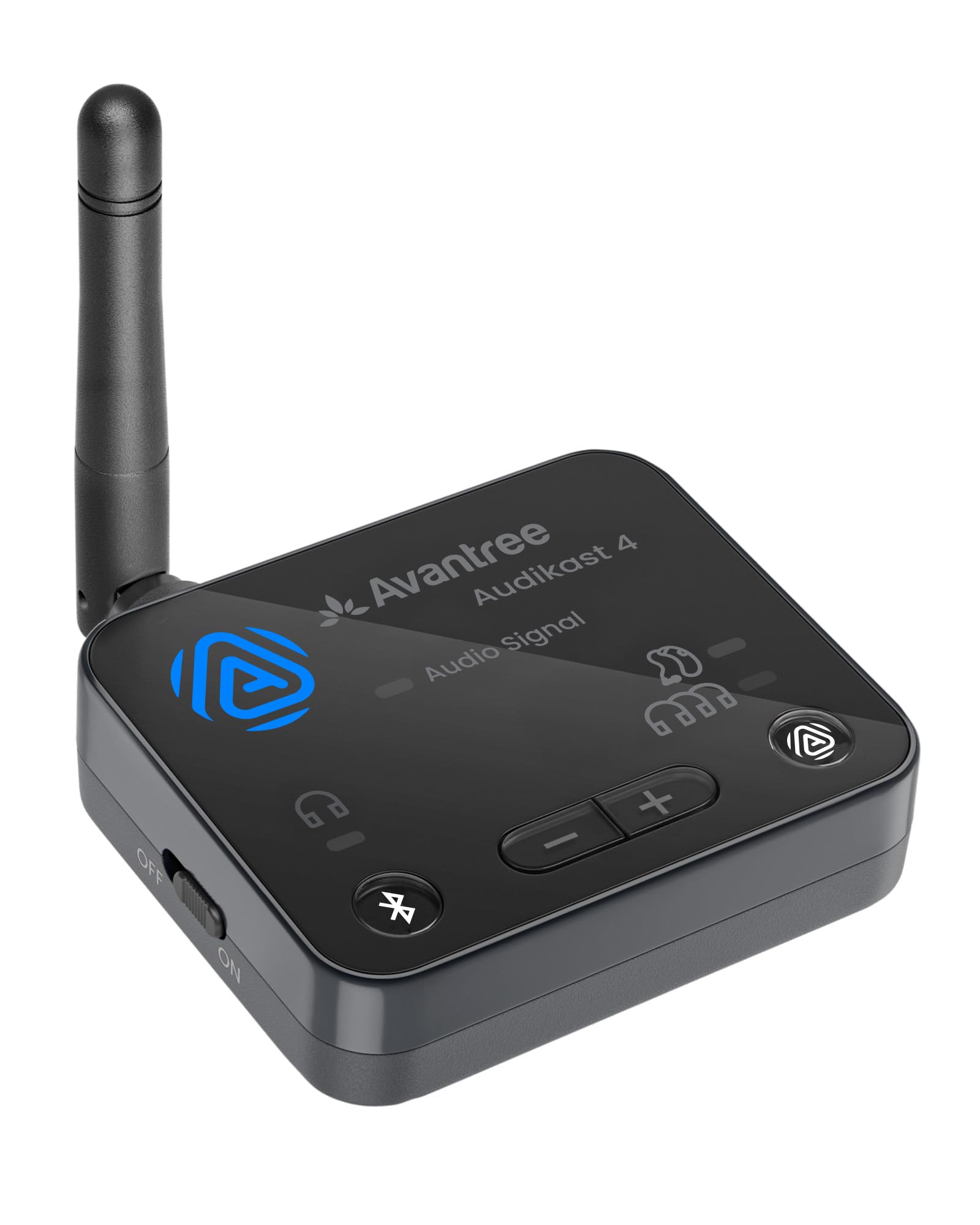
Hearing aids have been the awkward corner of this category for years — they pair like headphones, then arrive at the wrong volume, in the wrong codec, or not at all. The Audikast 4 handles them by broadcasting Auracast, the standard that lets several compatible aids and headphones tune into a single stream.

We think that makes it the pick for anyone buying on behalf of a parent or a partner with hearing loss. Set it up once and the aids find it themselves; volume stays on the aids, where a wearer wants it; and one box can serve a whole room of Auracast listeners instead of the usual two. It has paired successfully with aids from several major brands, which is the part that matters when a return means another round of configuration.

The limits are worth knowing. Classic Bluetooth mode connects one device at a time, so a couple sharing a film on ordinary headphones needs Auracast sets or a different transmitter. It doesn't pass audio through to a soundbar, and it needs optical or aux from the TV. It is also the most expensive unit here — worth it only when the Auracast side is the reason you're shopping.

Pros

  • Auracast serves several compatible listeners
  • Classic Bluetooth mode for ordinary headphones
  • Volume managed on the hearing aids
  • Pairs with aids from several major brands

Cons

  • One device at a time in classic mode
  • No soundbar passthrough support
Our verdict

For hearing aids that support Auracast, nothing else here comes close: one box, several listeners, and volume control on the aids themselves.

Check Latest Price
4

Best Budget

SOOMFON BT17 Transmitter

82 /100
LBD Score Excellent

Key details

Codecs
SBC, AAC
Display
1.8-inch LCD
Audio Inputs
Optical, RCA, 3.5mm AUX
Headphones At Once
2
View on Amazon

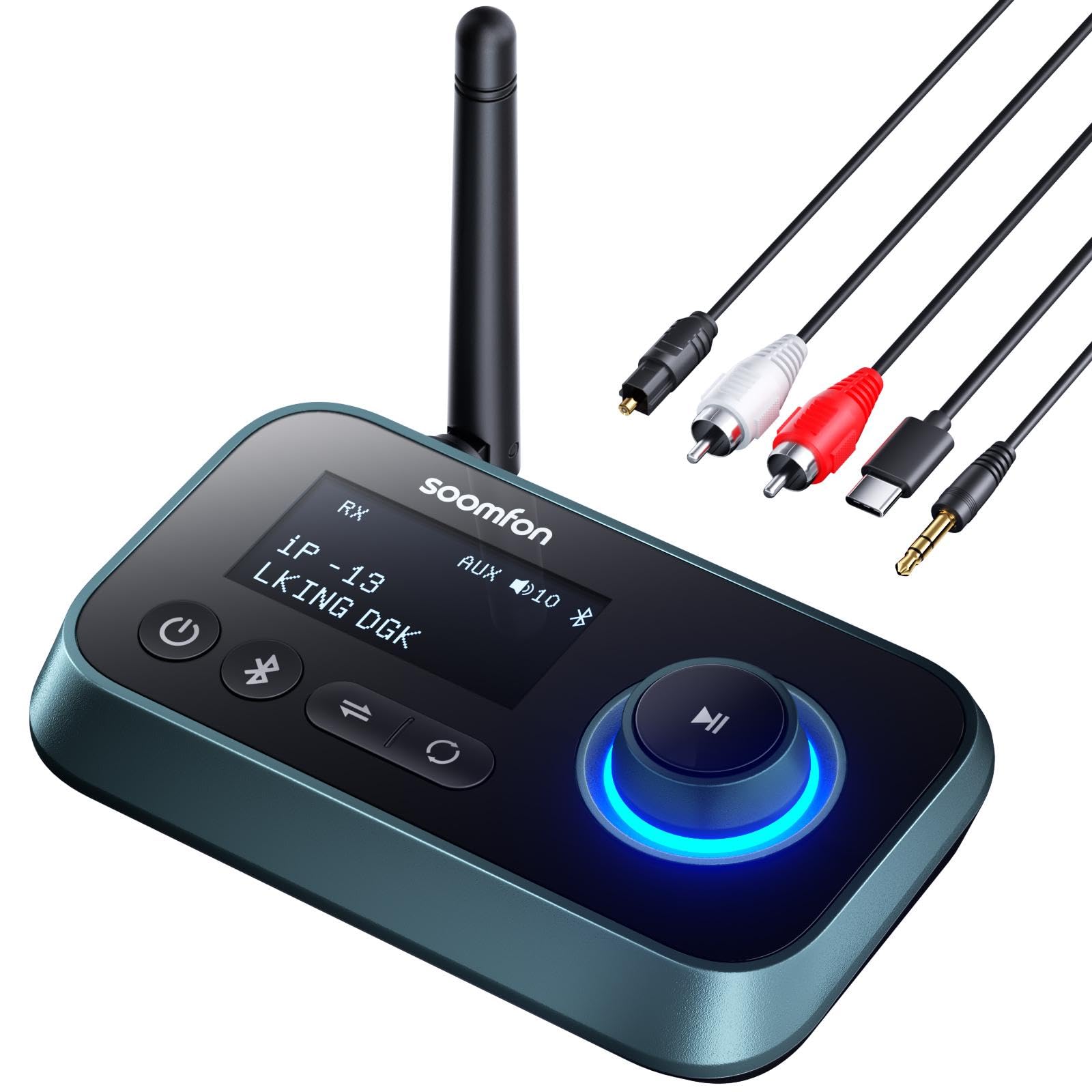
A 1.8-inch screen is the detail that makes this one easy to live with. It shows the mode you're in — transmit, receive, or off — along with the device you're paired to, which takes most of the guesswork out of setting it up.

The rest is sensible for the money: optical, RCA, and 3.5mm inputs, two headphones at once, volume buttons on the side, and a USB-C power cable in the box. It also works in reverse as a receiver, which is handy for pushing a phone or a laptop into an older stereo.

Our reservation is latency. There's no aptX on board — the radio runs SBC and AAC — so unless your headphones bring a low-latency trick of their own, expect the odd half-beat of lag on dialogue. Some of it can be dialed out with the TV's audio delay setting, and for music, sport, or a second-room speaker it barely matters. For film night with basic earbuds, spend a little more.

Pros

  • LCD shows mode and connected device
  • Optical, RCA, and aux inputs with dual pairing
  • Works as a Bluetooth receiver too

Cons

  • SBC and AAC only, so delay is likelier
  • Instruction sheet is hard to read
Our verdict

A useful budget transmitter whose screen takes the guesswork out of pairing, as long as your headphones can carry the low-latency load.

Check Latest Price
5

Best for Travel

LAICOMEIN B110 Transmitter

85 /100
LBD Score Excellent

Key details

Codecs
aptX Low Latency, AAC, SBC
Battery
20+ hours, 2-hour charge
Audio Inputs
3.5mm AUX, RCA
Headphones At Once
2
View on Amazon

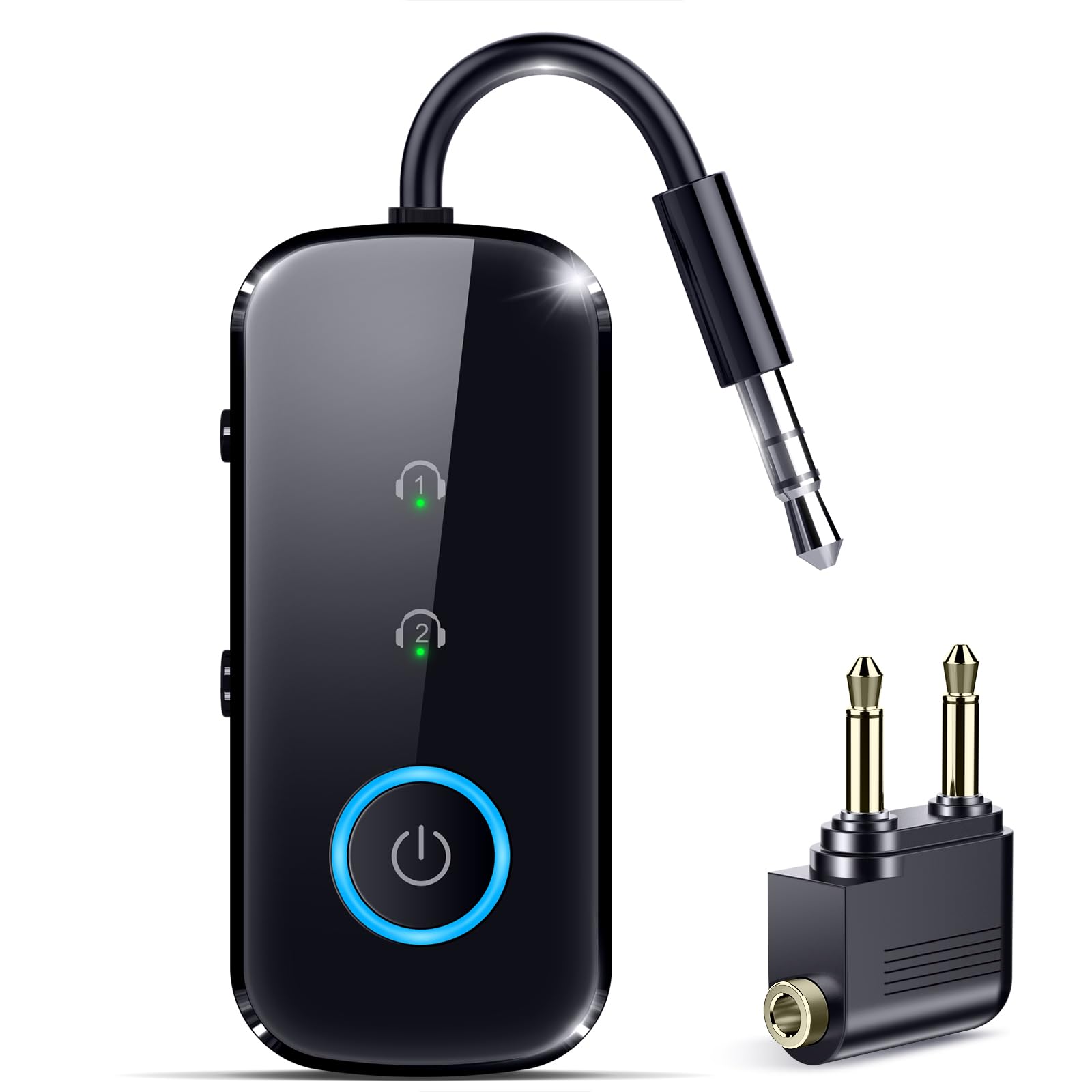
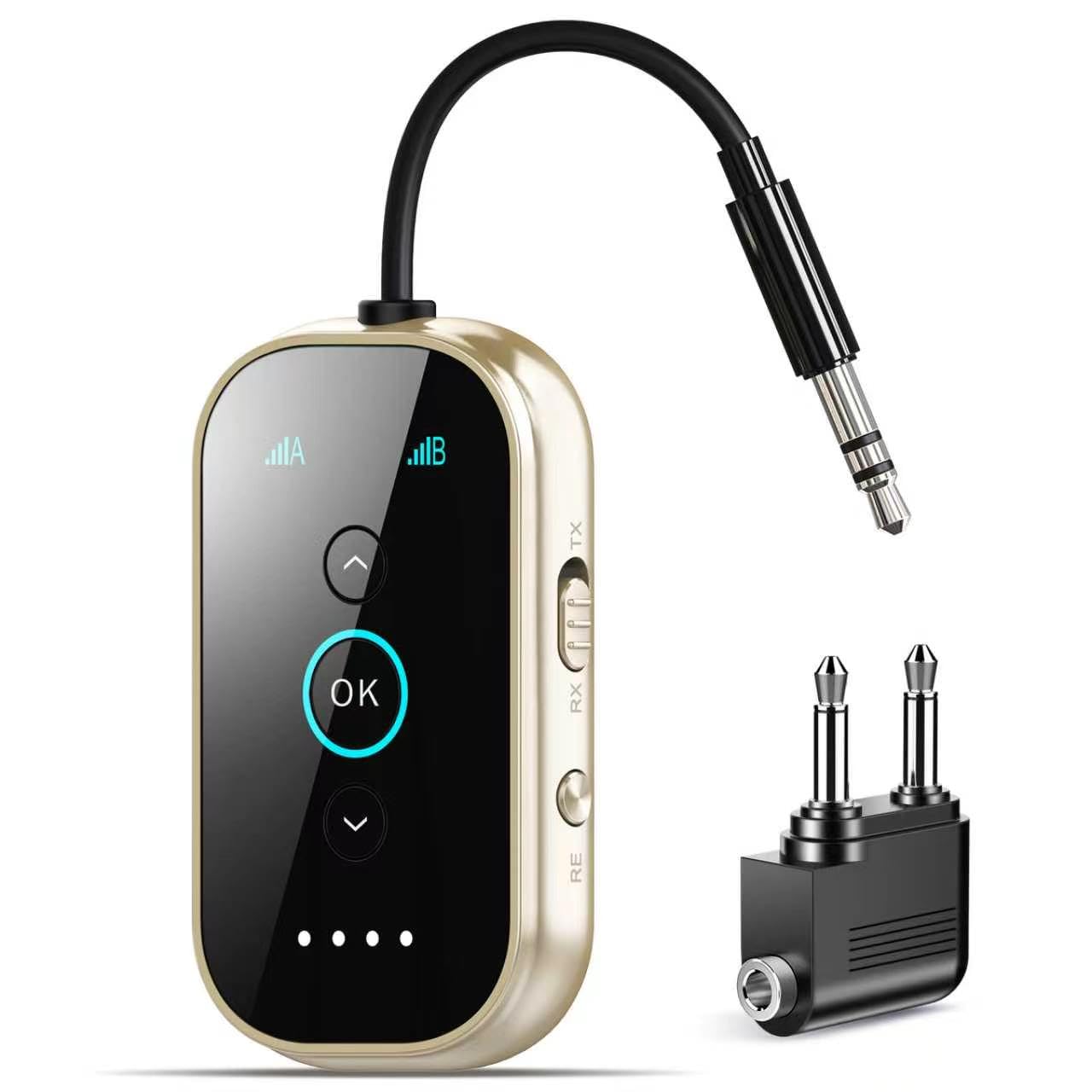
A dual-prong airline adapter in the box tells you exactly who this one is for. Seatback screens still use the old two-pin socket on plenty of aircraft, and this is the only pick here that arrives with everything you need for a flight. The unit itself is the size of a USB stick and weighs almost nothing in a bag.

At home it does the ordinary job well: 3.5mm or RCA into the TV, two headphones paired, a dedicated button and LED for each so you can see who is connected, and volume on the side. The battery is the headline — better than 20 hours of playback and about two hours to refill over USB-C, which covers a long-haul flight and then some.

What it lacks is an optical input, so a TV whose only audio output is Toslink can't use it. That's the trade: this is the one to pack, not necessarily the one to leave permanently under the television. If your set has a headphone jack or RCA outputs, it handles both jobs without fuss.

Pros

  • 20-plus hours of battery, two-hour charge
  • Airline adapter included for seatback screens
  • A button and LED for each headphone

Cons

  • No optical input for Toslink-only TVs
Our verdict

The travel pick: 20-plus hours of battery, an airline adapter included, and two headphones at once, for TVs with aux or RCA output.

Check Latest Price
6

Design-Minded Travelers

Xmagpot T3 Transmitter

82 /100
LBD Score Excellent

Key details

Codecs
aptX Low Latency, aptX HD, AAC, SBC
Battery
24+ hours, 1.5-hour charge
Audio Inputs
3.5mm AUX, RCA
Headphones At Once
2
View on Amazon

Machined metal and a ceramic-glass face are not what we expect at this price. The T3 reads as a small, solid object rather than a plastic dongle, and that's much of its appeal — it's the one here you won't mind leaving on a side table between trips.

Under the finish it's a straightforward transmitter: 3.5mm or RCA in, two pairs of headphones, aptX Low Latency and HD support, and a battery rated past 24 hours with a 1.5-hour charge over USB-C. That combination suits a hotel room, a rental, or a second TV, and it's the pick for anyone who wants the box itself to look like something.

There is no optical jack and no coaxial, so a television with only a Toslink output is out — and that rules out a fair number of modern sets. Buy it for the build, the battery, and the codecs. If your TV speaks optical and nothing else, the 1Mii or the Audikast 3 is the better call.

Pros

  • Metal and glass body feels like a premium object
  • 24-plus hours per charge, refilled in 1.5 hours
  • aptX Low Latency and HD support

Cons

  • 3.5mm and RCA only, with no optical
Our verdict

The best-looking transmitter here, with aptX support and a battery that outlasts a long weekend — just not for optical-only TVs.

Check Latest Price
7

Shared Living Rooms

ifofo 3-in-1 Bluetooth Adapter

79 /100
LBD Score Very Good

Key details

Bluetooth
5.0
Audio Inputs
Optical, RCA, 3.5mm AUX
Pass-through
TV speakers stay on
Headphones At Once
2
View on Amazon

Bypass is the feature that makes this one worth writing about. In bypass mode the television's own speakers, or a soundbar, keep playing while headphones listen over Bluetooth — nobody has to choose between a quiet house and a quiet TV.

The rest is well thought out: a 1.8-inch LCD that shows the input and the mode, physical buttons for switching between optical, aux, and RCA, an external antenna for range, and a 2-in-1 design that doubles as a receiver for an old stereo. Two pairs of headphones can connect at once, and volume adjusts on the unit.

The cost is latency, and a little noise. The radio is Bluetooth 5.0 without aptX, so with video the lips and the syllables drift apart — and the mismatch stands out here more than on other picks because the soundbar is still playing in sync beside you. Some setups pick up hiss or echo as well, which is worth testing inside the return window.

So it's the transmitter for a specific household: a room where the TV stays audible to everyone and one person wants headphones on top of that, or a stereo that needs Bluetooth more than a television does. If frame-accurate dialogue in headphones is the goal, the 1Mii or the Audikast 3 is the better buy.

Pros

  • Bypass keeps the TV speakers or soundbar playing
  • LCD and buttons for switching inputs
  • External antenna for longer range
  • Doubles as a Bluetooth receiver

Cons

  • Bluetooth 5.0 without aptX, so video delay shows
  • Audio can turn noisy in some setups
Our verdict

The pick when the room should keep hearing the TV while headphones listen too — good for news, sports, and music, less so for lip-sync.

Check Latest Price

How We Tested Bluetooth Transmitters for TV

We started by weeding out anything that couldn't take a TV's optical or 3.5mm aux output, and anything that required HDMI, which rules out most recent sets. From there we sorted by price and by the features people actually compare: two pairs of headphones at once, low-latency codecs, a volume dial you can reach from the couch, and whether the unit flips into receiver mode for a car stereo or an old speaker.

Fourteen units came in and stayed for five months. Each one went into the same rotation: a living room TV with a soundbar still connected, a bedroom set for late-night watching, a hand-me-down television with nothing but RCA jacks, and, for the pocket-sized ones, a plane seatback and a rental car's aux port. I timed setup with the manual closed, counting the button presses before the first pair of headphones connected, then the second, and noting how far into the booklet I had to dig to find the line about switching to transmit mode.

Range got checked on foot — living room, kitchen, down the hall, upstairs — and we marked the room where audio started to stutter or drop. Latency we judged by replaying the same dialogue scene and listening for whether voices landed on the moving mouths, then running a music track to catch hiss or a thin, watery edge. Reliability meant leaving each unit plugged in for weeks and letting the TV sleep and wake to see whether it reconnected on its own or needed a reseat, while build quality showed up in small things like whether a jack seated with a click or the case skidded off the shelf when a cable was tugged.

Value came down to whether the extras earned their keep: a display or a second input is only worth paying for if you'll use it, and more than one budget unit did the core job as well as the loaded ones.

How to Choose a Bluetooth Tv Transmitter

Match the Transmitter to Your TV's Audio Output

Before comparing anything else, look at the back of the set. Optical (Toslink), coaxial, red-and-white RCA, and a 3.5mm headphone socket are the four options, and the transmitter needs a matching input. Optical is the most common on sets from the past decade or so; a headphone jack is the most common on older and smaller ones.

Two traps catch people here. A TV whose only outputs are HDMI needs an audio extractor in between — no transmitter can pull sound out of an HDMI port on its own. And a TV's optical output usually has to be switched to PCM in the sound menu before any transmitter will lock onto it, which is why an install that looks wired correctly can play silence.

Latency Is What Decides Whether You Keep It

Bluetooth audio takes time to compress, send, and unpack, and that time shows up as a gap between lips and syllables. Low-latency codecs, aptX Low Latency and aptX Adaptive among them, shorten it — but only when the headphones support the same codec. Otherwise everything falls back to SBC and the delay returns, which is why the headphone spec sheet matters as much as the transmitter's.

Check your headphones' codec list before you buy. If a small gap survives, most TVs include an audio delay or sync adjustment for their digital outputs, and nudging that closes the difference for good.

Two Listeners, and the Room That Wants to Hear Too

Most transmitters here pair two headphones at once, which is the feature couples and caregivers ask about first. What varies is what happens to the television's own speakers: some units mute the TV's audio path while transmitting, while others pass it through so a soundbar keeps playing for everyone else in the room.

If you run a soundbar over optical, confirm the model supports passthrough before ordering — the Avantree Audikast 4 does not, while the ifofo's bypass mode is built for exactly that setup.

Plug-In Power or a Battery

A transmitter that lives under the television should be USB-powered and never thought about again; a battery only adds a charging routine and a slow decline over a few years. Battery models earn their place when the unit leaves the house — a flight, a hotel, a second home — and most run while plugged in, so they can do both jobs.

Get the input and the codec right first, then decide whether the unit needs to travel. Power is the easiest part to get right and the most annoying to get wrong.

Frequently Asked Questions

Final Verdict

For most people, the 1Mii B06TX is the one to buy. Four input types mean you can stop worrying about which jack your TV has, it pairs two headphones at once, and it never needs charging — the only real question is whether your headphones can handle aptX Low Latency.

If lip-sync is the reason you're shopping, the Avantree Audikast 3 is the better call. If the headphones in question are hearing aids, go straight to the Audikast 4 and confirm Auracast support before you order.