Best AM4 Micro-ATX Motherboards of 2026

An AM4 motherboard is the part of a PC build you handle for an afternoon and then live with for years, so the cheap board can turn into the costly mistake. I care less about a flashy spec sheet than whether the thing posts on the first try, recognizes my memory kit, and keeps its Wi-Fi connection when I move to the couch. The real risks are boring: a board that won't boot with the CPU you bought, a front-panel header buried under the graphics card, or a wireless radio that quits in the next room.

My team and I spent six months with 12 micro ATX AM4 boards, building them into real cases and using them for work, games, and everyday browsing. We paid attention to build quality and value, but also to the stuff that only shows up after a few weeks: boot quirks, dropped connections, and whether the board still feels solid after a couple of teardowns. AM4 is a mature platform now, which means most boards will run a Ryzen 5000 chip; what separates them is power delivery, BIOS behavior, and whether the Wi-Fi is genuinely usable rather than just listed on the box.

The picks below are the ones that made installation painless, held their performance under load, and stayed connected. They are not optimized for overclocking records or show builds, just for a reliable micro ATX system you can put together without second-guessing every header.

1

Best Overall

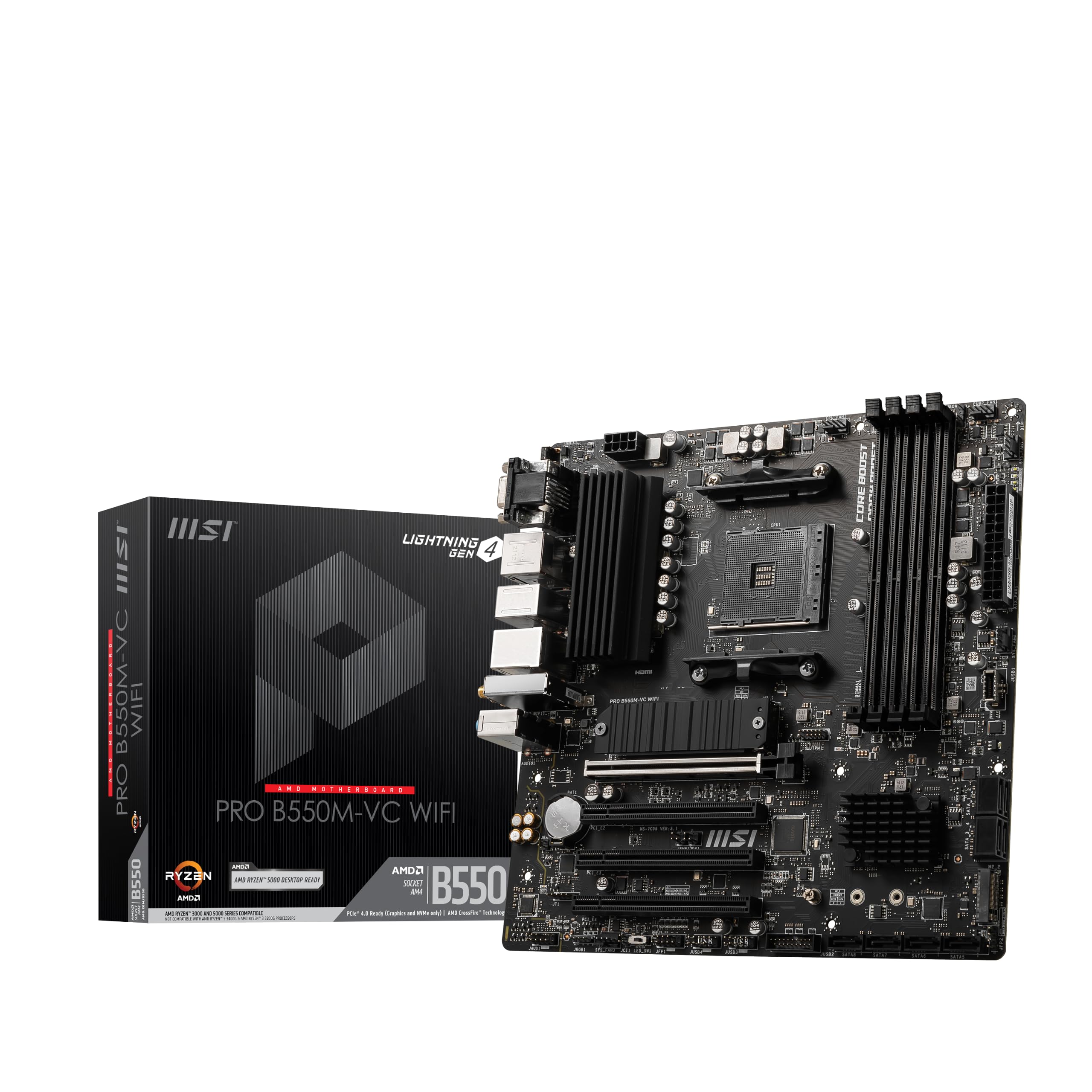
MSI PRO B550M-VC WiFi

91 /100
LBD Score Outstanding

Key details

M.2
1x PCIe 4.0 x4
Memory
4 DIMM, 128 GB max
Chipset
AMD B550
Wireless
Wi-Fi 6E, Bluetooth 5.2
View on Amazon

The MSI PRO B550M-VC WiFi is the board we reach for when a micro-ATX build needs to feel complete without add-in cards. It pairs the B550 chipset with four DDR4 DIMM slots, a PCIe 4.0 x16 slot, and a Gen4 M.2 slot, so a Ryzen 5000 CPU has room for a fast GPU, a fast SSD, and 128 GB of memory. The Wi-Fi 6E and Bluetooth 5.2 are the parts that make it easy to live with in a small case: no dongle, no card, and no antenna cable routing across the desk.

What makes it our top pick is the balance. The four DIMM slots leave room for a 2x16 GB kit now and another pair later, and the USB 3.2 Gen2 ports are the ones you will actually use on the rear panel. We also like the M.2 Shield Frozr and the extra thermal pad around the VRM; they do not turn this into a high-end overclocking board, but they make a compact case less fussy. The price is midrange for this group, and the feature set is the most complete.

The caveat is first-boot fussiness. If the board hangs before video, try a single memory stick in the A2 slot before pulling it out; that is the first fix to try. The wireless card can arrive dead, so test Wi-Fi and Bluetooth before the return window closes. Those are annoyances, not reasons to skip the board, but they are why a first-time builder should bench-test it outside the case.

Pros

  • Wi-Fi 6E and Bluetooth 5.2 built in
  • Four DIMM slots support up to 128 GB
  • PCIe 4.0 x16 and Gen4 M.2
  • USB 3.2 Gen2 and four PCIe slots

Cons

  • The wireless card can arrive dead
  • Limited fan headers for multiple case fans
Our verdict

We recommend the MSI PRO B550M-VC WiFi as the default AM4 mATX board for a Ryzen 5000 build with wireless, four DIMM slots, and PCIe 4.0.

Check Latest Price
2

Best Dual M.2 Alternative

ASUS Prime B550M-A AC

93 /100
LBD Score Outstanding

Key details

M.2
Dual M.2, one PCIe 4.0
Memory
4 DIMM, 128 GB max
Chipset
AMD B550
Wireless
Wi-Fi included
View on Amazon

The Prime B550M-A AC is the lower-cost alternative we recommend when the top pick's Wi-Fi 6E is more than you need and a second M.2 slot is worth more. It has two M.2 slots, one wired for PCIe 4.0 x4, plus four DIMM slots, PCIe 4.0 x16, built-in Wi-Fi, and a 1Gb LAN port. That is a lot of board for the money, and the layout stays clean in a compact case.

We like the dual M.2 arrangement because it lets you keep a fast boot drive and a second NVMe for games or scratch files without giving up SATA ports. The four DIMM slots and 128 GB ceiling are the same as the top pick, and the PCIe 4.0 x16 slot is there for a modern GPU. The board also has a VRM heatsink, a PCH heatsink, and Fan Xpert 2 for fan curves, so it does not feel stripped down.

The wireless is the compromise: it is built in and convenient, but it is not Wi-Fi 6E, so the MSI is the better choice if wireless speed is the priority. If you use Ethernet, that difference disappears. The Aura Sync header handles a little lighting without a separate controller, which is more control than we expect at this level.

Pros

  • Dual M.2 slots, one PCIe 4.0
  • Four DIMM slots up to 128 GB
  • Built-in Wi-Fi and 1Gb LAN
  • PCIe 4.0 x16 and USB 3.2 Gen2

Cons

  • Only four SATA ports
Our verdict

Choose the ASUS Prime B550M-A AC if you want dual M.2 and built-in Wi-Fi for less than our top pick.

Check Latest Price
3

Best for High-Core Ryzen

Gigabyte B550M AORUS Elite AX

86 /100
LBD Score Excellent

Key details

M.2
2x M.2, one PCIe 4.0
Power
5+3 phase
Chipset
AMD B550
Wireless
Wi-Fi 6E
View on Amazon

A 12-core Ryzen in a micro-ATX case is the scenario the AORUS Elite AX is built for. The 5+3 digital power stage and enlarged MOSFET heatsink are the reason to look here instead of a budget board, and the integrated I/O shield makes the build feel less like a compromise. It also has Wi-Fi 6E, dual M.2, and six SATA ports, so a small case can still carry a lot of storage.

We think it earns the premium for a 5900X or 5800X3D because the power delivery is the part you cannot upgrade later. The catch is physical: a long graphics card can block most of the SATA ports, so plan your drive connections before you screw the board down. The wireless is also the one area where we want a driver check; some early boards need the Wi-Fi driver installed before the adapter shows up.

For a 65-watt Ryzen 5, this board is more than you need, and the price says so. For a high-core build that will stay in service, the 5+3 stage, six SATA ports, and Wi-Fi 6E make it the most capable board here; a 65-watt buyer can save the money for a better GPU.

Pros

  • 5+3 power stage with enlarged heatsink
  • Wi-Fi 6E and dual M.2
  • Six SATA ports and integrated I/O shield
  • PCIe 4.0 x16 and Q-Flash Plus

Cons

  • Premium price for an AM4 board
Our verdict

We like the AORUS Elite AX for a high-core Ryzen in a small case, where its 5+3 power stage and Wi-Fi 6E earn the premium.

Check Latest Price
4

Best Budget

ASRock B550M-HDV

87 /100
LBD Score Excellent

Key details

M.2
1x PCIe 4.0 x4
SATA
4 ports
Memory
2 DIMM, 64 GB max
Chipset
AMD B550
View on Amazon

The B550M-HDV is our budget pick because it keeps the two things that matter on a cheap AM4 board: the B550 chipset and PCIe 4.0. It has a PCIe 4.0 x16 slot, one PCIe 4.0 x4 M.2 slot, four SATA ports, and three video outputs for an APU build. The board is simple, the layout is easy to work in, and the price leaves room for a better SSD or a case fan.

For a 65-watt Ryzen 5 5600 or 5700X, that is a sensible trade. We do not recommend it for a 5900X or a heavy overclock; the power delivery is not what you are paying for here. The two fan headers are the detail that catches people: a three-fan case needs a splitter, and an AIO plus case fans needs a plan.

The memory limit is the thing to plan: two DIMM slots and a 64 GB ceiling mean you should buy the 2x16 GB kit you actually want on day one. That is the main sacrifice for the price. The board still has three video outputs, which is useful for an APU build with a second monitor.

Pros

  • B550 and PCIe 4.0 at the lowest price
  • Three video outputs for APUs
  • Four SATA ports and one PCIe 4.0 M.2
  • Simple layout for a 65-watt build

Cons

  • No built-in Wi-Fi
Our verdict

The B550M-HDV is our budget pick when a 65-watt Ryzen and two memory sticks are all the build needs.

Check Latest Price
5

Basic Wi-Fi Builds

ASUS TUF Gaming A520M-PLUS WiFi

91 /100
LBD Score Outstanding

Key details

M.2
1x PCIe 3.0 x4
Memory
4 DIMM, 128 GB max
Chipset
AMD A520
Wireless
802.11ac Wi-Fi
View on Amazon

The TUF A520M-PLUS WiFi is the board we choose when the build is basic and the wireless is the point. It has four DIMM slots, 128 GB of memory support, built-in 802.11ac Wi-Fi, and a BIOS FlashBack button, which means you can update firmware without a supported CPU installed. The A520 chipset is the ceiling, so this is not a board for a performance-first build.

For a Ryzen 5 5600 or 5700X, that is enough. The four DIMM slots are the reason to pick it over a cheaper A520 board: you can run 2x16 GB now and add more later. The BIOS FlashBack button is the other reason; it takes the panic out of a board that ships with an older BIOS.

We like the display outputs, too: DisplayPort, HDMI, and D-Sub give an APU build room for a second monitor without a graphics card. The Wi-Fi drivers need to be installed manually, so do that before you decide the adapter is dead, and check the box for the antenna. This is a basic board, and it is honest about that.

Pros

  • Four DIMM slots and 128 GB support
  • Built-in 802.11ac Wi-Fi
  • BIOS FlashBack button
  • Three display outputs

Cons

  • No PCIe 4.0 support
  • Only one M.2 slot
Our verdict

The TUF A520M-PLUS WiFi makes sense for a basic Ryzen build that needs Wi-Fi and BIOS FlashBack, not PCIe 4.0.

Check Latest Price
6

Multi-Monitor APUs

ASRock B550M Pro4

89 /100
LBD Score Excellent

Key details

M.2
Dual M.2
Memory
4 DIMM, 128 GB max
Chipset
AMD B550
Video Outputs
HDMI, DisplayPort, VGA
View on Amazon

Three video outputs on a B550 board are unusual, and they are why the B550M Pro4 stays in this guide. It has HDMI, DisplayPort, and VGA, plus four DIMM slots, dual M.2, and a PCIe 4.0 x16 slot. For an APU build that needs to drive two or three monitors without a graphics card, that combination is hard to find.

We also like the 8 power phase design and the 2oz copper PCB; it feels like more board than the price suggests. The four DIMM slots and 128 GB ceiling give a media PC room to grow, and the dual M.2 slots mean you can keep the boot drive and a scratch drive separate. The layout is clean for a compact case.

The BIOS is the detail to check: some boards need an update before a Ryzen 5000 chip will post, so ask for the version or use a board with a flash button. Once it is running, the Pro4 is a well-laid-out board for a compact media build. That BIOS step is the one thing to resolve before the case goes back on.

Pros

  • Three video outputs: HDMI, DisplayPort, VGA
  • Four DIMM slots and dual M.2
  • 8 power phase design
  • PCIe 4.0 x16

Cons

  • Only two SATA ports
  • No built-in Wi-Fi
Our verdict

We keep the B550M Pro4 in the guide for APU builds that need three video outputs and four DIMM slots.

Check Latest Price

How We Chose and Tested These AM4 Micro ATX Boards

We started by pulling together more than 30 current AM4 micro ATX boards and narrowing them by chipset, memory support, M.2 slots, Wi-Fi, rear I/O, and what the board included for the money. From that group we brought in 12 for hands-on testing for six months, including boards with B550 and A520 chipsets and a mix of Wi-Fi and Ethernet-only models. Every board went through the same routine: a bench build first, then a full install in a micro ATX case with a Ryzen 5000 processor, 16GB and 32GB DDR4 kits, an NVMe drive, and a midrange graphics card. We installed each one twice to see how the layout felt after the novelty wore off.

Installation and build quality got judged with a screwdriver in hand. We noted whether the standoff holes lined up without pressure, whether the CPU socket and 24-pin connector stayed reachable with a graphics card installed, and how much room the front-panel headers left for my fingers. We also checked for flex, looked at how the M.2 and VRM heatsinks were attached, and counted usable fan and RGB headers. On the boot side, we logged cold starts, restarts, sleep and wake cycles, and any memory-training delays or settings that reset after power loss.

For performance, we ran a 30-minute all-core stress test and watched for throttling and VRM temperatures, then used the boards for normal work and gaming. Wi-Fi and Bluetooth got tested at close range and through two walls, with file transfers and a wireless headset, while Ethernet got a straight throughput check. We also swapped in a 3000-series chip where the board supported it to see how fussy the BIOS was about generation changes. The boards that survived our shortlist did the unglamorous things well: they booted cleanly, kept their wireless connection, and didn't make a future upgrade feel like a gamble.

How to Choose an Am4 Micro-Atx Motherboard

Start with the chipset, not the feature list

B550 is the default for a Ryzen 5000 build because it supports PCIe 4.0 and CPU overclocking. A520 is the basic chipset: it can run the same AM4 processors, but it limits the primary graphics slot and M.2 to PCIe 3.0 and does not support CPU overclocking. If you have a PCIe 4.0 graphics card or a fast Gen4 SSD, the difference is real; if your parts are PCIe 3.0, an A520 board can be enough.

We start every build by asking whether the board will ever see a Gen4 drive. If the answer is yes, stay with B550. Our top pick and the budget ASRock B550M-HDV both use it; the ASUS TUF A520M-PLUS WiFi is the exception for a basic build that values BIOS FlashBack and built-in Wi-Fi more than PCIe 4.0.

Match the board to your CPU's power draw

A 65-watt Ryzen 5 is easy on a micro-ATX board; a 5900X or 5800X3D is not. Look at the power stage and the size of the VRM heatsink, not just the chipset. A 5+3 design with an enlarged heatsink, like the Gigabyte AORUS Elite AX, gives a high-core CPU more headroom in a small case with limited airflow.

For a 5600 or 5700X, a simpler board is fine, and spending more on power delivery takes money away from the GPU or SSD. The budget ASRock B550M-HDV is a good example: it is honest about being a 65-watt board. Match the board to the CPU you will actually run, not the one you might buy later.

Decide how much memory and storage you need now

Two DIMM slots are not a problem if you buy the right kit on day one: 2x16 GB is plenty for most games and general work. Four slots give you room to add another pair later, which is why we prefer them on a board that will stay in service. The same logic applies to M.2: one fast drive is enough for many builds, but a second slot lets you add storage without pulling the first drive.

Check the SATA count if you keep hard drives or a capture drive. The ASUS Prime B550M-A AC gives you dual M.2 and four SATA ports; the ASRock B550M Pro4 trades SATA count for three video outputs. Neither is better in the abstract; the right one depends on what you are carrying over from an older PC.

Treat Wi-Fi and rear I/O as part of the price

Built-in Wi-Fi is convenient, but the version matters. Wi-Fi 6E, as on the MSI PRO B550M-VC WiFi, is the one to choose if wireless is your main connection. An older 802.11ac adapter can be fine for browsing, but it is not the reason to pay extra. If you use Ethernet, skip the Wi-Fi board and put the savings into a better CPU or storage.

Count the USB ports you actually use and check for a BIOS FlashBack button if you might install a newer Ryzen on an older board. The ASUS TUF A520M-PLUS WiFi includes FlashBack, which lets you update firmware without a supported CPU. That feature can matter more than one extra USB port when you are building around a Ryzen 5000 chip.

Check the physical fit and BIOS support

Micro-ATX boards are usually 9.6 by 9.6 inches, but the layout still matters. A long graphics card can cover SATA ports or the second M.2 slot, and a tall CPU cooler can crowd the top PCIe slot. Measure the case clearance and look at a photo of the board before you buy, especially in a small case.

BIOS support is the other quiet trap. A board that supports Ryzen 5000 on paper may ship with an older BIOS, so ask for the version or choose a board with a flash button. Plan for that step rather than discovering it with the case closed. A little homework here saves a tear-down later.

Frequently Asked Questions

Final Verdict

The MSI PRO B550M-VC WiFi is the board we recommend for most AM4 micro-ATX builds. It gives you Wi-Fi 6E, four DIMM slots, PCIe 4.0, and USB 3.2 Gen2 without forcing an add-in card, and it has the most complete feature set in this group. If you already use Ethernet and want a second M.2 slot, the ASUS Prime B550M-A AC is the better value. For a 5900X or 5800X3D in a small case, the Gigabyte AORUS Elite AX is the one to step up to.