Best 49-Inch Super Ultrawide Monitors of 2026

Moving to a 49-inch super ultrawide is the kind of switch that spoils you: no bezel running down the middle of a spreadsheet, no second cable snaking to the laptop, one wide canvas for a timeline and a preview window at once. What the listing photos leave out is the desk math. These panels are wide, deep on the stand, and heavy, and the curve reads a lot more dramatically in your room than it does in a product shot.

I've lived with a curved 32:9 screen as my main display for a while now, and over the past eight months we put seven of them to work — spreadsheets, color grading, late-night gaming. What separates a good one from a frustrating one is rarely the refresh rate printed on the box. It's whether the stand lifts the center of the screen to eye level, whether small text stays crisp out at the far edges, and whether the panel still behaves in month six the way it did on day one.

Two specs people tend to overpay for: HDR numbers and refresh rates their graphics card can't drive. Two they underrate: a height-adjustable stand, which you will feel by Thursday, and a single USB-C cable that carries video and a charge at the same time. The picks below are the ones that survived all of that.

1

Best Overall

Samsung Odyssey G9 G91F

81 /100
LBD Score Excellent

Key details

HDR
DisplayHDR 600
Curvature
1000R
Resolution
5120x1440
Refresh Rate
144 Hz
View on Amazon

The 1000R curve is the first thing that hits you: the Samsung G9 G91F wraps so far around the desk that two full-size windows sit in view without a bezel between them. At 5120x1440, it is effectively two 27-inch QHD screens fused together, and the 144Hz refresh keeps motion smooth when you switch from spreadsheets to a game. That combination is why this is the 49-inch we recommend first.

Samsung pairs the VA panel with DisplayHDR 600 and FreeSync Premium Pro. We appreciated the matte finish in a room with windows behind the desk; it keeps reflections from washing out dark scenes. The listed 280-nit brightness is the limiter. HDR highlights have punch in a dim room, but this is not a monitor that fights direct sun, and the HDR600 badge promises more than the panel can deliver in a bright office.

The stand handles height and tilt, and the 34.4-pound panel has VESA mounting if you want it off the desk. Ports are two HDMI, DisplayPort, and USB, but there is no USB-C input. Laptop users need a dock or a USB-C-to-DisplayPort cable. The three-year warranty is a real advantage on a panel this size.

We kept coming back to the split-screen mode: two inputs side by side, no second monitor and no window snapping. It is not the brightest or the most colorful screen here, but it is the one that makes the two-monitor replacement feel normal rather than compromised.

Pros

  • Dual-QHD sharpness for two windows
  • 144Hz with FreeSync Premium Pro
  • 1000R curve adds immersion
  • Three-year warranty

Cons

  • No USB-C input
  • 280-nit panel limits bright-room HDR
Our verdict

The G91F is the 49-inch we recommend first: dual-QHD sharpness, 144Hz speed, and a 1000R curve make one screen do the work of two without OLED upkeep.

Check Latest Price
2

Best for USB-C Docking

Samsung Business S95UA

87 /100
LBD Score Excellent

Key details

HDR
VESA DisplayHDR 400
Resolution
5120x1440
Refresh Rate
120 Hz
USB-C Charging
90W
View on Amazon

A 49-inch monitor is only a productivity upgrade if it cleans up the desk rather than adding to it. The Samsung S95UA does that with USB-C that carries video and up to 90W of charging, plus two HDMI inputs, DisplayPort, Ethernet, and built-in speakers. We used it as the hub for a laptop and a desktop; one cable handled the laptop, and input switching kept the second source close at hand.

The 5120x1440 panel runs at 120Hz, which is enough to make scrolling and window drags feel smooth without pretending this is a competitive gaming screen. The 5ms response time and 120Hz ceiling leave it behind the 144Hz and 165Hz picks for fast games. What we value here is the working package: a height-adjustable stand, VESA mounting, 90W charging, and speakers that are good enough for calls and video.

The 32.2-pound panel is heavy but manageable on a sturdy desk, and the three-year warranty is a better match for a work purchase than the one-year coverage on the budget picks. The Ethernet port is the detail we did not expect to use as much as we did: one cable can carry the display, charge the laptop, and keep a wired connection.

Pros

  • USB-C with 90W charging
  • Built-in speakers and Ethernet
  • 120Hz DQHD panel
  • Height-adjustable stand

Cons

  • 5ms response time trails gaming picks
Our verdict

For a work desk, the S95UA earns our recommendation: USB-C with 90W charging, built-in speakers, and a 120Hz DQHD panel replace a dock and two monitors.

Check Latest Price
3

Best Budget Gaming

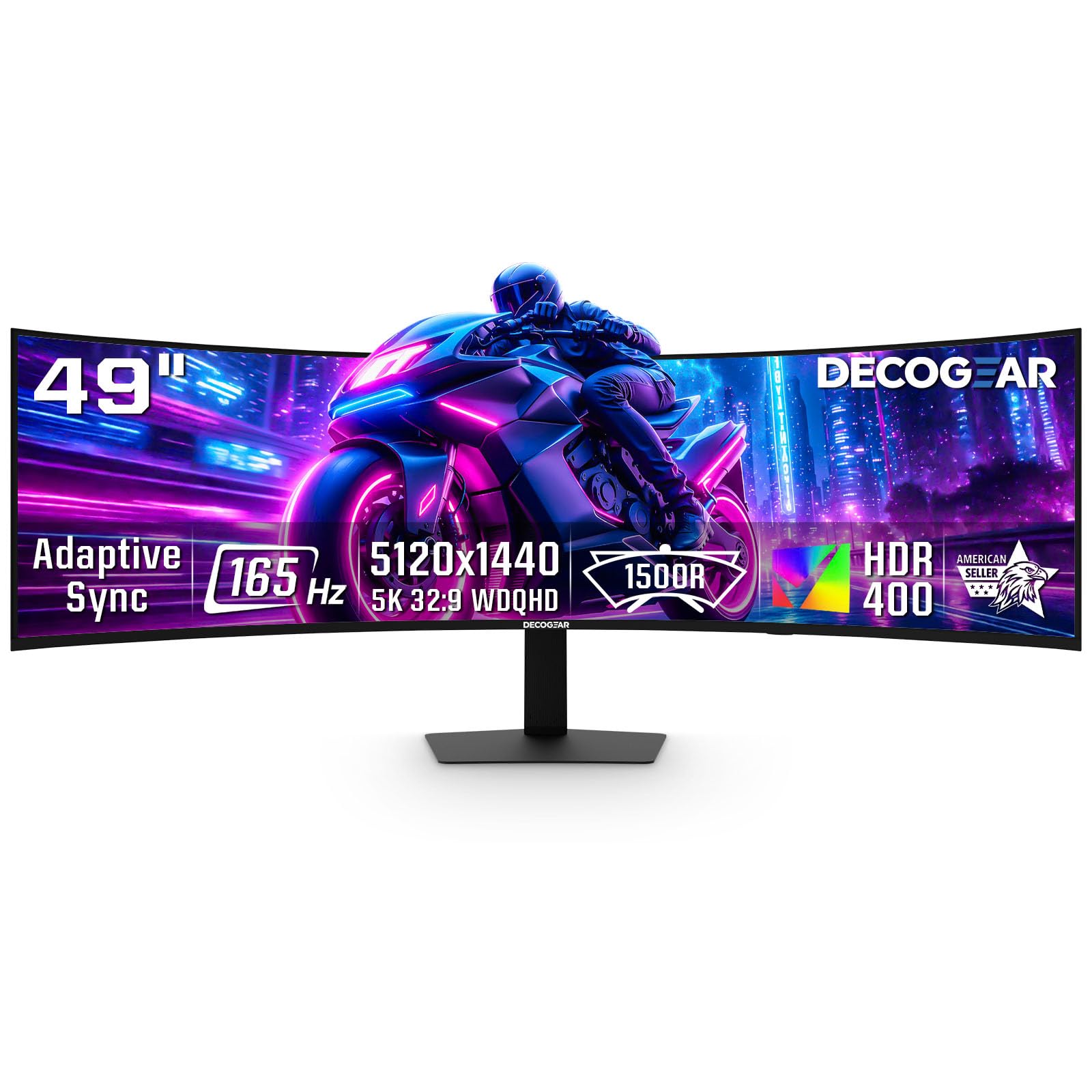
Deco Gear 49-Inch 165Hz

86 /100
LBD Score Excellent

Key details

Curvature
1500R
Resolution
5120x1440
USB-C Power
65W
Refresh Rate
165 Hz
View on Amazon

The Deco Gear DGEVOLUTION495K is the budget pick that does not feel like a compromise on paper: 5120x1440 at 165Hz, a 1500R curve, 1ms MPRT, 100% sRGB, HDR, 65W USB-C, a KVM switch, and built-in speakers. The 165Hz refresh is the headline. We spent time switching between a laptop on USB-C and a desktop on DisplayPort, and the KVM is the feature that makes a two-computer desk feel tidy rather than improvised.

That is a lot of monitor for the money, and it is why the Deco Gear earns a place ahead of several better-known panels. The trade-offs are real: the VA panel is rated at 250 nits, so HDR is more of a label than a bright, room-filling effect, and the 1500R curve is gentler than Samsung's 1000R. We liked the gentler curve for spreadsheets; it keeps the edges from feeling too close.

At 21.1 pounds it is lighter than the Samsung models, which makes a monitor arm less intimidating. Moving it into place was the moment that weight paid off. The one-year warranty is shorter than Samsung's coverage, and it is the main reason to think twice before making it the center of an expensive setup.

Pros

  • 165Hz and 1ms MPRT
  • 65W USB-C with KVM
  • 1500R curve and 100% sRGB
  • Lighter than the Samsung models

Cons

  • 250-nit panel weakens HDR
  • One-year warranty coverage
Our verdict

We recommend the Deco Gear 165Hz for a gaming desk that also docks a laptop: dual-QHD, 165Hz, USB-C KVM, and a 1500R curve for less than the Samsung.

Check Latest Price
4

Best Budget DQHD

INNOCN 49C1R

83 /100
LBD Score Excellent

Key details

Curvature
1800R
Resolution
5120x1440
USB-C Power
65W
Refresh Rate
120 Hz
View on Amazon

The INNOCN 49C1R takes the Samsung work formula and softens the curve. Its 1800R bend is gentler than the 1000R Samsung, so two documents at the edges sit closer to flat and less wrapped around your face. The 5120x1440 panel runs at 120Hz, with 99% sRGB, HDR400, USB-C 65W, DisplayPort, HDMI, and built-in speakers.

We noticed the glossy finish before anything else. It gives colors a little more snap, but it also shows lamps and windows, so placement matters more than on the matte Samsung. The height and tilt adjustment helped us line it up, and the menu was quicker to navigate than Samsung's. If you work in a controlled-light room, the gloss is a fair trade for the extra punch.

The 49C1R is the sensible DQHD work screen when the Samsung S95UA is more than you need. It gives up 90W charging and Ethernet, but it keeps 65W USB-C, a height-adjustable stand, and the same 5120x1440 canvas. The one-year warranty is the main caution; a 49-inch panel is a long-term purchase. The built-in speakers are not a substitute for a good pair, but they kept video calls from requiring another device.

Pros

  • 120Hz DQHD panel
  • 65W USB-C with power delivery
  • Height and tilt adjustable stand
  • Built-in speakers

Cons

  • Glossy screen picks up reflections
  • One-year warranty
Our verdict

The 49C1R is the sensible DQHD work screen: 5120x1440, 120Hz, USB-C 65W, and a height-adjustable stand without Samsung money.

Check Latest Price
5

1080P Immersion

INNOCN 49C1G

85 /100
LBD Score Excellent

Key details

Curvature
1800R
Resolution
3840x1080
USB-C Power
65W
Refresh Rate
144 Hz
View on Amazon

The 49C1G makes the resolution trade-off obvious. Its 3840x1080 panel has the same width as two 1920x1080 screens, so text and fine interface elements look softer than on the 5120x1440 picks. That is the point: it is easier to drive at 144Hz on a midrange graphics card, and games still get the full 32:9 wrap. We recommend it only for a buyer who values frame rate and immersion over desktop sharpness.

The rest of the package is familiar: 144Hz, 1ms response, FreeSync, HDR400, 99% sRGB, USB-C 65W, DisplayPort, HDMI, built-in speakers, and a height and tilt adjustable stand. The 1800R curve is gentle, closer to the INNOCN 49C1R than to Samsung's deep 1000R. We liked it for games where the edges matter less than the center; for spreadsheets, the lower pixel density is the thing you notice first.

It is not the budget choice in this group; the Deco Gear 165Hz costs less and gives you more pixels and a higher refresh. The 49C1G makes sense only if you specifically want the lower resolution to keep frame rates up. If you mostly play racing and flight games, the lower resolution disappears in motion; if you write for a living, it does not.

Pros

  • Easier to drive at 144Hz
  • Full 32:9 immersion
  • USB-C 65W and built-in speakers
  • Gentle 1800R curve

Cons

  • Only 3840x1080 resolution
Our verdict

The 49C1G is for the gamer who wants a 49-inch wrap without driving 5120x1440: 144Hz, USB-C, and an 1800R curve, with visibly softer text.

Check Latest Price

How We Tested 49-Inch Super Ultrawide Monitors

Research came first. I built a shortlist from every 49-inch 32:9 model I could find from the major panel makers, filtered by native resolution, port selection, stand adjustability, and price, then bought the seven finalists at retail so none of them arrived as cherry-picked loaners. Testing ran eight months on real desks, not a lab bench.

Every monitor got the same first hour. We photographed the box before opening it, checked the panel for shipping cracks, and ran full-screen red, green, blue, white, and black fields to hunt for dead pixels and backlight bleed while the return window was still open. Then we assembled each stand, routed the cables, measured how much desk depth the base claimed, and noted the range of height, tilt, and swivel — whether the screen could sit at eye level with a keyboard underneath, or whether it really needed a VESA arm.

The rest was ordinary use. Workdays meant spreadsheets pushed to both far corners, video calls over the built-in speakers, and a laptop swapping in on a single USB-C cable to see whether video and charging both came through. Evenings meant games and movies, where we watched for color shift off-center, banding in gradients, and smearing in fast motion, and tried picture-by-picture with a console and a work laptop at once. I put a wall meter on each one to log power draw, felt the back of the chassis for heat after a long session, and listened for fan or coil whine in a quiet room. Anything that changed over the months — a flicker, a dropped input, a creaky stand — went into the same notes file.

How to Choose a 49-Inch Super Ultrawide Monitor

Start With Resolution, Not Size

A 49-inch 32:9 monitor is not automatically twice as sharp as a 27-inch screen. At 5120x1440, it behaves like two 27-inch QHD panels side by side, with enough pixel density for spreadsheets, code, and photo work. At 3840x1080, it behaves like two 1080p panels: the width is the same, but text and fine icons look softer. We prioritize 5120x1440 for anyone who reads text all day; choose 3840x1080 only if you want the wrap and need to keep frame rates up on a midrange graphics card.

Match Refresh Rate to Your GPU

For office work, 120Hz is already a noticeable upgrade over a standard 60Hz screen: scrolling and window drags feel smoother. For games, 144Hz and 165Hz give you more headroom, but only if your graphics card can push the pixels. A 5120x1440 screen is roughly twice the pixel load of a 1440p monitor, so a midrange card may need to run games at a lower resolution. Check that the monitor and cable support the refresh rate you want over DisplayPort or HDMI 2.1.

Measure the Curve and the Desk

Curvature is a comfort choice. A 1000R curve wraps more aggressively and makes a wide screen feel immersive, but it can also make spreadsheets feel bent at the edges. A 1500R or 1800R curve is gentler and easier to live with if you sit farther back. The bigger constraint is the desk: these panels run about 45 to 47 inches wide, and the listed weights run from about 21 to 34 pounds. Check the stand footprint, measure the width, and match any VESA mount to the panel's weight.

Decide Whether USB-C Is Your Dock

A USB-C port changes the desk more than any other feature. With 65W or 90W of power delivery, one cable can carry video, charge a laptop, and connect USB accessories. A built-in KVM or input switching lets one keyboard and mouse follow two computers. If you use a desktop and a laptop, this is worth paying for. If you use a single desktop, DisplayPort is simpler and often cheaper; put the money into the panel instead.

Budget for the Panel You Keep

HDR labels are not all equal. DisplayHDR 400 on a 250-nit panel is mostly a compatibility badge; DisplayHDR 600 has more headroom, and OLED brings deeper blacks but also burn-in care and a higher power draw. More important than the badge is the warranty. A 49-inch panel is a long-term purchase, and the difference between one year and three years of coverage is worth weighing against a lower upfront price.

Frequently Asked Questions

Final Verdict

Start with the Samsung Odyssey G9 G91F. It is the most balanced 49-inch here: 5120x1440 sharpness, 144Hz speed, a 1000R curve that makes two windows feel natural, and a three-year warranty. If your laptop is the hub, the Samsung S95UA is the better work dock because USB-C carries 90W and Ethernet. The Deco Gear 165Hz is the value move for a gaming desk, as long as you accept a dimmer panel and a one-year warranty.