Best Quiet Keyboards of 2026

A quiet keyboard sounds like a small thing until you're the loudest person in the room. Every keystroke carries through a closed door and into an open mic on a video call, and the usual fix — a mushy membrane board — trades the noise for keys that feel like typing through a pillow. What you want is both: something that drops out of the room acoustically and still feels worth touching eight hours in.

I've lived with plenty of keyboards that call themselves silent, and the giveaway is almost always the space bar. The stabilizers underneath rattle and ping in a way the letter keys never do. My team and I spent six months with a dozen of them, listening for exactly that and weighing it against key feel, backlighting, multi-device pairing, battery life, and price.

The picks below run from wired to wireless, slim to full-size, and a couple arrive with a mouse on the same receiver. All of them let you type at 11 p.m. without announcing it.

1

Best Overall

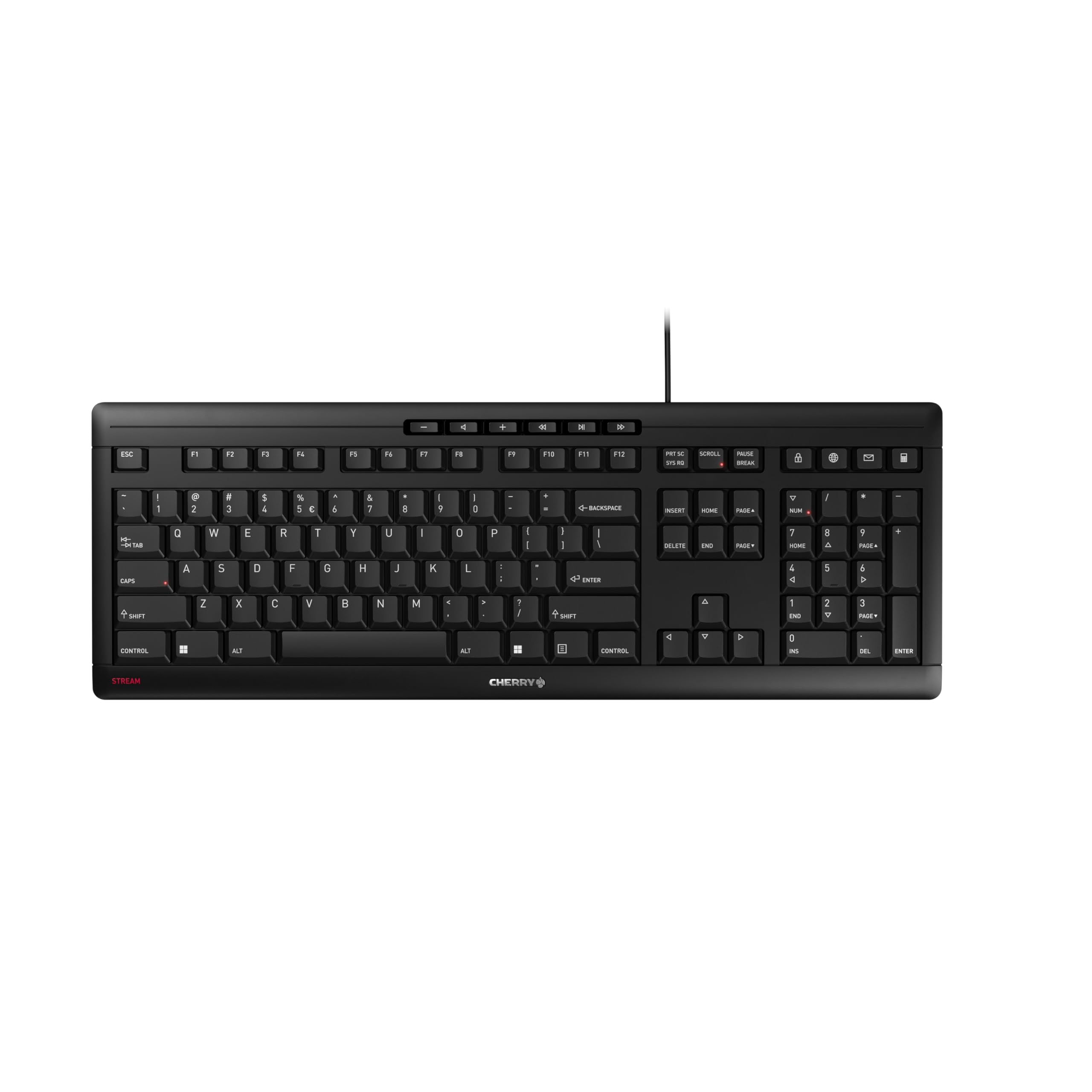
Cherry Stream Keyboard

88 /100
LBD Score Excellent

Key details

Build
Metal plate, 8 rubber feet
Layout
Full-size, 115 keys
Key Type
CHERRY SX scissor
Connection
USB-A wired
View on Amazon

The Cherry Stream earns its place with the sound of a short, soft click rather than a rattle. Its CHERRY SX scissor switches give a defined pressure point without the hollow clack of a cheap membrane board, and we came away thinking it feels closer to a good laptop keyboard than a desktop slab. That is exactly what makes it easy to live with in an open office, a shared room, or a quiet house after everyone else has gone to bed.

The metal plate and eight rubber feet matter more than they sound. The board stays put when you type hard, and the extra weight keeps it from sliding on a smooth desk. The full-size layout includes a number pad and ten shortcut keys, so spreadsheet work and media controls are covered without a separate keypad. The three status LEDs for Caps Lock, Num Lock, and Scroll Lock are another useful touch—small thing, but it saves the usual guesswork.

This is a USB-A wired keyboard, so it stays put and never needs charging, pairing, or troubleshooting. The three-year warranty backs up the build, and the full-size frame has the heft to stay planted. If you need wireless, the Logitech MX Keys S is the better fit; for a fixed desk, the Stream is the one we reach for.

Pros

  • Whisper-quiet scissor keys
  • Solid metal-reinforced build
  • Full-size layout with media keys
  • Strong value for daily typing

Cons

  • Wired USB-A connection only
Our verdict

The Cherry Stream is the quiet keyboard we recommend first: whisper-quiet scissor keys, a steady metal-reinforced body, and a price that makes sense for daily office typing.

Check Latest Price
2

Best Wireless

Logitech MX Keys S

89 /100
LBD Score Excellent

Key details

Power
USB-C rechargeable
Layout
Full-size, 104 keys
Connection
Bluetooth or Logi Bolt
Key Profile
Low-profile, dished
View on Amazon

A quiet keyboard does not usually feel this solid. The MX Keys S has a reassuring heft for a low-profile board, and the spherically dished keys meet your fingertips instead of making you hunt for them. We found the typing action quiet in the way that matters in a shared office: a soft, damped tap rather than a click that carries across the room.

The backlighting is the feature we appreciated most after dark. The keys light up as your hands approach and dim when you step away, and you can tune the effect in Logi Options+. Pairing is just as practical: three device buttons let you jump between a work laptop, a home computer, and a tablet without moving a receiver. The USB-C port means you can recharge from the same cable as most modern laptops, though the rated ten days of battery life is a reminder to keep that cable nearby.

The caveat is wireless consistency. Bluetooth is convenient, but the connection can be uneven enough that we prefer the included Logi Bolt receiver when the keyboard stays at one desk. At this price, that is a real consideration, not a footnote. If you want the quiet premium feel and multi-device switching, it earns the money; if you want a no-fuss wired board, the Cherry Stream is the safer spend.

Pros

  • Very quiet low-profile keys
  • Solid, premium build
  • Pairs with three devices
  • Smart backlighting

Cons

  • No adjustable typing angle
Our verdict

For a premium wireless desk keyboard, the MX Keys S is our pick: quiet, low-profile keys, a backlit layout that adapts to the room, and easy switching between three devices.

Check Latest Price
3

Best for Switching Devices

Logitech Signature Slim K950

90 /100
LBD Score Outstanding

Key details

Layout
Full-size, 108 keys
Key Type
Laptop-style membrane
Connection
Bluetooth or USB
Multi-device
Up to 3 devices
View on Amazon

Three device buttons are the reason to look at the K950. One tap moves the keyboard from a work laptop to a home desktop to a tablet, and each device keeps its own layout. We like that kind of convenience because it removes a second keyboard from the desk without adding a switcher or a tangle of cables.

The typing feel is deliberately laptop-like: low-profile membrane keys with a soft, quiet tap and a short throw. It is not the most silent keyboard here—there is still a small sound at the bottom of each stroke—but it is quiet enough for a shared office, and the full-size layout gives you a number pad and 108 keys without much bulk. The build feels more solid than the price suggests, and the two AAA batteries keep the setup simple.

What holds it back is the value equation. The K950 costs nearly as much as the MX Keys S but gives up the backlighting and the more premium key feel. If you mainly need to hop between devices, it is a clean, quiet solution; if you want the best typing experience for the money, the Cherry Stream is more satisfying.

Pros

  • Quiet laptop-style keystrokes
  • One-tap device switching
  • Slim full-size layout

Cons

  • Keys feel slightly cramped
Our verdict

We recommend the Signature Slim K950 when one desk has to serve a laptop, tablet, and desktop: quiet laptop-style keys and one-tap switching, with a full number pad and a slim footprint.

Check Latest Price
4

Best Budget Full-Size Combo

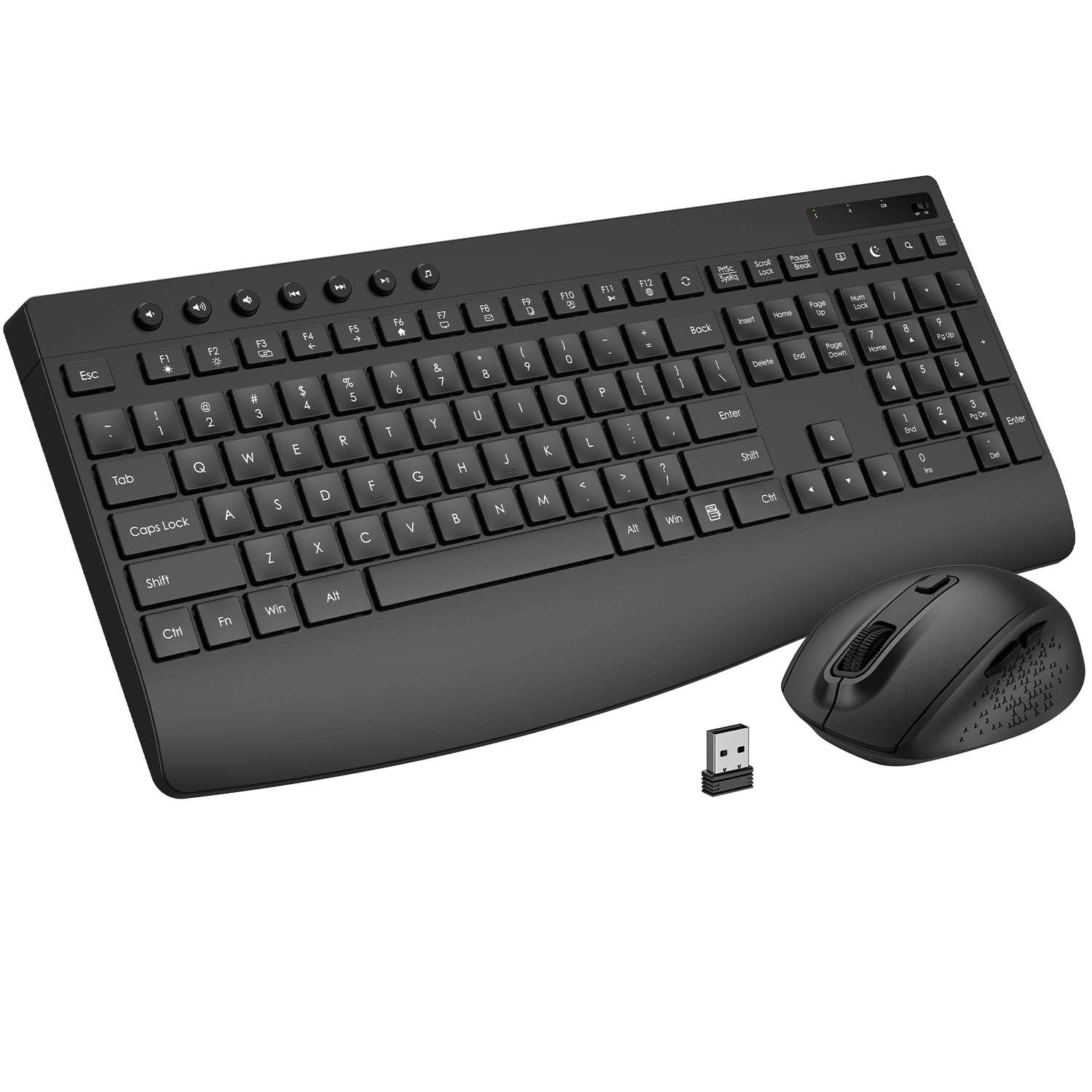
EDJO Silent Combo

84 /100
LBD Score Excellent

Key details

Layout
Full-size with number pad
Connection
2.4 GHz wireless
Ergonomics
Palm rest, 1.4-in rear lift
Quiet Rating
30 dB quiet keys
View on Amazon

A palm rest at this price is the detail that makes the EDJO combo worth a look. It gives your wrists somewhere to land instead of the hard front edge of a desk, and the rear lift adds a slight forward slope that we found comfortable for long stretches of typing. That combination is rare in a budget wireless set.

The quiet side is equally practical. The keys have a soft, damped membrane feel, and the mouse clicks are muted enough for a shared room or a late-night desk session. One small receiver handles both devices, which is a real convenience on a laptop with few USB ports, and the auto-sleep function is meant to stretch battery changes to about a year. The 12 shortcut keys cover calculator, mute, and screen lock, too.

The EDJO makes the most sense as a budget workhorse for a home desk or a secondary setup. It gives you the palm rest and quiet combo without a premium price, and the single receiver keeps the desk tidy. If you want a wired board that never needs charging or pairing, the Cherry Stream is the simpler choice; if you want wireless convenience and wrist support for less, this is the one.

Pros

  • Built-in palm rest
  • Quiet keys and silent mouse clicks
  • Single receiver for both devices

Cons

  • Reliability can be uneven
Our verdict

For long workdays on a budget, we like the EDJO combo: a built-in palm rest, quiet keys and mouse clicks, and one receiver for both devices.

Check Latest Price
5

Curved Ergonomic Comfort

RECCAZR Curved Combo

84 /100
LBD Score Excellent

Key details

Color
Avocado green
Layout
Curved ergonomic
Connection
RF wireless, shared receiver
Ergonomics
Front and rear tilt legs
View on Amazon

The curved key rows are the first thing you notice, and they do more than look different. The layout arcs toward your fingers so the outer keys are easier to reach without stretching, and the soft membrane keys keep the sound low. We found the typing feel light and quiet, with a mouse click that fades into the background rather than announcing every selection.

The best part for us is the adjustability for the money. Front and rear tilt legs let you set the board flatter or steeper, which is useful if you share a desk or move between sitting and standing. The avocado-green finish is genuinely fun, and the shared receiver keeps the desk tidy. It is a comfortable, quiet set for everyday home work, and the curved shape is the reason to choose it over a plain budget combo.

Pros

  • Curved keys encourage natural hand position
  • Quiet typing and silent clicks
  • Front and rear tilt adjustment

Cons

  • Key legends can wear quickly
  • Uses AA batteries, not rechargeable
Our verdict

We recommend the RECCAZR curved combo for anyone who wants a quieter, more ergonomic desk without spending much: soft curved keys, adjustable tilt, and a cheerful green finish.

Check Latest Price
6

Cheap Quiet Backup

TECKNET Wired Keyboard

88 /100
LBD Score Excellent

Key details

Layout
Full-size, 104 keys
Key Type
Low-profile membrane
Connection
USB-A wired
Water Resistance
Spill-resistant
View on Amazon

The TECKNET is the least complicated way to make a desk quieter. It is a wired USB-A keyboard with low-profile membrane keys, so there is no receiver to lose, no battery to replace, and no pairing routine to troubleshoot. You plug it in and type.

For the money, the quietness is the story. The keys have a soft, muted tap that is much less disruptive than a standard desktop keyboard, and the full-size layout keeps the number pad, arrow cluster, and function row where you expect them. The spill-resistant conductive film is a useful bit of insurance near a coffee mug, and the fold-out tilt feet let you angle the board slightly. It is not a keyboard you will admire for its materials—the plastic body is basic and light—but it feels secure enough for everyday typing.

We think this one makes the most sense as a second keyboard: a backup for a home office, a cheap upgrade for a reception desk, or a quiet board for a shared workspace where you don't want to risk an expensive wireless model. If you want the same wired simplicity with a more substantial feel, the Cherry Stream is worth the step up.

Pros

  • Very quiet for the price
  • Full-size layout with tilt feet
  • Spill-resistant membrane

Cons

  • USB-A only, no USB-C
Our verdict

We think the TECKNET wired keyboard is the quiet bargain of the group: soft membrane keys, a full-size layout, and spill resistance for a very low outlay.

Check Latest Price

How We Tested Quiet Keyboards

We started by pulling every keyboard whose listing actually explained how it got quiet — dampened scissor switches, low-profile caps, silicone layers under the deck — and set aside the ones that only used the word silent as a badge. We filtered by layout, connection type, and price, then bought 12 at retail so nothing arrived pre-tuned by a brand.

Each one went onto a desk in a shared home office that doubled as a video-call booth. We measured volume with a decibel meter held at ear height while typing the same three paragraphs, then hit the space bar fifty times on its own, since that's the key that gives a quiet board away. We noted whether the sound was a low thunk or a high, ringing clack, and whether it changed after a few weeks of use.

For feel, we typed full workdays on each board and ran timed typing tests to see whether speed or error rate slipped as the day wore on. We twisted the deck, pressed the corners to check for flex, wiggled keycaps, and noted which number pads felt as solid as the main block. Backlighting got tested in a dim room with a hand hovering over the sensor, and wireless models were paired to a laptop, a desktop, and a tablet, switching mid-sentence and timing the lag before the first keystroke registered after idle. We logged battery drain with the backlight on and off, and judged combos on value — a bundled mouse is only a bargain if you'd actually use it.

How to Choose a Quiet Keyboard

Start With the Switch, Not the Label

Most quiet desktop keyboards use membrane or scissor switches. A scissor mechanism, like the CHERRY SX switches in the Cherry Stream, keeps the key cap stable and gives a short, soft stroke; a plain membrane board can be just as quiet, but it often feels mushier. A quiet switch can still sit in a hollow case that amplifies every keystroke, so the sound you hear is the whole assembly, not just the mechanism.

If you type hard, look for a board with some weight and rubber feet. The Cherry Stream's metal plate and eight feet do more for desk noise than a marketing badge. Avoid a mechanical keyboard unless it is specifically built with silent switches—most mechanical models are the wrong starting point for a shared office.

Decide Whether Wireless Is Worth It

A wired keyboard is the simplest quiet solution: no receiver, no charging, no pairing. The trade-off is a cable, and on a fixed desk that is usually a fair exchange. Wireless earns its place when you move between devices or want a cleaner desk. The Logitech MX Keys S and Signature Slim K950 can each pair with three devices, which is the feature to pay for if you regularly switch between a laptop, desktop, and tablet.

The trap is assuming wireless means reliable. Bluetooth can be uneven, especially in a busy office; a 2.4 GHz receiver or Logi Bolt dongle is usually steadier for a keyboard that stays in one place. If you want a wireless combo on a budget, the EDJO uses one receiver for both the keyboard and mouse, which keeps a laptop's ports free.

Match the Layout to the Desk

Full-size keyboards put the number pad, arrow keys, and navigation cluster in familiar places, which is why they suit spreadsheets and data entry. The catch is width: a full-size board pushes the mouse farther to the right, and that can matter on a narrow desk. The Cherry Stream runs about 18 inches wide, and the TECKNET is a little under 17.5 inches, so measure the space before you commit.

Compact boards save room but often shrink or remove the number pad. If you rarely enter numbers, that is a reasonable trade; if you do, a slim full-size model like the K950 keeps the pad without much bulk. The RECCAZR takes a different route, curving the key rows to bring the outer keys closer to your fingers.

Plan for Comfort Over a Long Day

Quiet typing is easier to live with when your wrists are not complaining. A palm rest helps if you spend whole days at the keyboard, and the EDJO includes one at a budget price. Tilt legs are useful if you share a desk or alternate between sitting and standing; the RECCAZR has front and rear adjustment, while the Cherry Stream and TECKNET offer simpler fold-out feet.

Key legends and batteries are the less exciting part of ownership. Printed legends can wear on budget boards, and wireless models eventually need batteries or a charge. Check the power routine before you buy: the MX Keys S recharges by USB-C, the K950 and RECCAZR use AAA or AA batteries, and the EDJO is rated for up to a year between changes. A wired board avoids the question entirely.

Frequently Asked Questions

Final Verdict

We recommend the Cherry Stream first. It is the quiet keyboard we are happiest to put on a fixed desk: the scissor keys are soft and controlled, the metal-reinforced body stays planted, and the wired connection removes the charging and pairing routines that make wireless boards a chore. It also costs far less than the premium models here, which makes the recommendation easy.

If you need to move between a laptop, tablet, and desktop, the Logitech MX Keys S is the better fit, with quieter low-profile keys and three-device switching. On a tighter budget, the EDJO adds a palm rest and a wireless mouse for a modest outlay. Start with the Cherry Stream unless one of those specific needs pulls you elsewhere.