Best Podcast Mixers for Multiple Hosts of 2026

The first time my co-hosts and I recorded a three-person episode, we lasted ten minutes before the headphone passing started: one output, one splitter, three people arguing about whose levels were too hot. A podcast mixer ends that. Each host gets a mic input with its own gain, a headphone output with its own mix, and on the good ones, a separate track so no one's edit depends on everyone behaving at once.

The mistake I see first-time buyers make is shopping by input count. A ten-channel board with one headphone out is a worse four-host rig than a compact box with four of them. We spent six months recording weekly sessions on 11 mixers and interfaces with two to four people at the table, and the keepers stayed quiet when nobody was talking.

Controls you can work by feel matter more than the spec sheet suggests, and USB that carries separate tracks beats USB that carries a stereo mix. Battery power changes where you can record at all. Here's what we'd plug in again.

1

Best Overall

Zoom LiveTrak L-8

88 /100
LBD Score Excellent

Key details

Power
Battery or AC
Recording
12 tracks to SD and USB
Mic Inputs
6 combo
Headphone Outputs
4
View on Amazon

The feature that turns the LiveTrak L-8 from a nice mixer into a multi-host tool is the monitoring: four headphone outputs and three independent monitor mixes, so each host can hear more of themselves or the guest without re-patching. Six combo mic inputs give you room for four people on mics, a phone guest, and a stereo music source. That matters more than raw channel count when three or four people are talking over each other.

We prefer it as the default because it records 12 tracks to an SD card and to a computer over USB at the same time. That means you can capture a clean multitrack backup without opening a DAW, then edit later. The battery option is a real convenience for a field recording or a studio with outlet anxiety, and the L-8 also works as a USB interface when you want the computer in the loop.

If your panel is four people, the L-8 is the one that keeps the session moving. The PodTrak P4next is smaller and simpler, but it does not match the L-8's six preamps or three monitor mixes. The L-8 earns its extra size with capacity, and that is why it is our default for a show that expects to grow.

Pros

  • Four headphone outs with three monitor mixes
  • Six combo mic inputs for hosts and guests
  • Records 12 tracks to SD and USB at once
  • Battery or AC power

Cons

  • Menu-based controls take time to learn
Our verdict

For a four-person show that needs everyone in headphones and a clean multitrack backup, the LiveTrak L-8 is the mixer we reach for first.
Check Latest Price
2

Best Portable

Zoom PodTrak P4next

88 /100
LBD Score Excellent

Key details

Power
2 AA batteries
Recording
Multitrack to SD
Mic Inputs
4 XLR
Headphone Outputs
4
View on Amazon

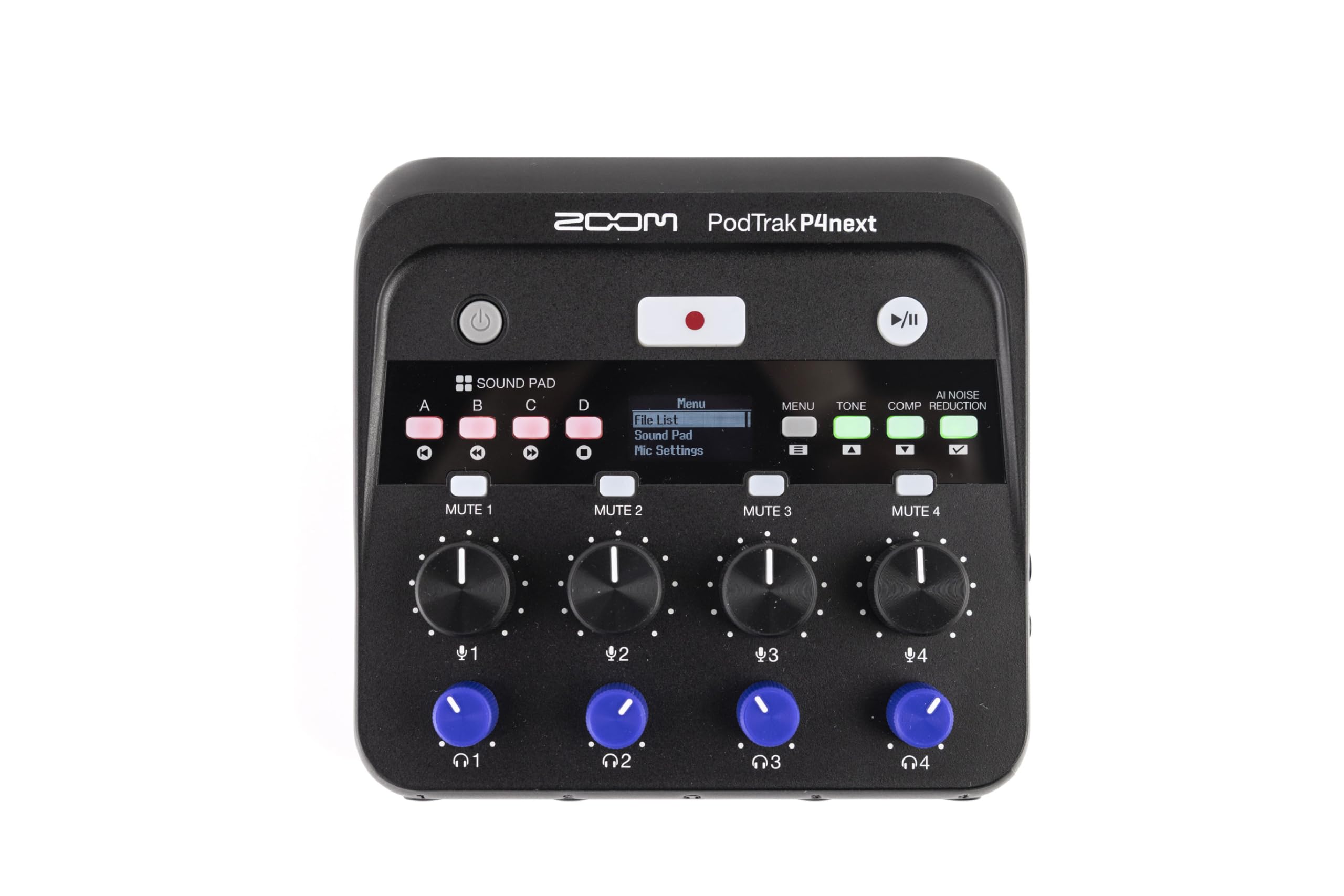
The PodTrak P4next is the rare podcast recorder that makes a four-person table feel uncomplicated: four XLR inputs, four headphone outputs with their own volume controls, and a battery-powered body that fits in a laptop bag. We reach for it when the show leaves the studio and everyone still needs to hear themselves.

The AI noise reduction and tone enhancement are not magic, but they shorten the gap between a raw mic and a usable track, and the sound pads give a live show some produced texture without a computer. The phone input handles a remote guest, and the USB interface lets you send audio to a computer. The four headphone outs are the part we appreciate most: no splitter, no shared mix, no guessing whether the guest can hear the intro.

The P4next records multitrack to an SD card, so you can fix a level in the edit instead of committing to a stereo mix. For a four-host show, that is the sweet spot: more control than a stereo interface, less console than the L-8. It is the one we pack when the recording happens away from the desk.

Pros

  • Four XLR inputs and four headphone outs
  • Battery power for field recording
  • AI noise reduction and tone enhancement
  • Multitrack recording to SD

Cons

  • Four mic inputs cap the panel size
  • Fewer monitor mixes than the L-8
Our verdict

For four hosts recording away from the desk, the PodTrak P4next is the compact battery-powered recorder we trust to keep everyone heard.

Check Latest Price
3

Best for Two Hosts

Focusrite Vocaster Two

87 /100
LBD Score Excellent

Key details

Gain
70 dB+
Connection
USB-C
Mic Inputs
2
Headphone Outputs
2
View on Amazon

The Vocaster Two solves the two-host problem without pretending to be a studio console: two mic inputs, two headphone outputs, and a USB-C box small enough to sit under a monitor. We reach for it when a host and a guest need a clean computer-based recording with as little setup as possible.

We like the one-button gain because it gets a usable level fast, and the mute button is the sort of thing you miss when it is not there. The two headphone outputs mean neither presenter has to share a splitter, and the compact size makes it easy to pack for a remote interview. The 70 dB of gain is enough for demanding dynamic mics, which is not something every small interface gets right.

The Vocaster is a computer-first box, which keeps the hardware simple and the footprint small. For a two-person show, that is a better trade than a full mixer with channels you will never use. It is the one we recommend when the goal is a fast, clean host-and-guest recording rather than a live show with music and effects.

Pros

  • Two mic inputs and two headphone outs
  • Auto Gain and Enhance presets
  • Compact USB-C interface
  • Over 70 dB of gain

Cons

  • Two mic inputs only
  • No standalone recording
Our verdict

For a host-and-guest show recorded on a computer, the Vocaster Two is the compact interface that makes two mics and two headphones feel effortless.

Check Latest Price
4

Best Compact All-In-One

RØDECaster Duo

85 /100
LBD Score Excellent

Key details

Faders
4
Connection
USB-C
Mic Inputs
2 combo
SMART Pads
6
View on Amazon

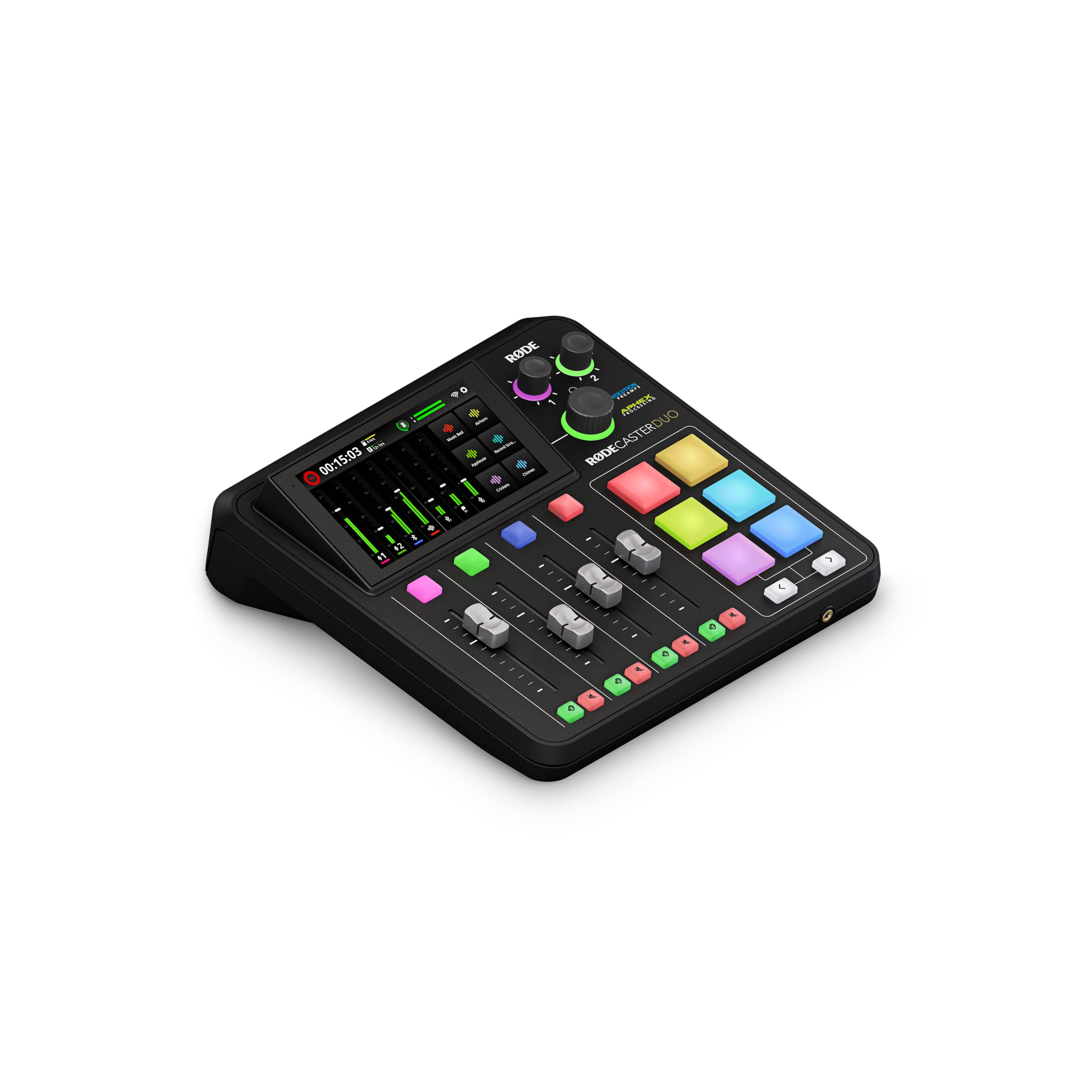
The RØDECaster Duo is the compact console for people who want to touch the show: four faders, a haptic touchscreen, and six SMART pads give a two-host podcast a physical control surface that fits on a desk. It looks like a piece of broadcast gear, and the controls make that impression hold up.

The two combo inputs are enough for a host and a cohost, and the pads trigger stingers and music without a computer. The faders make level rides obvious, and the APHEX processing is the reason voices sound finished before you edit. We also like that the Duo works as a USB interface, so the computer can record while you use the hardware.

This is a premium two-host tool, not a four-host solution. The tactile workflow is the most enjoyable of the compact consoles here, and the touchscreen makes routing less abstract than a row of buttons. For a duo that wants a produced feel without a rack of gear, it is the most fun option in this group.

Pros

  • Four faders and a haptic touchscreen
  • Six SMART pads for live show control
  • APHEX voice processing built in
  • Compact two-host all-in-one

Cons

  • Two mic inputs only
  • Some units fail to boot
Our verdict

For a two-host show that wants faders, pads, and broadcast-style processing in one compact box, the RØDECaster Duo is the most tactile choice here.

Check Latest Price
5

Best for Mixed Music and Voice

Yamaha MG10XU

92 /100
LBD Score Outstanding

Key details

USB
USB audio
Weight
7.7 lb
Effects
SPX digital
Channels
10
View on Amazon

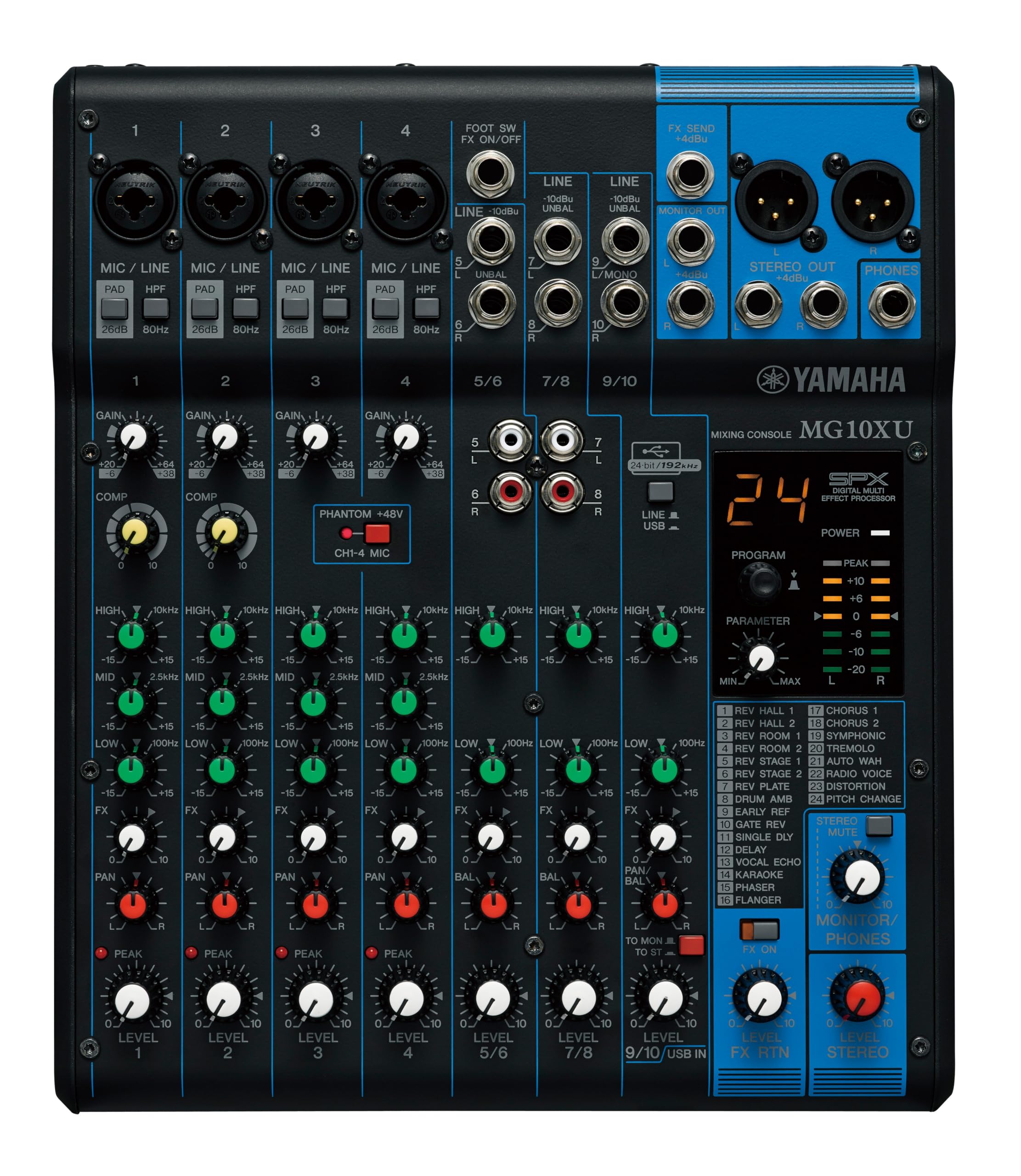
The MG10XU is the traditional analog desk in this group: a powder-coated metal chassis, one-knob compressors on the mono channels, and Yamaha's SPX effects built in. It looks and feels like a piece of gear that belongs on a shelf, not a plastic podcast gadget.

We keep it in the conversation because it is a genuine mixer for a podcast that also records music. The preamps are clean, the three-band EQ and high-pass filters let you shape a voice, and the USB connection gets the mix into a computer. The one-knob compressors are a useful safety net for hosts who drift in level.

The MG10XU is a genuine analog desk with a USB output, not a purpose-built podcast console. That is why it appeals for a show that also records music: the EQ, compressors, and effects are all there under your hands. The high-pass filters are especially useful for removing room rumble before it reaches the mix. It is also the heaviest pick here, so it stays on the desk rather than traveling to every session.

Pros

  • Clean Yamaha preamps and one-knob compressors
  • Three-band EQ and high-pass filters
  • Built-in SPX effects
  • Rugged metal chassis

Cons

  • Heavy at 7.7 pounds
Our verdict

For a podcast that also records music and wants a real analog desk, the Yamaha MG10XU is the sturdy, clean-sounding workhorse to beat.

Check Latest Price
6

Minimal Two-Host Desk

Mackie 402VLZ4

90 /100
LBD Score Outstanding

Key details

Weight
2.5 lb
Outputs
1/4-inch and RCA
Line Inputs
4
Mic Preamps
2 Onyx
View on Amazon

At 2.5 pounds, the Mackie 402VLZ4 is the smallest serious mixer here: two Onyx mic preamps, four line inputs, and main outs on both 1/4-inch and RCA. We reach for it when a two-host show already has an audio interface and needs a clean analog front end without a computer-style console.

The Onyx preamps are the reason it earns a place. They are quiet and have enough headroom for dynamic mics, and the build feels denser than the price suggests. The controls are simple enough to learn in a session, and the compact footprint leaves room for a keyboard or a second monitor. It also has a real power switch, which sounds minor until you have owned a small mixer that does not.

This is an analog front end for a studio that already has an interface. It makes the most sense when you want two good mic channels with phantom power and no menu diving. The lack of extras is the point: fewer things to configure, fewer things to go wrong.

Pros

  • Two quiet Onyx mic preamps
  • Compact 2.5-pound chassis
  • Four line inputs for sources
  • Simple, direct controls

Cons

  • No USB or built-in recording
  • Only two mic preamps
Our verdict

For a two-host show that already has an interface, the Mackie 402VLZ4 is the tiny analog front end we choose for clean Onyx preamps and zero fuss.

Check Latest Price
7

Budget Hobby Mixer

Pyle PMXU63BT

86 /100
LBD Score Excellent

Key details

Weight
3.8 lb
Channels
6
Connectivity
Bluetooth and USB
Phantom Power
48V
View on Amazon

The PMXU63BT is the budget desk that looks like it should cost more: six channels, XLR inputs with 48V phantom power, Bluetooth and USB playback, and a metal chassis.

The Bluetooth and USB inputs are genuinely handy, and the channel count gives you room for a few mics without spending much. The 3-band EQ and 16-bit DSP effects are enough to shape a voice or a backing track, and the sealed rotary controls resist dust. We like the Bluetooth input for quick phone clips, though it is not a substitute for a proper remote feed.

The mixer can add hiss, especially when you push the gain, so it is better for a hobby show or a backup rig than a critical recording. At the budget end, that is the compromise. If you need clean tracks for a serious podcast, spend more on a mixer with better gain staging.

We see it as a utility mixer for a hobby show, a backup rig, or a stream where the mixer is also the music player. It gives you the channel count and the wireless convenience, but not the quiet front end a four-host podcast deserves.

Pros

  • Six channels with 48V phantom power
  • Bluetooth and USB playback
  • Metal chassis and sealed controls
  • Budget-friendly for hobby use

Cons

  • No pan or balance controls
Our verdict

For a hobby show or backup rig that needs cheap channels and Bluetooth, the Pyle PMXU63BT covers the basics, as long as you can live with some hiss.

Check Latest Price

How We Tested Podcast Mixers With Four People Talking at Once

We started by filtering out the things that break a multi-host show: fewer than four mic inputs, a single headphone output, or no way to send separate tracks over USB. That narrowed a long list of mixers, podcast interfaces, and recorder-mixers to 11 units across a wide price range. Each one got set up cold, no manual and a timer running, to see how long it took to get two people on mic and hearing themselves.

Most of the testing happened where these things actually live: the dining table, with two, three, or four hosts and a guest on the phone, recording the same weekly show on each unit across six months. We set gain by feel with headphones on, noted every time we had to dive into a menu to mute a mic or change a headphone mix mid-sentence, and cranked each preamp in a silent room to hear how much hiss it added.

After each session we pulled the recording apart on a laptop to confirm the tracks were truly separate and in sync, and logged every hiccup: a dropout, a card that needed reformatting, a unit that had to be power-cycled. Battery-powered models ran a full session on the back porch and we timed how long they held. For value, we counted what came in the box, since a mixer that needs a drawer of adapters isn't the bargain it looks like.

How to Choose a Multi-Host Podcast Mixer

Count mic inputs and headphone outputs first

A mixer's channel count can be misleading. A six-channel desk may offer only two real mic preamps and fill the rest with line inputs. For a three- or four-host show, look for four XLR or combo mic inputs with phantom power, then count headphone outputs. Two hosts can share a single headphone amp in a pinch, but four hosts cannot share one jack without a splitter and a compromised mix.

The Zoom LiveTrak L-8 and PodTrak P4next both give four hosts a headphone output and enough mic inputs to add a guest. That combination matters more than extra channels you never plug into.

Choose a recorder, an interface, or an analog desk

There are three useful paths. A standalone recorder such as the L-8 or P4next captures multitrack audio to an SD card, so the computer is optional. A USB interface such as the Vocaster Two relies on the computer but keeps the hardware simple. An analog desk such as the Yamaha MG10XU or Mackie 402VLZ4 gives you hands-on EQ and preamps, but often sends only a stereo mix to the computer.

If you edit your show, multitrack recording is worth paying for because it lets you fix one host's level later. If you stream live and commit to a mix, a stereo output can be enough.

Monitoring is a feature, not an accessory

A single headphone jack forces everyone into one mix. Independent headphone outputs let each host hear more of themselves or the guest, which keeps people from leaning into mics or talking over each other. The L-8 goes furthest here with four headphone outputs and three independent monitor mixes. The Vocaster Two gives two presenters their own outputs, which is the right minimum for a host-and-guest show.

Do not treat a headphone splitter as a permanent solution. It works for a scratch recording, but it makes a four-person session harder to manage.

Budget for clean gain, not just channel count

Noise adds up when several mics are open. A budget mixer can hiss when you push its gain, and that hiss sits under every voice in the recording. Clean preamps and sensible gain staging matter more than an extra channel or a built-in effects bank.

Set gain before the show, keep cables short, and use dynamic mics if your room is noisy. The budget Pyle PMXU63BT is fine for a hobby rig or a backup setup, but a critical multi-host recording deserves a quieter front end.

Frequently Asked Questions

Final Verdict

The Zoom LiveTrak L-8 is the safest default for a multi-host show because it gives you six mic preamps, four headphone outs, and a multitrack recording you can edit later. If you need a smaller battery-powered rig for four hosts, the PodTrak P4next is the one we pack. For a two-host computer setup, the Vocaster Two is the simpler route.