Best Nintendo Switch 2 Controllers of 2026

The first time I swapped the pack-in controllers for a full-size one, my hands stopped cramping halfway through an adventure game—and I never went back. A good controller changes how the console feels: longer battery life, a grip that actually fits, and buttons that respond the way you expect. Over the past six months, we've tested a dozen controllers for the Switch 2, from budget picks to premium options with Hall Effect sticks and RGB lighting.

The tricky part is that the console's new C button and updated connectivity mean not every older controller works perfectly—and even among those that do, the differences in ergonomics and battery life are bigger than the spec sheets suggest. We looked at comfort during long sessions, how buttons and triggers felt, whether custom mapping was useful, how often we reached for a charging cable, and whether RGB lighting was a fun touch or a distraction. Below are the ones that earned a spot in our rotation, whether you play docked on the TV or handheld on the train.

1

Best Overall

Nintendo Switch 2 Pro Controller

96 /100
LBD Score Outstanding

Key details

Weight
13.1 oz
Buttons
18
C Button
Yes
Compatibility
Nintendo Switch 2 System
View on Amazon

The Switch 2 Pro Controller is the pad we reach for when the console is docked, and the 13.12-ounce body explains why. It fills your hands in a way the modular Joy-Con pair cannot, with a full-size grip that stays comfortable through a long session. The C button, HD Rumble 2, and built-in amiibo support make it feel like the console's native controller rather than an accessory.

The 18-button layout sounds busier than it feels. We especially like that the back buttons can be mapped on the fly, which matters in a game with a lot of inputs and then disappears when you don't need it. The sticks are smooth and precise, and the whole pad has a solid, quiet feel that the budget options here don't match.

The 13.12-ounce weight is the reason it feels planted, and also the reason it stays by the dock rather than in a bag. That's the right trade for a living-room controller. If you split your time between handheld and TV play, the Joy-Con 2 pair covers both; if the console mostly lives under the TV, this is the one we keep coming back to.

Pros

  • Full-size grip for long sessions
  • C button and 18-button layout
  • HD Rumble 2 and built-in amiibo
  • Solid, quiet premium feel

Cons

  • Premium price
Our verdict

For docked Switch 2 play, the Pro Controller is the one we recommend first: full-size comfort, the C button, and HD Rumble 2 in one official package.
Check Latest Price
2

Best Joy-Con Pair

Nintendo Joy-Con 2

95 /100
LBD Score Outstanding

Key details

Pair
Left and right
Color
Light Purple/Light Green
Wireless
Yes
Compatibility
Nintendo Switch 2 only
View on Amazon

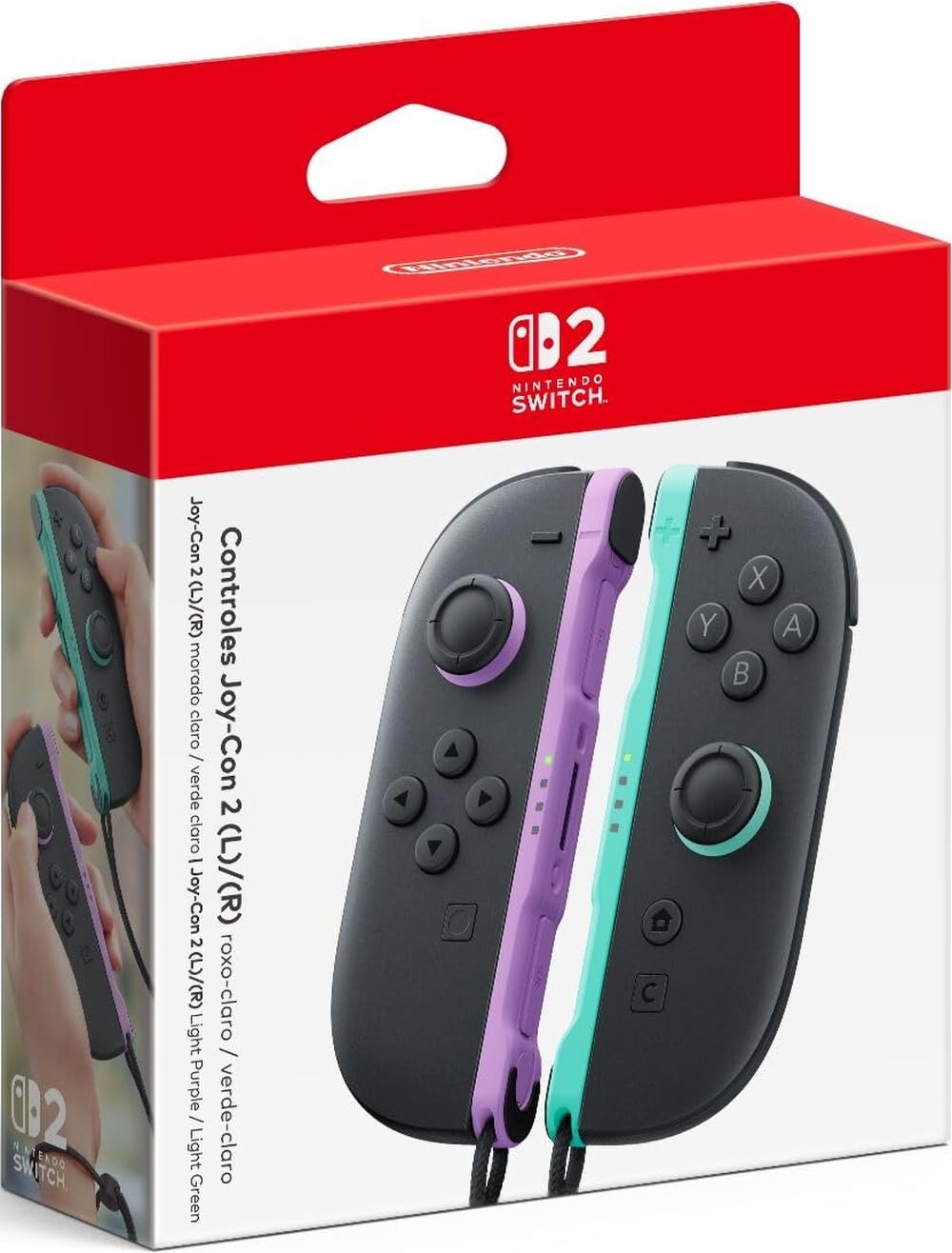
If you need the console to be a handheld again, or a second pair for a Mario Kart night, the Joy-Con 2 pair is the official answer. The left/right set is designed for the Switch 2, so there's no ambiguity about fit, and the light purple/light green shells are easy to tell apart when four people are reaching for controllers.

We found the new attachment easier to live with than the original Joy-Con mechanism. The pair clicks on and off without the old wiggle, and it feels more secure in handheld play than the first-generation design. The colors are a small thing, but they help when you're handing one to a child and keeping the other.

These are a specialist purchase. We keep them attached for handheld mode and hand them to a second player when the Pro Controller is already in use. The pair is not the value pick for solo play, but that's not the job.

Pros

  • Official Switch 2 fit
  • Modular handheld and party use
  • Easier attach and remove

Cons

  • Switch 2 only
  • Stick drift can still develop
Our verdict

Buy the Joy-Con 2 pair if you want the official handheld setup or a second local-multiplayer set.

Check Latest Price
3

Best Battery Life

Turtle Beach Rematch

88 /100
LBD Score Excellent

Key details

Thumbsticks
TMR
Back Buttons
2 mappable
Battery Life
Up to 40 hours
Wireless Range
Up to 30 feet
View on Amazon

Forty hours is the number that makes the Turtle Beach Rematch stand out in this group. That's the manufacturer's claim, but even with some real-world falloff it's a much longer runway than the 20-hour PDP or the 10-12-hour Fliresy pair. For a controller that lives in a bag, that matters more than RGB.

The TMR thumbsticks are the more interesting spec. They use magnetic sensing rather than a physical wiper, which is the same basic idea behind Hall Effect sticks: less mechanical wear and smoother movement over time. The textured caps feel secure under your thumb, and the controller is light enough to disappear in your hands during a long session.

We kept noticing the light build: it doesn't drag on your wrists the way a heavier pad can, and the textured grips keep it from feeling cheap. If you want a pad that stays out of the way and runs for days between charges, this is the one.

Pros

  • Up to 40 hours per charge
  • TMR thumbsticks
  • Light, textured build

Cons

  • No rumble
Our verdict

The Rematch is our pick for marathon sessions and travel: 40 hours of claimed battery, TMR sticks, and a light body that stays comfortable.

Check Latest Price
4

Best Officially Licensed Value

PowerA Advantage

89 /100
LBD Score Excellent

Key details

C Button
Yes
Thumbsticks
Hall Effect
Back Buttons
2 mappable
Battery Life
Up to 30 hours
View on Amazon

The PowerA Advantage is the first third-party pad here we trust to cover the C button. It's officially licensed, it has Hall Effect sticks, and it lists the same 30-hour battery class as the official Pro Controller. For a Switch 2 owner who wants the GameChat button without paying official-pad money, that combination is the reason it makes the cut.

We like the two mappable Advanced Gaming Buttons because they program on the fly, with no system menu to dive into. The 10-foot USB-C cable is also a practical touch: it reaches from a console under the TV to the couch, so you can keep playing while it charges. The two-year limited warranty is longer than most pads here offer.

The Hall Effect sticks are the better bet for long-term drift resistance, and the C button makes it feel like a proper Switch 2 pad rather than a generic wireless controller. If you want the official feature set without the official price, this is the value play in the group.

Pros

  • Hall Effect thumbsticks
  • C button support
  • Up to 30 hours per charge
  • Two-year limited warranty

Cons

  • Connection can be inconsistent
Our verdict

The PowerA Advantage is our pick for a licensed, lower-cost docked pad: Hall Effect sticks, a working C button, and a 30-hour battery.

Check Latest Price
5

Best Budget Single

PDP Afterglow Wave

90 /100
LBD Score Outstanding

Key details

C Button
No
Lighting
8 RGB zones
Back Buttons
2 programmable
Battery Life
Up to 20 hours
View on Amazon

At the budget end, the PDP Afterglow Wave leans on lighting and a low price rather than a complete Switch 2 feature set. Eight RGB zones and four preset modes give it the most visual personality here, and the translucent shell makes the lighting part of the design rather than an add-on.

We were surprised by how much the light show changes a desk setup: it's fun in a dark room, and the thumbsticks changing color as they move is a small detail that makes the controller feel more expensive than it is. The 20-hour battery is shorter than the Turtle Beach and PowerA claims, but it's still several sessions between charges.

The back buttons and motion controls are welcome at this price, and the 20-hour battery is enough for a few evenings. We keep it as a second pad for guests rather than the one we use for a serious single-player run.

Pros

  • Eight RGB lighting zones
  • Up to 20 hours per charge
  • Two programmable back buttons

Cons

  • No C button
  • Connection can be inconsistent
Our verdict

The Afterglow Wave is our budget pick for a flashy second pad: eight RGB zones, mappable back buttons, and a 20-hour battery.

Check Latest Price
6

Best Premium Third-Party

NYXI Hyperion 3

84 /100
LBD Score Excellent

Key details

Gyro
9-axis
Buttons
Mechanical
Thumbsticks
Hall Effect
Back Buttons
2
View on Amazon

The Hyperion 3 feels like a bid to out-premium the official Pro Controller, with mechanical buttons and Hall Effect sticks. The clicky face buttons are the first thing you notice, and the 9-axis gyro plus adjustable vibration give it a feature list that reads more like a high-end specialty pad than a budget alternative.

We like the Hall Effect sticks for the same reason we like them on the PowerA: magnetic sensing avoids the physical wear that leads to drift, and the mechanical switches give every press a crisp, definite feel. The adjustable vibration is a nice touch for late-night play, where you can dial the rumble down without losing the feedback entirely.

It is also a substantial controller, so it suits a docked setup or a bag with room rather than a slim travel case. The mechanical feel is the reason to choose it over the official pad; if you prefer a softer, quieter press, the Pro Controller is the better fit. We came away thinking of it as a specialist pad, not the default.

Pros

  • Hall Effect sticks
  • Mechanical buttons
  • 9-axis gyro
  • Adjustable vibration

Cons

  • Premium price
  • ZR button can fail over time
Our verdict

The Hyperion 3 is the premium third-party pick for players who want mechanical buttons and Hall Effect sticks in a full-size pad.

Check Latest Price
7

Best Budget Two-Pack

AceGamer 2-Pack

87 /100
LBD Score Excellent

Key details

Pack
2 controllers
Turbo
3 speeds
Wake-Up
One-button
Thumbsticks
Hall Effect
View on Amazon

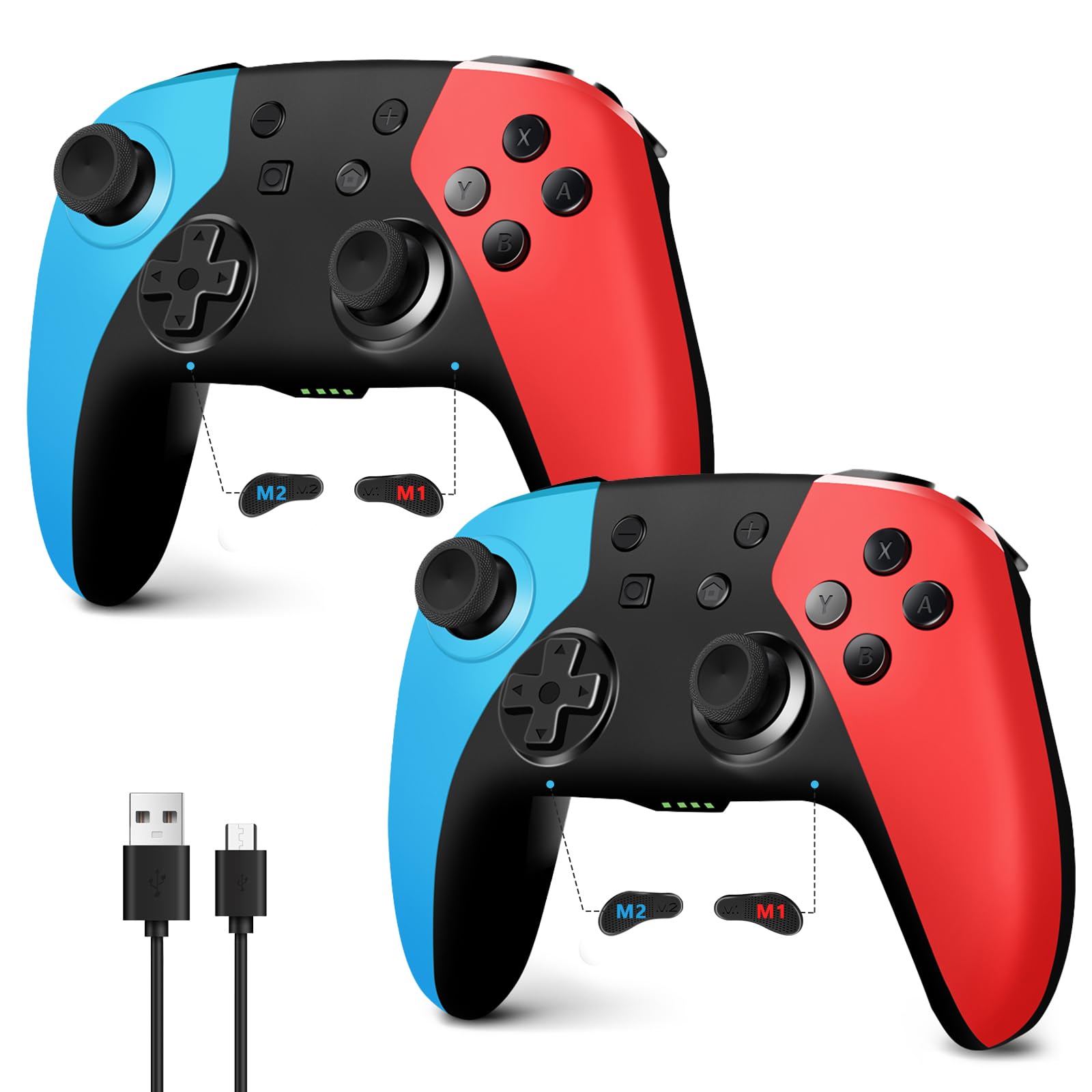
Two Hall Effect controllers for less than one premium pad is the pitch, and that is exactly what the AceGamer bundle delivers. You get a pair of full-size wireless pads with textured grips, programmable M1/M2 buttons, and a turbo function that can be set to three speeds.

The Hall Effect sticks are the headline. They use magnetic sensing rather than a physical wiper, which is the design aimed at avoiding the wear that causes drift. For a family that goes through controllers, that's a more useful feature than RGB lighting or another plastic stand.

We found the ergonomics closer to a PlayStation pad than a Joy-Con, with a comfortable grip for adults and a shape that still works for older kids. The 2-pack is the practical part: one charge, two players, and no scrambling for the spare when someone brings a friend home.

For the price of one premium pad, you get a pair that covers a second player, PC use, and the kind of rough handling a family room brings. We keep this bundle for guests and kids; the official pad stays for serious solo sessions.

Pros

  • Two Hall Effect controllers
  • Programmable M1/M2 buttons
  • Three turbo speeds
  • Comfortable textured grips

Cons

  • Wake-from-sleep can be unreliable
  • Some games may not recognize it
Our verdict

The AceGamer 2-Pack is our budget pick for adding two Hall Effect wireless pads without paying premium money.

Check Latest Price
8

Family Game Night

Fliresy 2-Pack

82 /100
LBD Score Excellent

Key details

Pack
2 controllers
Battery Life
10-12 hours
Charging Dock
Included
Battery Capacity
800 mAh
View on Amazon

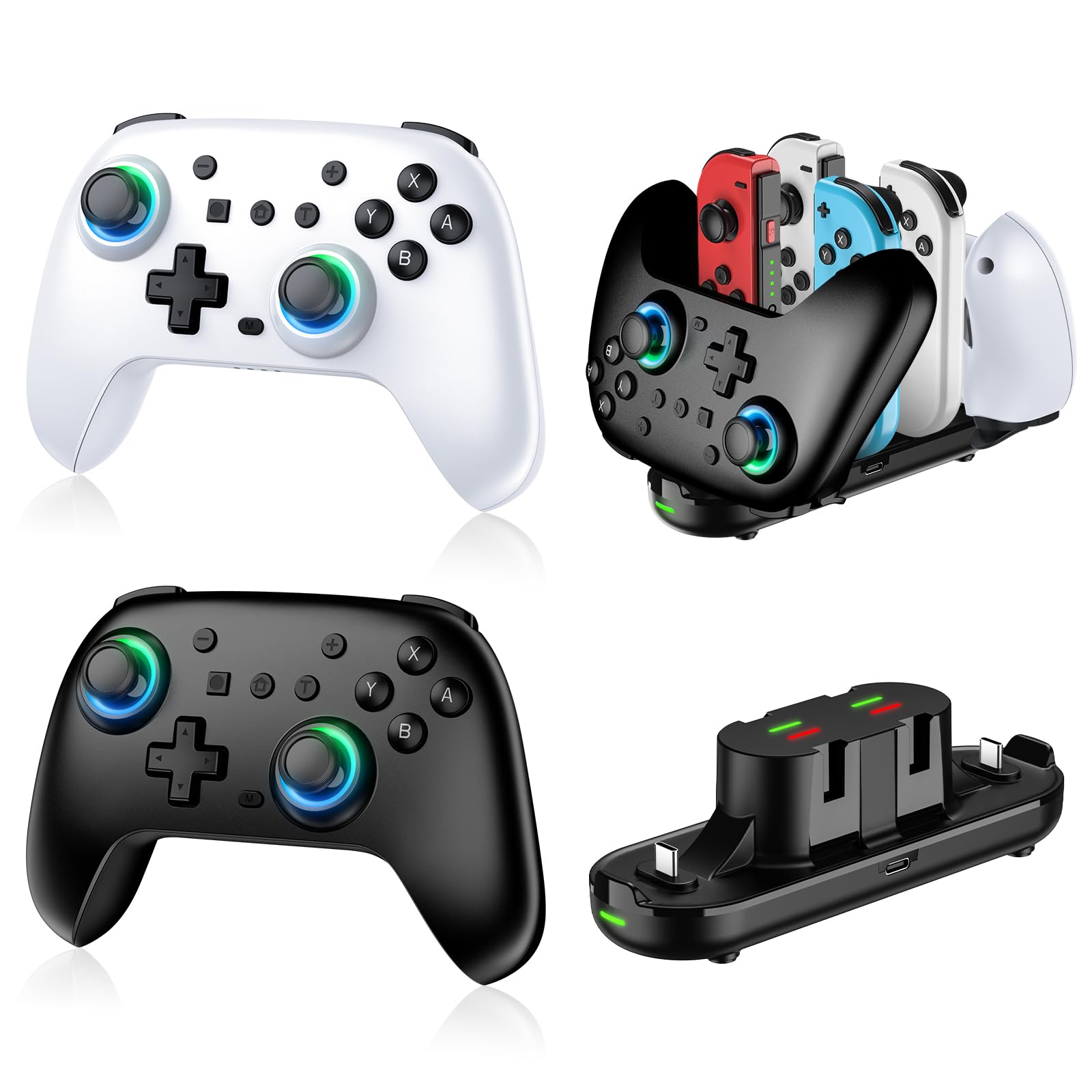
The Fliresy bundle solves a different problem: keeping two controllers charged and together. The box includes two wireless pads and a charging dock, so the pair has a home between sessions instead of ending up under the couch.

The dock is the feature we appreciate most. It charges the two included controllers and gives them a place to live, which is the difference between a tidy shelf and a drawer of dead pads. The 800 mAh battery is rated for 10-12 hours, shorter than the 30- and 40-hour pads here, but the dock makes the number less important.

The RGB lighting and turbo controls are nice extras, not the reason to buy. The controllers pair easily and feel comfortable, and the whole package is aimed at a family room rather than a tournament setup.

For a family room, the bundle makes a lot of sense: two controllers, a dock, and a place for everything. It is not the pad we reach for when we want the best feel in a single-player game, but it is the one we leave out for guests.

Pros

  • Two controllers plus charging dock
  • 10-12 hour battery
  • RGB lighting and turbo

Cons

  • Vibration can be inconsistent
Our verdict

The Fliresy bundle is our family-room pick: two wireless controllers and a charging dock that keeps them ready for the next session.

Check Latest Price

How We Tested the Best Switch 2 Controllers

We started by pulling together every Switch 2 controller we could find, first-party and third-party, and filtering out anything that didn't explicitly support the console's new C button and wireless protocol. That left us with a dozen models spanning different grip shapes, stick technologies, and budgets. We weighed each one's extra features—mappable back buttons, charging docks, adjustable vibration—against the rest of the field to see where the value landed.

For six months, those controllers lived where our Switch 2 does: on the couch for long docked sessions, in a bag for handheld commutes, and in the hands of friends during weekly game nights. We noted how each felt after an hour of play—whether our palms got sweaty, if the grips dug into our fingers, and how easy it was to reach the shoulder buttons without shifting our grip. To test battery life, we ran each controller from full charge to the low-battery warning during repeated play sessions and logged the hours. We also paired and re-paired each one after the console went to sleep, walked them across the room to check wireless range, and remapped buttons and back paddles to see how intuitive the process was.

Button responsiveness got a separate workout: we ran each controller through fast-twitch action games and precision platformers, paying attention to trigger travel and whether presses registered on the first try. Build quality got its own pass, too—we looked for creaking shells, wobbling sticks, and buttons that felt mushy after a few weeks. Lighting was subjective: some of us liked the glow, others found it distracting in a dark room, so we noted whether it could be dimmed or turned off. By the end, we had a clear sense of which controllers felt great for an hour and which ones we'd still reach for after three.

How to Choose a Nintendo Switch 2 Controller

Match the pad to the way you play

Start with the console's position. If it lives in a dock and you play on a TV, a full-size pad like the Switch 2 Pro Controller is the most comfortable default; the built-in C button and HD Rumble 2 are the official advantages. If you play handheld, the Joy-Con 2 pair is the only way to keep the modular setup, and it is also the simplest second set for local multiplayer. A two-pack makes sense when four hands are more common than one long solo session.

Treat Hall Effect and TMR as drift insurance, not a guarantee

The official Pro Controller and Joy-Con 2 use standard sticks, and drift can still appear. Hall Effect and TMR sticks use magnetic sensing instead of a physical wiper, which is why pads like the PowerA Advantage and NYXI Hyperion 3 advertise them. They are the better bet if drift has burned you before, but they do not make a controller immune to every failure. Prioritise them on a budget pad; do not pay a premium solely for the label.

Battery life matters less when charging is easy

A 40-hour claim is useful for travel, but in a living room a dock can matter more. The Fliresy pair includes a charging stand, and the PowerA Advantage comes with a long USB-C cable for play-and-charge. If you hate hunting for cables, put a charging solution ahead of the biggest battery number; if the controller lives in a bag, the Turtle Beach Rematch's 40-hour claim is the one to beat here.

Check the C button and the compatibility line

The C button is the Switch 2 feature third-party makers most often leave out. The official Pro Controller and PowerA Advantage list it; the PDP Afterglow Wave explicitly does not. If you use GameChat, that is a dealbreaker, not a footnote. Also check whether a pad is Switch 2-only or lists both generations: the Joy-Con 2 pair is Switch 2-only, while several third-party models are sold as compatible with both. The console compatibility line is the one to read before you click buy.

Buy back buttons only if you will map them

Programmable back buttons and turbo are useful in shooters and action games, but they add complexity and can be accidentally pressed. The PowerA Advantage and PDP Afterglow Wave both offer mappable back buttons; the AceGamer pair adds three turbo speeds. If you never remap controls, skip these features and put the money toward stick quality or battery life.

Frequently Asked Questions

Final Verdict

Start with the Nintendo Switch 2 Pro Controller. It's the most complete docked pad here: full-size comfort, the C button, HD Rumble 2, and a button layout that doesn't make you think about the controller. If you play handheld, the Joy-Con 2 pair is the official alternative; if you need two pads for family play, the AceGamer 2-Pack is the budget route. The Pro is the one we recommend first because it gets the everyday job right without a compatibility compromise.