Best MIDI Keyboards of 2026

A MIDI keyboard doesn't make a sound. It tells your computer what to play, which means what you're really choosing is a keybed, a handful of controls, and the software that comes in the box. Get the keys wrong and every session starts with a small, grinding annoyance.

My team and I have spent six months with 11 of these boards, from 25-key minis that live in a backpack to 88-key slabs that never leave the desk. The thing nobody tells a first-time buyer: key size matters more than key count. Mini keys are great for chords and drum programming and cramped the moment you want two hands, and a well-built 37 can feel roomier than a cheap 49. Weight and the bundled software deserve equal scrutiny — a board you won't carry to a rehearsal is one you won't use, and the included DAW is often why a cheaper controller ends up costing less.

What follows is sorted by how these boards actually feel under the hands, not by how long their feature lists are.

1

Best Overall

Akai MPK Mini IV

93 /100
LBD Score Outstanding

Key details

Pads
8 MPC pads
Controls
8 knobs, push encoder, color screen
Connection
USB-C
Number Of Keys
25 mini, velocity-sensitive
View on Amazon

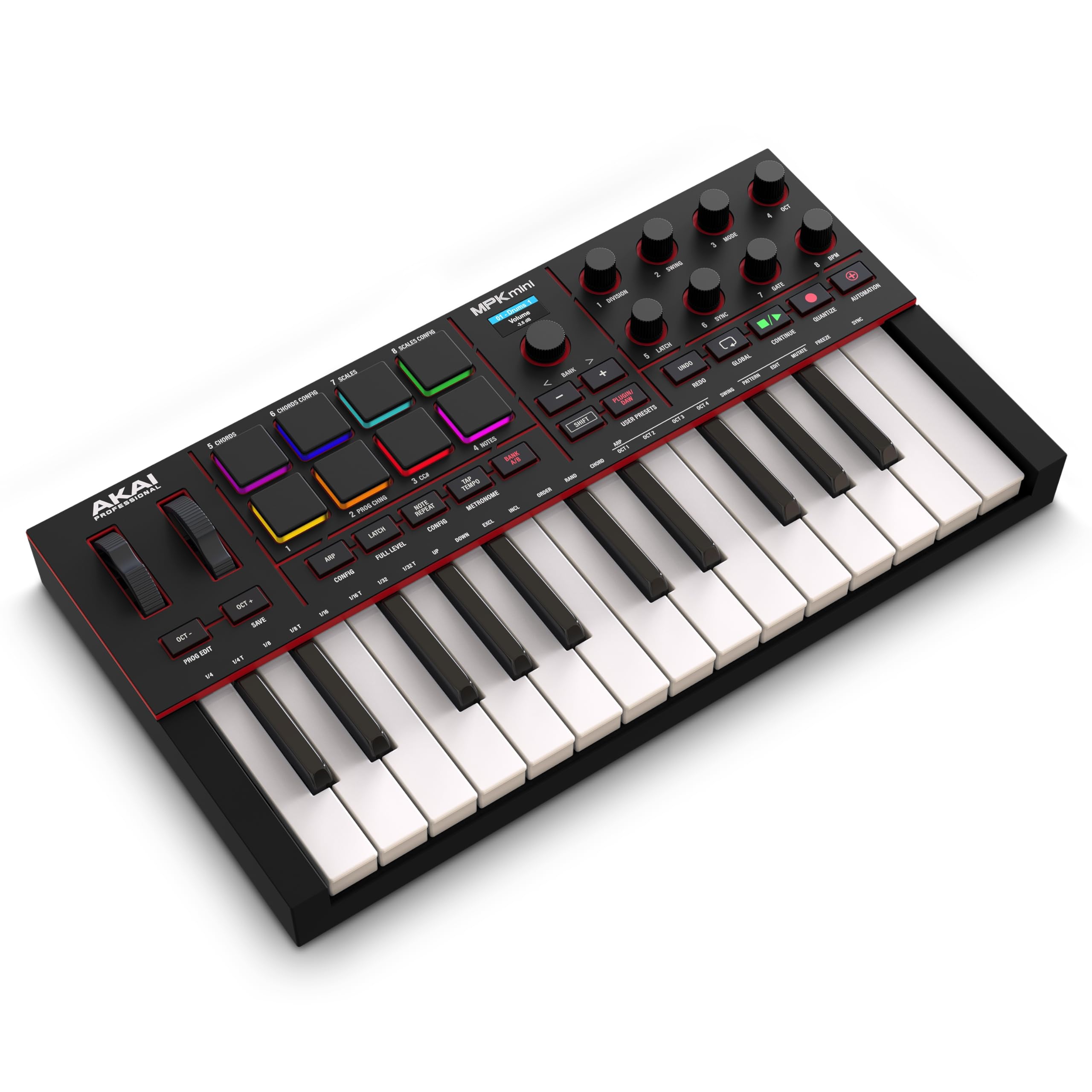
A full-color screen and a push-and-turn encoder sit above the pads, and no other 25-key controller here has either. That reads like a spec-sheet flourish until you are scrolling presets and reading parameter names without leaving the hardware. We used that encoder far more than we expected to, and it is the detail that makes this feel like a current product rather than a refreshed one.

It is our pick for most people starting out because the pieces fit together. Twenty-five velocity-sensitive mini keys, eight pressure-sensitive MPC pads, eight 360-degree knobs and a mapped transport section cover how tracks actually get made: a melody on the keys, a beat on the pads, a filter sweep on a knob. The software side is unusually complete for the money, with over a thousand drums, keys, synths and basses from AIR, Akai and Moog plus Ableton Live Lite, and the pads and knobs arrive pre-mapped for Logic, FL Studio and Ableton so the first session produces something.

The keys need a firmer press than the Arturia or the Keystation, and anyone with piano muscle memory will feel it on fast runs. Chord and scale modes take some of the sting out, since you can hold a root and let the controller fill in the rest, but they do not change the keybed underneath.

Compatibility is the other soft spot, and it is specific: mapping runs deepest in Logic and FL Studio, thinner in Ableton than the marketing suggests, and it is not the controller to buy for Studio One. Outside those edges there is not much to argue with in a board this size that covers keys, beats and mixing without asking you to buy three things.

Pros

  • Screen and encoder speed up preset browsing
  • Eight pads and eight knobs, pre-mapped
  • Large software bundle including Ableton Live Lite
  • Compact enough to sit in front of a laptop

Cons

  • Ableton mapping is shallower than advertised
  • USB only, with no MIDI DIN or CV outputs
Our verdict

We recommend the MPK Mini IV as the first controller for most people: 25 keys, eight pads, eight knobs, a screen that keeps you off the mouse, and software that starts you writing.
Check Latest Price
2

Best for Two-Handed Play

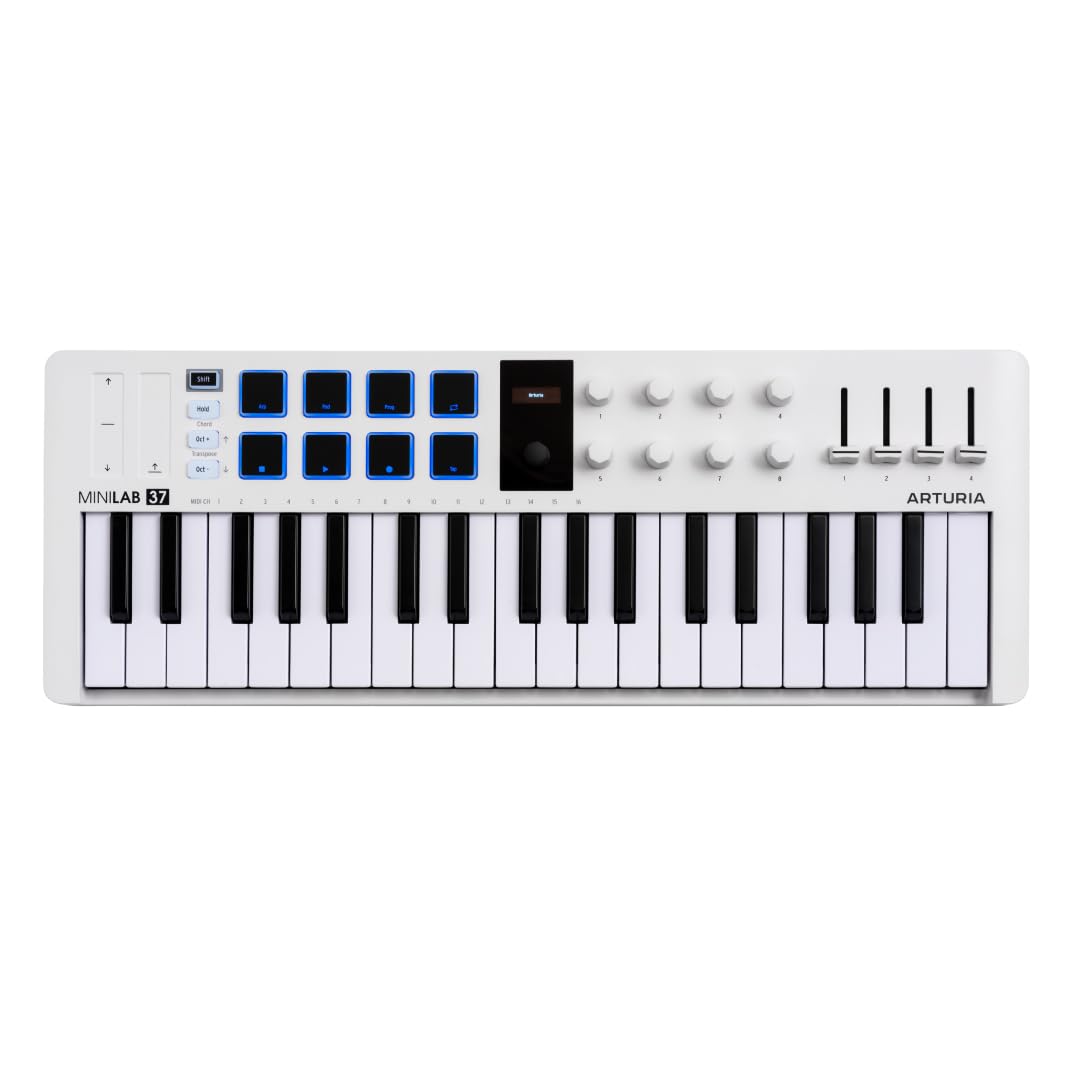
Arturia MiniLab 37

92 /100
LBD Score Outstanding

Key details

Pads
8 in a 2x4 grid
Controls
Faders, knobs, real-time display
Connection
USB-C
Number Of Keys
37 slim
View on Amazon

Thirty-seven keys is twelve more than the compact controllers here, and Arturia fits them into a shell shallow enough to sit in front of a laptop. Two hands on the keys without rebuilding the desk is the whole pitch, and it holds up. The slim keys are narrower than full-size, so wide intervals feel different, but chord voicings and bass lines that need both hands are suddenly available.

The controls are laid out for the same kind of work. The 2x4 pad grid keeps your hands close together for drumming and clip launching, the faders and knobs arrive mapped in the main DAWs, and the small display tells you what you are touching before you touch it. Chord mode and the arpeggiator do a lot of the composing when you are stuck, and the bundled instrument suite is broad enough to finish a track without buying anything else.

Where it beats the MPK Mini IV is playing rather than programming. The keybed has a natural, unforced feel that makes melodic parts easier to write, and the extra octave means fewer reaches for the transpose buttons. If your sessions start with chords and melodies rather than a drum pattern, this is the better buy of the two compact controllers.

It still fits in front of a laptop, which a 49-key board does not, and it is light enough to move between rooms one-handed. That is the trade in one line: less width per key, more keys per inch.

Pros

  • 37 slim keys allow two-handed playing
  • Pads, faders and knobs already DAW-mapped
  • Chord mode and arpeggiator built in
  • Broad bundled instrument suite

Cons

  • Slim keys are narrower than full-size
  • Installers and authorisation slow the first session
Our verdict

Buy the MiniLab 37 if you want two hands on the keys without clearing desk space: the extra octave and the natural keybed make it the better writing tool of the compact picks.

Check Latest Price
3

Best for Hardware Setups

Akai MPK Mini Plus

92 /100
LBD Score Outstanding

Key details

Pads
8 MPC pads
Sequencer
64 steps, two tracks
Connectivity
USB, MIDI I/O, CV/Gate
Number Of Keys
37 mini
View on Amazon

Look at the back of the MPK Mini Plus and you find the two connections that decide whether it belongs in your studio: MIDI in and out, and a set of CV/Gate jacks. Nothing else at this size here talks to a hardware synth, a groovebox or a modular rack without a computer in the middle.

That makes it our pick for a desk built around hardware rather than a laptop. The 64-step sequencer is the other half of the argument, with one track for drums and one for melody or chords, so you can start an idea away from the DAW and bring it in later. NKS support and one of three Komplete 15 Select bundles mean the software side is not an afterthought either.

The 37 mini keys give three octaves, which is the right amount for this footprint, but the action runs stiff and heavy compared with the Arturia and long melodic takes get tiring. It is a programming keybed more than a playing one, and we were comfortable with that once we stopped expecting otherwise.

Where it loses ground is as a pure keyboard. If most of your work is playing rather than sequencing, the MiniLab 37 is the friendlier instrument for about the same money, and the MPK Mini IV covers beat-making for less. The Plus earns its keep the moment a hardware synth enters the room.

Pros

  • MIDI and CV/Gate outputs for hardware
  • 64-step sequencer works without a computer
  • Three octaves in a slim footprint
  • NKS support with a Komplete bundle

Cons

  • Pads need a firm hit to register
  • Menu-driven editing takes time to learn
Our verdict

For a desk full of hardware, the MPK Mini Plus earns its place: MIDI and CV outputs plus a 64-step sequencer let you work without the computer in the middle.

Check Latest Price
4

Best Full-Size Keys on a Budget

M-Audio Keystation 49 MK3

89 /100
LBD Score Excellent

Key details

Weight
4.9 lb
Wheels
Pitch and modulation
Controls
Volume fader, transport buttons
Number Of Keys
49 full-size, velocity-sensitive
View on Amazon

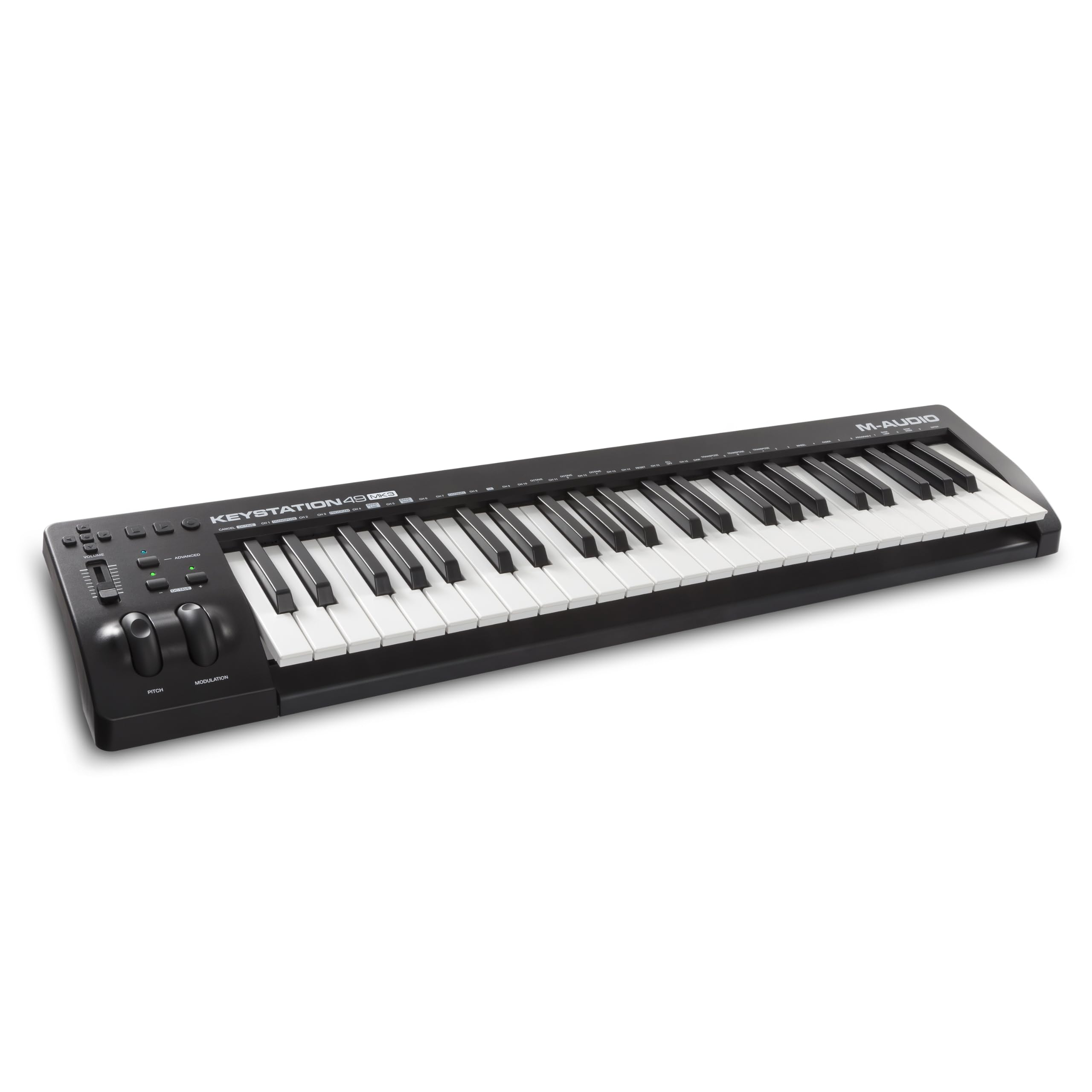
Forty-nine full-size velocity-sensitive keys for roughly what a compact 25-key controller costs: that is the Keystation 49 MK3's entire argument, and it is the one we point to when the keyboard itself is what matters. Full-size keys mean an octave feels like an octave and four-note chords do not fold your hand, and the keys respond to a light touch without much force behind them.

What you give up is everything that is not keys. There are no pads and no screen, just pitch and modulation wheels, a volume fader, octave and transport buttons and a sustain pedal input. For someone who plays parts into the piano roll, that is not a sacrifice, because the Keystation stays out of the way of the music. For someone who wants to finger-drum or ride a filter, it is the wrong tool.

The rest is refreshingly boring. It weighs 4.9 pounds and sits a little over 32 inches wide, so it fits across a desk or on a stand and is light enough to carry to a session. There is no power supply and no driver, just one USB cable, and it will drive an iPad through Apple's camera adapter if you write on a tablet.

Pros

  • 49 full-size velocity-sensitive keys
  • Plug-and-play USB, no drivers or power supply
  • Light enough to carry to a session
  • Works with an iPad via camera adapter

Cons

  • Action is light rather than piano-weighted
Our verdict

If you play parts in rather than tap them out, the Keystation 49 gives you 49 full-size keys and nothing you do not need, for about the money of a compact controller.

Check Latest Price
5

Best 88-Key for DAW Work

Novation Launchkey 88 MK3

92 /100
LBD Score Outstanding

Key details

Pads
16 velocity-sensitive
Mapping
Deep DAW integration, MIDI out
Arpeggiator
Strum mode, three chord modes
Number Of Keys
88 semi-weighted, full-size
View on Amazon

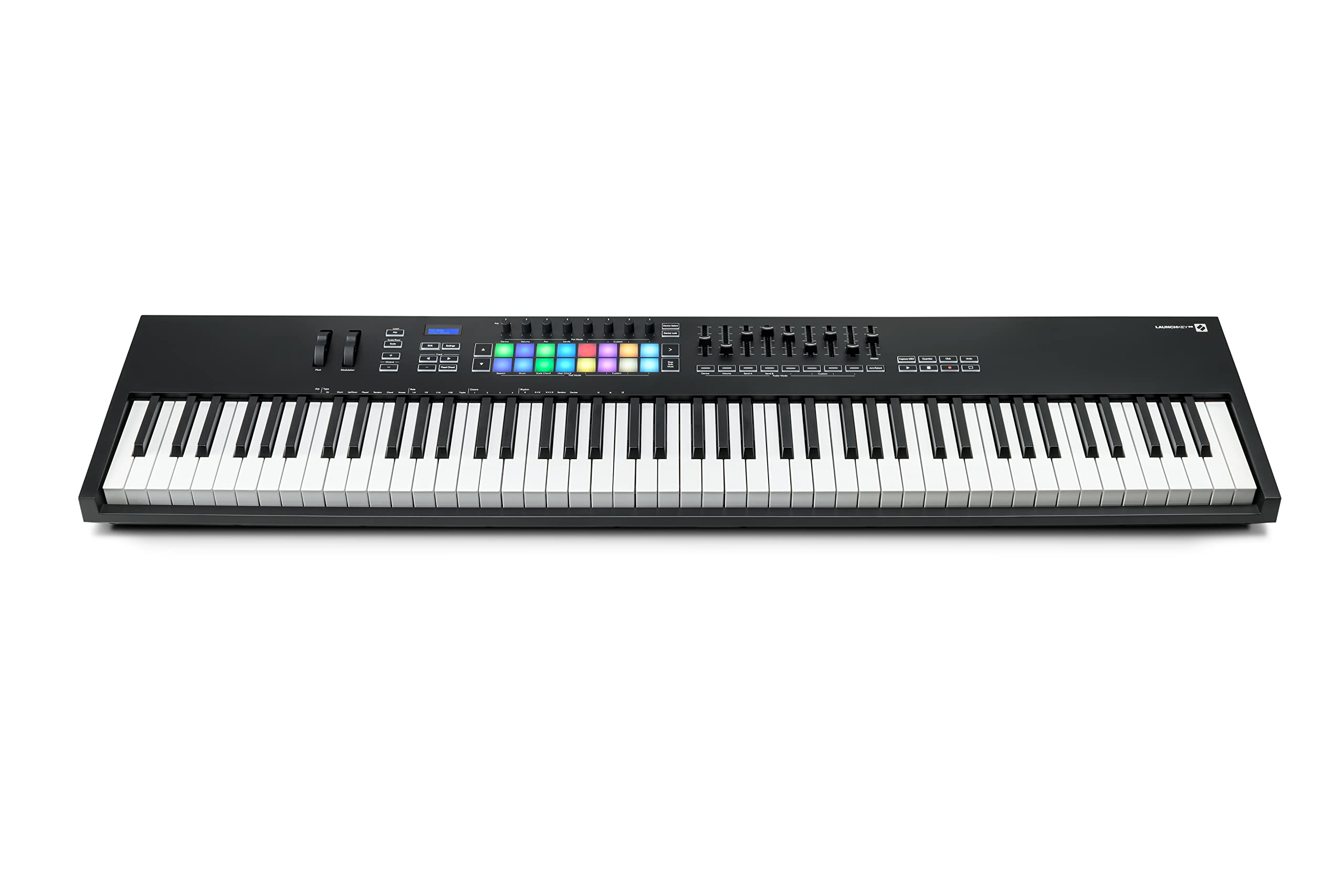
Fifty inches wide and just over 18 pounds, the Launchkey 88 is closer to furniture than to the compact controllers here. It wants a stand or a permanent stretch of desk, and it repays that commitment with 88 full-size semi-weighted keys, 16 velocity-sensitive pads and pitch and modulation wheels with real travel.

The integration is what you are paying for. Transport, mixer, device parameters and clip launching run from the hardware in Ableton and Logic, with custom modes for everything else, and there is a MIDI output for synths that do not want to meet your computer. The arpeggiator's Strum mode is the sleeper: hold a chord and it rolls the notes like a guitarist's strum.

Of the two 88-key controllers here, this is the one we choose when the computer is doing the heavy lifting. The keys are quick enough for synth parts and weighted enough for piano lines, the 16 pads give you somewhere to put drums that the Keystation does not, and the three chord modes and scale mode are useful when you are writing fast rather than just a demo feature.

It also expects a certain amount of prior knowledge. The mapping is deep, and getting to the useful parts means understanding how your DAW routes tracks and devices. Once it is mapped, though, you can work for an hour without touching the mouse, and that is the whole reason to put a board this size on your desk.

Pros

  • 88 full-size semi-weighted keys
  • 16 pads plus deep DAW mapping
  • Arpeggiator with Strum and chord modes
  • MIDI out for hardware synths

Cons

  • Plastic chassis at a premium price
  • Software downloads and registration front-load setup
Our verdict

The Launchkey 88 is the 88-key controller to buy when your DAW is the center of your work: full-size semi-weighted keys, 16 pads and mapping deep enough to stay off the mouse.

Check Latest Price
6

Full Piano Range

M-Audio Keystation 88 MK3

89 /100
LBD Score Excellent

Key details

Weight
13.8 lb
Controls
Volume fader, transport, pitch and mod wheels
Connection
USB, sustain pedal input
Number Of Keys
88 semi-weighted, full-size
View on Amazon

No pads, no knobs, no screen. The Keystation 88 MK3 gives you 88 full-size semi-weighted keys, pitch and modulation wheels, a volume fader, transport buttons and a sustain pedal input, and that is the whole panel. The absence is the product: it is the least expensive way here to get a full piano range under your fingers.

That suits a particular job well. Scoring, playing piano parts, working with sampled instruments that span the keyboard, anything where range matters more than controls. The semi-weighted action has enough resistance to play with dynamics, and the full-size keys mean a two-octave spread feels the way it does on an acoustic instrument.

It is also big: 54 inches wide and 13.8 pounds, the widest thing here. That is still light enough for one person to move, but it needs a stand or a dedicated desk and it will not go in a bag. Plan the space before you plan the purchase.

Buy this one for the keys and nothing else. If you want pads, mapping and a screen in the same box, the Launchkey 88 is the upgrade; if you want a full range to play into a DAW you already know, this is the honest route to it, and the money you save buys a stand and a pedal.

Pros

  • 88 full-size semi-weighted keys
  • Volume fader, transport and pitch/mod wheels
  • 13.8 pounds, manageable for one person
  • Plug-and-play USB, no drivers or power supply

Cons

  • Sustain pedal is sold separately
  • No 5-pin MIDI out for hardware
Our verdict

If you need 88 keys and nothing else, the Keystation 88 MK3 is the least expensive route to a full range here, and the missing pads and knobs are exactly why.

Check Latest Price
7

Travel and Komplete

Native Instruments Komplete Kontrol M32

92 /100
LBD Score Outstanding

Key details

Controls
OLED display, touch-sensitive knobs
Software
Komplete instruments, Ableton Live Lite
Connection
USB 2.0, bus-powered
Number Of Keys
32 compact
View on Amazon

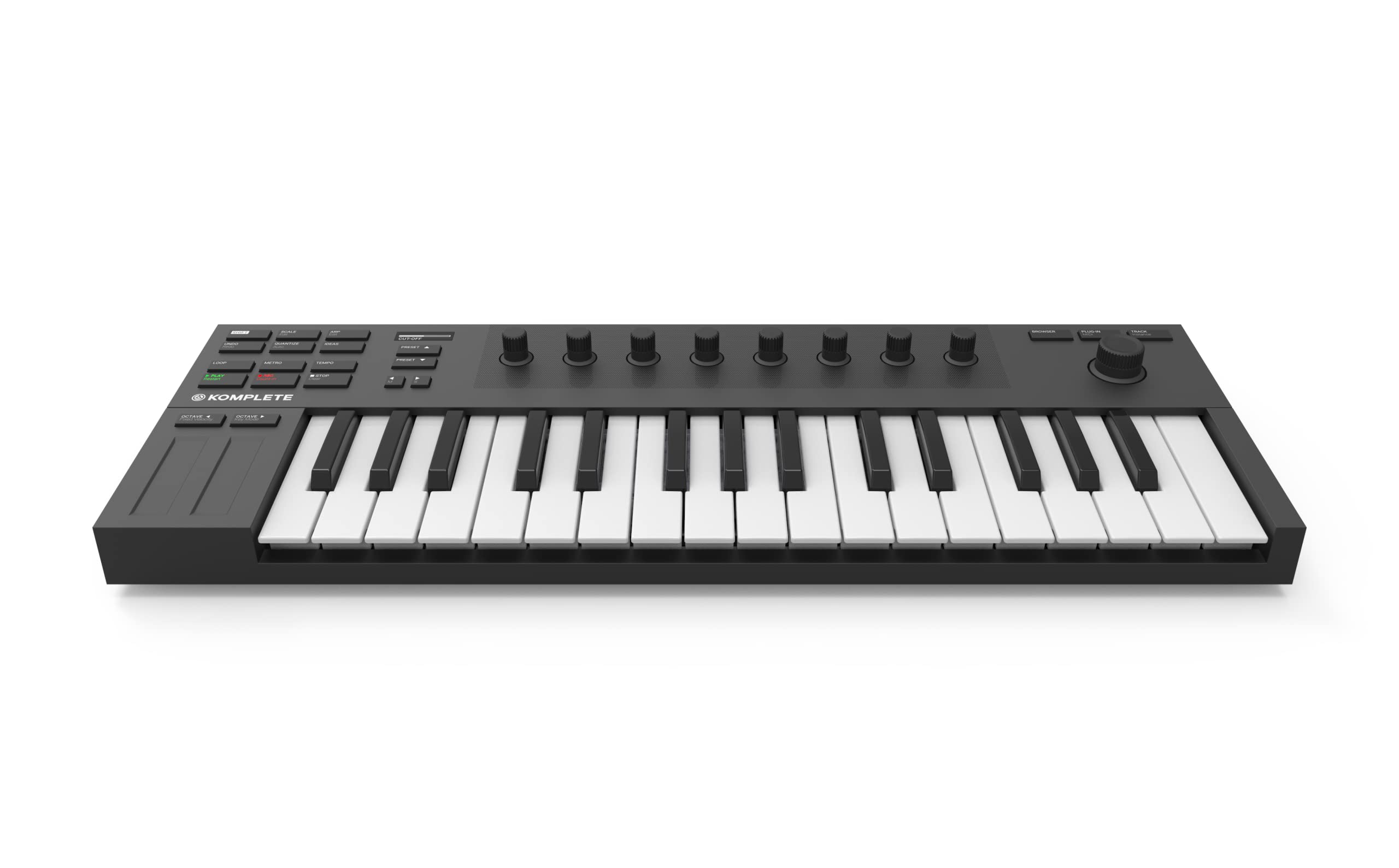
Thirty-two keys sounds like a rounding error next to 25 until you are mid-phrase and out of range. Those extra seven keys are why the Komplete Kontrol M32 is the compact controller we recommend for anyone carrying a keyboard between rooms: it measures 18.7 inches wide, still fits a backpack, and gives you more music before the octave buttons.

The rest of the design assumes you will use it with Native Instruments software. The OLED display and touch-sensitive knobs map onto Komplete instruments so you can read parameter names and adjust them without a mouse, and the bundle of synths, basses, drums and effects alongside Komplete Kontrol and Ableton Live Lite is one of the more useful collections here. It is bus-powered over USB, so there is no second cable to forget.

Mapping thins out once you leave that ecosystem. Transport buttons that work in one host do nothing in another, and the Native Instruments way of doing things is not always the obvious one if you are new to production. What it does better than anything else this small is portability with range, and that is a narrow, specific thing worth paying for.

Pros

  • 32 keys in an 18.7-inch body
  • Touch-sensitive knobs with OLED feedback
  • Komplete instruments plus Ableton Live Lite
  • Bus-powered over USB

Cons

  • Keys run small even for mini keys
  • No pads for finger drumming
Our verdict

The M32 is the compact controller for people who already work in Native Instruments' world, where its touch-sensitive knobs and Komplete bundle do the most for you.

Check Latest Price

How We Tested the Best Midi Keyboards

We started by pulling specs and manuals for roughly 30 controllers and cutting anything that needed a power brick, a separate driver install on both Mac and Windows, or an adapter just to connect. From there we narrowed to 11 boards across different price points and key counts, and each one spent at least a week as the only keyboard on my desk.

That meant real work rather than scales: tracking basslines, playing two-handed chords, and programming drum parts on the pads. The small ones went into a gig bag and onto a bus to a friend's living room; the 88s stayed put, which told us plenty about weight and about who each board actually suits.

I laid a ruler across an octave to compare key width, pressed keys at the front edge to see whether they rocked, and weighed every board on a kitchen scale. Each was connected to a Mac, a Windows laptop, and an iPad to check that notes and knob moves registered without fuss, and we played fast hi-hat patterns to catch any lag. We installed the bundled software on each one and counted the steps to the first sound, then noted whether the pads wanted a firm hit or a light tap.

For value, we tallied what the included software and controls would cost bought separately, and asked whether a beginner could finish a track with nothing else in the box.

How to Choose a Midi Keyboard Controller

Key Count Decides How You Write

There is a real fork between 25 and 37 keys. Twenty-five covers melodies and bass lines but keeps your hand on the octave buttons, while 37 opens up two-handed chords without widening the desk much at all. In this set that is the difference between the Akai MPK Mini IV and the two 37-key boards. Forty-nine keys and up are for people who play piano parts rather than draw them, and an 88-key board runs four and a half feet wide and wants a stand, not a shelf.

The trap is assuming more keys is always better. If the board has to travel or share a desk with a laptop, range you cannot reach comfortably is range you will not use.

Keybed Feel Beats the Spec Sheet

Mini keys are narrower than piano keys, and no feature list closes that gap. If you play from piano muscle memory, a compact keybed will feel wrong for a week and merely different after that; full-size and semi-weighted keys are the safer match for players. Velocity response matters just as much, and the resistance varies sharply between the boards here, with the compact Akai keybeds running firmer than the Arturia. A stiff action is tiring on long takes.

Read for feel before you read for features, and expect to adjust for a week whichever you choose.

Count the Controls You Will Actually Reach For

Pads are for drums and clip launching, knobs for filters and plugin parameters, faders for mixing. Eight pads cover a kit and a handful of clips; 16 suit clip-heavy sets. A screen or an encoder is quieter but changes more, because it decides how often you go back to the mouse to find out what you are editing.

Our rule of thumb: if a control does not replace a mouse action you repeat every few minutes, you will not learn it, and it should not sway the purchase.

Check Your DAW Before the Feature List

Works with any DAW means it sends MIDI, not that it is mapped. Depth varies a lot: the Launchkey goes deep into Ableton and Logic, Akai's mapping is strongest in Logic and FL Studio, and Native Instruments builds its controls around Komplete Kontrol first. Look up your DAW's supported-device list before ordering, and treat pre-mapped transport buttons as a bonus rather than a promise.

Budget the Evening, Not Just the Money

Bundles here run from Ableton Live Lite plus a few instruments to a full Komplete collection, and that changes what you can make on day one more than the keybed does. The real cost is time: account creation, downloads, authorisation, and a first session lost to installers. Install the DAW before the extras, and do it on a night you were not planning to record.

Frequently Asked Questions

Final Verdict

Our default is the Akai MPK Mini IV: 25 velocity-sensitive keys, eight pads, eight knobs and a screen, with a software bundle that gets you writing in the first session rather than the first week. It is the right first controller for most people, at a price that still leaves room for a sustain pedal.

Move off it for a specific reason. If you play with both hands and want the extra octave, the Arturia MiniLab 37 is the better instrument. If your studio is a rack of hardware, the Akai MPK Mini Plus has the ports the others do not.