Best Keyboards with Macro Keys of 2026

A macro key makes a small promise: press once, and the whole sequence happens — the combo, the pause, the second combo, the thing you'd otherwise fumble at the worst possible moment. That's the appeal whether you're juggling cooldowns in a game or pasting the same block of text into a spreadsheet forty times a day.

What the listings don't tell you is that macro keys are only as good as the memory and software behind them. Twelve of them are worthless if the configuration app has to be running for any of them to fire, and dedicated keys you can hit blind beat a clever key combination every time. Switch feel is a close second: linear stays quiet, tactile tells your fingers when the press lands.

We've spent seven months typing on and reprogramming 12 of these keyboards, from membrane budget boards to hot-swappable mechanical ones with aluminum plates. The quiet models weren't always the sturdy ones, and the cheapest macro keys were sometimes the easiest to set up. The picks below cover desk work and gaming alike, and the good ones all remember what you told them to do.

1

Best Overall

Redragon K580

89 /100
LBD Score Excellent

Key details

Switch
Outemu Brown tactile
Key Count
104
Macro Keys
5 dedicated (G1-G5)
Connectivity
USB-C wired
View on Amazon

Five dedicated macro keys, a full 104-key layout, and hot-swappable switch sockets are the parts of the Redragon K580 that matter most. It comes with tactile brown switches, doubleshot keycaps, and a media wheel, and it connects over USB-C. Nothing about the spec sheet is flashy; the appeal is that the useful pieces are all here.

That combination is why it earns our top spot. Five G keys cover the shortcuts most of us actually use, including push-to-talk, a chat macro, and a couple of app commands, without turning the left side of the board into a second keypad. The keys record on the fly, so you can set a simple combo without opening software; deeper profiles are there when you want them. We prefer this balance to a twelve-key bank that makes you hunt for the main cluster.

The hot-swap sockets are the detail we appreciate most. If a switch starts double-typing or loses its click, you can pull it and drop in a replacement instead of retiring the board. The brown switches have a gentle bump and enough resistance for long typing sessions, and the doubleshot keycaps should resist the shine that kills legends on cheaper boards. The K580 is not silent, and there is a hollow ring on some keystrokes, but it stays below the clicky boards here.

The five-key bank is still the limit. If your workflow lives on macros, the K550's twelve keys are the better tool; for everyone else, the K580 is the safer default. We kept coming back to the media wheel and the steady feel of the aluminum plate, which are the small things that make it pleasant to use after the novelty of RGB wears off.

Pros

  • Five dedicated macro keys program on board
  • Hot-swap sockets make switch repair easy
  • Tactile brown switches suit typing and gaming
  • Doubleshot keycaps resist legend wear

Cons

  • Deeper macro profiles require software
Our verdict

The K580 earns our top recommendation because five macro keys, hot-swap sockets, and brown switches cover gaming and typing without excess.

Check Latest Price
2

Best Low-Noise Gaming

Razer BlackWidow V4 X

88 /100
LBD Score Excellent

Key details

Switch
Razer Yellow linear
Keycaps
Doubleshot ABS
Lighting
Chroma RGB per-key
Macro Keys
6 dedicated
View on Amazon

Late-night gaming is where the BlackWidow V4 X makes its case. Razer's Yellow switches are linear and quiet, with a 1.2mm actuation point and 45g of force, so they register fast without the click that carries through a headset. The board still gives you a full layout and six dedicated macro keys, which is the combination that puts it near the top of this group for quiet play.

Six macro keys is a useful middle ground. You can put push-to-talk, inventory, a repair bind, and a couple of work shortcuts on them without the bank becoming its own keyboard. The keys are programmable through Razer's software, and Chroma lighting is per-key, so the board can look as deliberate as the setup around it. The doubleshot ABS keycaps are a practical touch, too; the legends are molded in rather than printed on.

We rate it as the best low-noise gaming pick here, but reliability is the reservation. Unresponsive keys and double inputs are the failure pattern to watch for, so buy from a retailer with a straightforward return policy and test every key and macro early. That caveat matters because the V4 X is a premium wired board; if it behaves, the quiet linear feel and six-key bank justify the outlay.

The quiet action is what we came back to. It is not a board that calls attention to itself while you work, and the six keys stay useful after the game closes. For a shared room or a late-night desk, that calm feel does more for the experience than another row of keys.

Pros

  • Six dedicated macro keys
  • Quiet Razer Yellow linear switches
  • Per-key Chroma RGB lighting
  • Doubleshot ABS keycaps

Cons

  • Large 20.5-inch footprint
Our verdict

Quiet gaming is where we prefer the V4 X: six macro keys, fast linear switches, and per-key lighting without the click.

Check Latest Price
3

Best Spill-Resistant

Corsair K55 RGB PRO

87 /100
LBD Score Excellent

Key details

Switch
Rubber dome
Key Count
110
Macro Keys
6 dedicated
Spill Rating
IP42
View on Amazon

Coffee on the desk is the test the Corsair K55 RGB PRO is built for. It carries an IP42 rating for dust and spill resistance, and its rubber-dome keys are quiet enough for an open office. This is the board we recommend first to someone who wants six macro keys without mechanical noise or a high-maintenance deck.

The six dedicated macro keys are set up through Corsair's iCUE software, which also handles the Elgato integration. That is a different approach from the Redragon boards, which record simple macros on the keyboard itself. We like the Corsair route for app launches and multi-step shortcuts because the software gives you more control; the trade-off is that you need iCUE installed to get the most from the board.

The typing feel is the bigger trade-off. Rubber domes are soft and quiet, but they do not have the crisp bottom-out or the replaceable switches of a mechanical board. If you spend the day typing and want a responsive feel, the K580 is the better tool. The detachable palm rest is a practical comfort, though, and the 19-inch frame is wide without being unreasonable for a full-size board with a macro bank.

Pros

  • IP42 dust and spill resistance
  • Six dedicated macro keys with iCUE setup
  • Quiet membrane keys for shared rooms
  • Detachable palm rest adds comfort

Cons

  • Zone lighting instead of per-key RGB
Our verdict

For shared desks, we pick the K55 for its six macro keys, spill resistance, and quiet membrane keys.

Check Latest Price
4

Most Macro Keys

Redragon K550

80 /100
LBD Score Excellent

Key details

Key Count
131
Top Plate
Aluminum
Macro Keys
12 dedicated (G1-G12)
USB Pass-Through
1 port
View on Amazon

Twelve dedicated macro keys is the number that sets the Redragon K550 apart. The board pairs that bank with a 104-key layout, an aluminum top plate, a media scroll bar, and a USB pass-through, so it is aimed at the person who wants a command center rather than a stripped-down gaming deck.

For MMO rotations, spreadsheet macros, or a stream deck replacement, that many keys is the point. We prefer it to the five-key K580 when the macro count is the actual job, even though the K580 is the safer all-rounder. The G1-G12 keys program on the fly, and the keys light up when they have something assigned, which makes the bank easier to read at a glance.

The aluminum top plate gives the K550 a steadier feel than the plastic case alone would. The extra USB port is genuinely useful for a mouse or a wireless receiver, and the media controls are separate from the macro bank. We also appreciate that Redragon includes a wrist rest; long sessions are easier when the front edge is not digging into your palms.

The reservation is reliability. The board can stop responding after a few minutes, and macro editing can be limited, so keep the receipt and test the whole board early. If you get a good one, the twelve-key bank is the reason to choose it over the K580; if you want the safest bet, the K580 remains our default.

Pros

  • Twelve dedicated macro keys
  • Aluminum top plate steadies the board
  • USB pass-through adds convenience
  • Macro keys light when assigned

Cons

  • Windows-only compatibility
Our verdict

Twelve dedicated macro keys make the K550 our shortcut-heavy specialist in this group.

Check Latest Price
5

Best Premium Quiet

be quiet! Dark Mount

83 /100
LBD Score Excellent

Key details

Numpad
Detachable, left or right
Switch
Silent tactile black
Keycaps
PBT double-shot
Macro Keys
8 display keys
View on Amazon

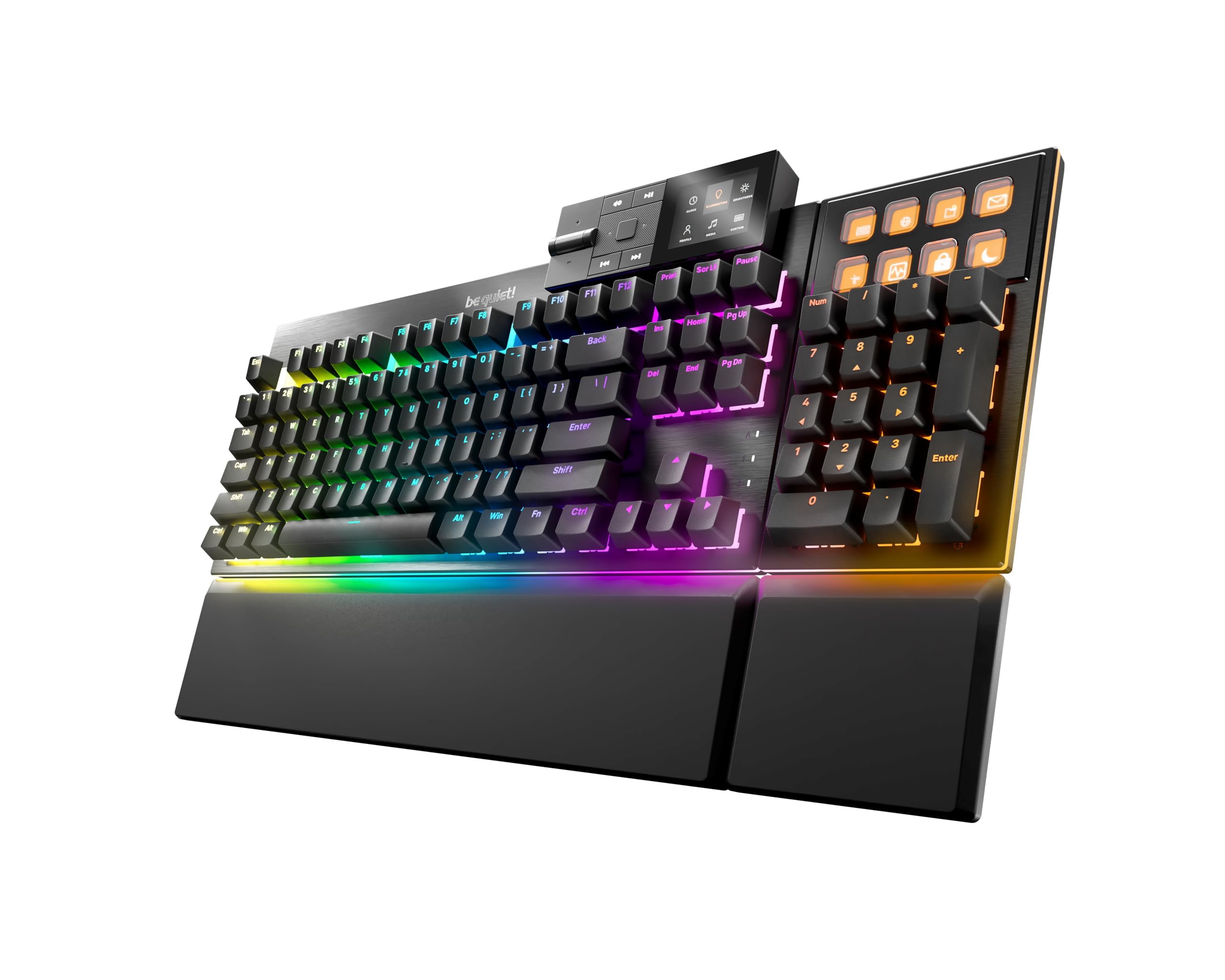
A keyboard that lives in a shared office has to do more than feel good; it has to disappear acoustically. The be quiet! Dark Mount Tactile is built around that idea, with silent tactile black switches, three layers of sound-absorbing material, an aluminum plate, and PBT doubleshot keycaps.

The eight display keys are the unusual part. Each one is a small screen you can label and assign, so it can launch a game, start a stream, or fire a macro without asking you to remember what an unlabeled G key does. We like that for streaming and productivity because the label is the memory aid. The detachable numpad can sit on the left or right, or come off entirely when desk space is tight.

We rate it as the premium quiet pick in this set. The tactile switches have a soft bump without the high-pitched click that carries across a room, and the PBT keycaps feel more substantial than the ABS on most gaming boards. The catch is that this is a software-heavy keyboard, and the display keys are only worth it if you will use them. For pure typing, the K580 gets you most of the way there for much less; for a shared office where every click is noticed, the Dark Mount earns its place.

Pros

  • Eight customizable display keys
  • Silent tactile switches with layered dampening
  • Detachable numpad fits either side
  • PBT doubleshot keycaps

Cons

  • Windows-only software support
Our verdict

When quiet typing and labeled controls matter more than cost, we point to the Dark Mount.

Check Latest Price
6

Small Desks

RK Royal Kludge M70

79 /100
LBD Score Very Good

Key details

Layout
75% (73 keys)
Battery
6000mAh
Macro Keys
Dedicated macro keys
Connectivity
BT, 2.4 GHz, USB-C
View on Amazon

A 75% layout with a small display and a knob is the M70's whole personality. It squeezes a mechanical board into 73 keys, adds a set of dedicated macro keys, and keeps the volume control and profile switching on the top edge. This is the pick for a small desk or a laptop bag, not for someone who lives in a spreadsheet.

The macro keys are there, but they are not the main event. The display and knob handle device switching and volume, and the gasket mount with five layers of sound-absorbing material gives the board a softer, quieter character than a plain tray-mount case. We like that combination for a work-from-anywhere setup because the controls you reach for most are physical, not buried in software. The 6000mAh battery and tri-mode connection cover USB-C, 2.4GHz, and Bluetooth.

The trade-off is the missing number pad and the compact key spacing. If you type numbers all day, the K580 or K550 will be easier. If you want a wireless board that fits beside a laptop and still gives you macro keys, the M70 is the one here that makes the smallest footprint feel deliberate. The hot-swappable sockets are the repair-friendly detail that tips it for us.

Pros

  • Tri-mode wireless and 6000mAh battery
  • Hot-swappable sockets
  • Macro keys plus display and knob
  • 75% layout saves desk space

Cons

  • Windows-only compatibility
Our verdict

Small wireless setups are where we recommend the M70: macro keys, a screen, and a knob in a 75% board.

Check Latest Price
7

Clicky Gaming

Razer BlackWidow V4

80 /100
LBD Score Excellent

Key details

Switch
Razer Green tactile/clicky
Keycaps
Doubleshot ABS
Macro Keys
6 dedicated
Wrist Rest
Magnetic leatherette
View on Amazon

The BlackWidow V4 is the clicky counterpoint to the V4 X. Its Green switches are tactile and audible, with a 1.9mm actuation point and 50g of force, and the board pairs them with six dedicated macro keys, per-key Chroma lighting, and a magnetic leatherette wrist rest.

If you want a keyboard that announces every keystroke, this is the one. The click is part of the experience, not an accident, and the wrist rest makes long sessions more comfortable than the V4 X's bare front edge. The six macro keys are the same useful middle ground: enough for a game's keybinds and a few work shortcuts without becoming a separate command deck.

We appreciate the doubleshot ABS keycaps and the two-side underglow, which make the board look more finished than a plain black rectangle. The media controls and volume roller are also welcome. The V4 is not trying to be subtle, and that is the point.

The V4 X is the safer choice for most people: quieter, less expensive, and easier to live with in a shared room. The V4 only makes sense if the click is a feature you seek out. The magnetic wrist rest is the detail that keeps it comfortable, and it comes off cleanly when you want a lower front edge.

Pros

  • Six dedicated macro keys
  • Tactile clicky Green switches
  • Magnetic leatherette wrist rest
  • Doubleshot ABS keycaps

Cons

  • Large footprint
Our verdict

We suggest the V4 for clicky-switch fans who want six macro keys, per-key lighting, and a plush wrist rest.

Check Latest Price
8

Budget Macros

Bloody B318

77 /100
LBD Score Very Good

Key details

Switch
LK black optical-mechanical
Backlight
Tri-color LED
Macro Keys
9 dedicated
Water Resistance
Nano-coated PCB
View on Amazon

The Bloody B318 is the budget board with the most macro keys in this set: nine dedicated keys, a 113-key layout, and a water-resistant nano-coated PCB. It also uses Light Strike optical-mechanical switches on the QWER and ASDF cluster, which is an unusual spec at this end of the market.

The optical switches are only on part of the board. Eight of them cover the main gaming cluster, while the rest of the keys use conventional mechanisms. We like that trade-off for the price because the keys you hit fastest get the quicker response, and the macro bank gives you plenty of room for game binds or work shortcuts. The tri-color backlight is basic, but it is easy to read in a dark room.

The nine macro keys are programmed through Bloody's KeyDominator2 software, not on the board itself. That makes the B318 less convenient than the Redragon boards if you change shortcuts often, but the software gives you more control than a few onboard slots. The reinforced space bar and spill protection are the kind of details that matter on a desk where a drink is always nearby.

The macro count is generous, but the B318 is a compromised all-rounder: part-optical, software-dependent, and not as refined as the K580. If you want nine macro keys and spill protection on a tight budget, it earns a look. Just label the macros and test the optical cluster before the return window closes.

Pros

  • Nine dedicated macro keys
  • Water-resistant nano-coated PCB
  • Optical switches on main gaming cluster
  • Reinforced space bar

Cons

  • Windows-only compatibility
Our verdict

Budget buyers who need nine macro keys should look at the B318, which we recommend if they can program through Bloody's software.

Check Latest Price

How We Chose and Tested These Keyboards

We started by pulling every current keyboard that ships with dedicated macro keys — at least five, or a programmable column — and reading spec sheets for switch type, keycap material, onboard memory, hot-swap sockets, and whether the board connects by cable or wirelessly. Then we set a price ceiling so the shortlist spanned budget and mid-range options, and ordered 12 of them.

Testing ran seven months. Each keyboard took up residence on a desk for at least two weeks of real work — spreadsheets, email, a few long writing sessions — followed by a handful of evenings of games. We bound the same three macros on every board: a multi-step combo with a built-in delay, a block of text, and a profile switch, which let us time setup and see whether the keys landed where our fingers expected them.

Midway through, we rebooted, unplugged, and moved each keyboard to a second computer to see which ones kept their programming. We typed the same paragraph on all of them to judge tactile feel, recorded each board from three feet away to compare noise, and checked the lighting in a bright room and again after dark.

We also logged the small stuff: whether keycaps went shiny after a month, how many profiles stored on board, whether the software found the board on the first try, whether presses registered at the speed we pressed them, and any dropped or doubled keystrokes over weeks of use. At the end we weighed what each one cost against what it actually did well.

How to Choose a Keyboard with Macro Keys

Count the Macro Keys You Will Actually Use

Five or six dedicated keys cover most gaming and office shortcuts: push-to-talk, a repair bind, a chat macro, and a couple of app commands. Twelve keys make more sense for MMO rotations, spreadsheet automation, or a streaming deck, where you want a labeled command for every situation. The K580's five keys and the K550's twelve define the useful range in this set. We prefer a smaller bank that stays easy to reach and label to a huge bank that turns the left side of the board into a second keypad.

Match Switch Feel to the Room

Membrane boards are the quiet, budget-friendly choice, and they tolerate spills better than most mechanical decks; the Corsair K55 is the obvious example here. Mechanical switches give you more travel, a crisper bottom-out, and often replaceable keycaps or switches. Linear switches are fast and quiet, tactile switches add a bump, and clicky switches are loud by design. We prioritize silent tactile or membrane for shared rooms, and a tactile brown switch for all-day typing.

Choose Full-Size or Compact, Then Check the Macro Cluster

A full-size board gives you a number pad and usually puts the macro keys in their own column, but it takes up more desk width. A 75% board like the RK M70 saves space and still fits macro keys, a screen, and a knob; you give up the number pad and some key spacing. Measure the width before you buy, especially if your mouse hand already has little room. The macro bank should feel like an addition to the keyboard, not a reason to relearn where the main keys are.

Plan for Software, Profiles, and Key Testing

Some boards record simple macros on the fly, while others rely on a desktop app for anything beyond a single keystroke. On-board recording is faster for a quick combo; software is better for app launches, multi-step sequences, and profiles that follow you between games. Check whether the profile lives on the keyboard or only on the computer. Whatever you choose, test every key and macro during the return window, because key sticking, double typing, and early failures are the recurring risks in this category.

Frequently Asked Questions

Final Verdict

The Redragon K580 is the keyboard we recommend first because it gets the important parts right: five dedicated macro keys, a comfortable tactile mechanical feel, hot-swappable sockets, and a full-size layout that still types well. It is the safest default for gaming and work.

If your workflow needs a dozen macros, choose the K550. If quiet is worth a premium, the be quiet! Dark Mount is the calmer board.