Best Gaming Controller Stands of 2026

A controller stand sounds like a small thing until your desk is buried under three gamepads, a headset, and a charging cable you keep untangling. The right one gets that gear off the surface and gives each device a place to land—but the wrong one wobbles when you bump the desk, grips a controller too tightly or not at all, or takes a hex key and a prayer to assemble. I’ve rearranged enough desk clutter to be picky about what earns a permanent spot.

Over the past three months, my team and I tested 14 controller stands on real desks, from single-controller cradles to multi-tier racks with headset hooks. We assembled every one, loaded them with gamepads and headsets, routed charging cables where the stand allowed it, and lived with them through daily gaming sessions and weekly desk cleanups. Sturdiness, appearance, and value separated the keepers, but the real test was whether each stand held controllers and a headset securely without making them annoying to grab.

1

Best Overall

Kytok 4-Tier Controller Stand

94 /100
LBD Score Outstanding

Key details

Material
Aluminum alloy
Dimensions
2.76 x 7.87 x 7.95 inches
Headset Holder
Yes
Controller Capacity
Up to 8 controllers
View on Amazon

A four-tier tower is the right shape for the mess most gaming desks accumulate: one controller on the desk, another in a drawer, a headset draped over a monitor. The Kytok stand gives each item a spot and does it without turning the desk into a showroom. We recommend it as the default because it holds up to eight controllers, adds a dedicated headset holder, and includes a cable organizer, so it solves the whole cluster rather than just one gamepad.

The aluminum main body gives it more presence than a plastic rack, and the four-step assembly is simple enough that we did not need to clear the desk for long. Each tier cradles a controller at an angle, so the grips face out and the pads are easy to grab. We like that the headset hangs off the side instead of competing for a tier, and the cable organizer keeps charging cords from sliding behind the desk.

The open cradles are not a locking fit. A controller can rock slightly as you lift it out, which is the kind of thing you notice on a glass desk more than a carpeted floor. That is a minor trade-off for how easy it is to grab one mid-game, and the padded holders keep the controller from sliding around on its own.

For a desk with multiple consoles, this is the one we keep coming back to because it organizes without asking you to baby it. The four tiers also leave enough air around each controller that they do not knock into each other, which is more than we can say for a crowded drawer. If you have only two controllers, a smaller stand makes more sense; if you have a shelf of them, the Kytok earns the space.

Pros

  • Holds up to eight controllers and a headset
  • Aluminum body with a cable organizer
  • Simple four-step assembly
  • Keeps a multi-console desk organized

Cons

  • Some oversized retro pads may not fit
Our verdict

We recommend the Kytok for mixed collections: it holds eight controllers, a headset, and charging cables in one compact tower.
Check Latest Price
2

Best Wooden Desk Piece

Humancozy Wood Controller Stand

90 /100
LBD Score Outstanding

Key details

Material
Solid wood and metal
Dimensions
7.6 x 5.1 x 10.2 inches
Headset Support
Yes
Controller Capacity
2 controllers
View on Amazon

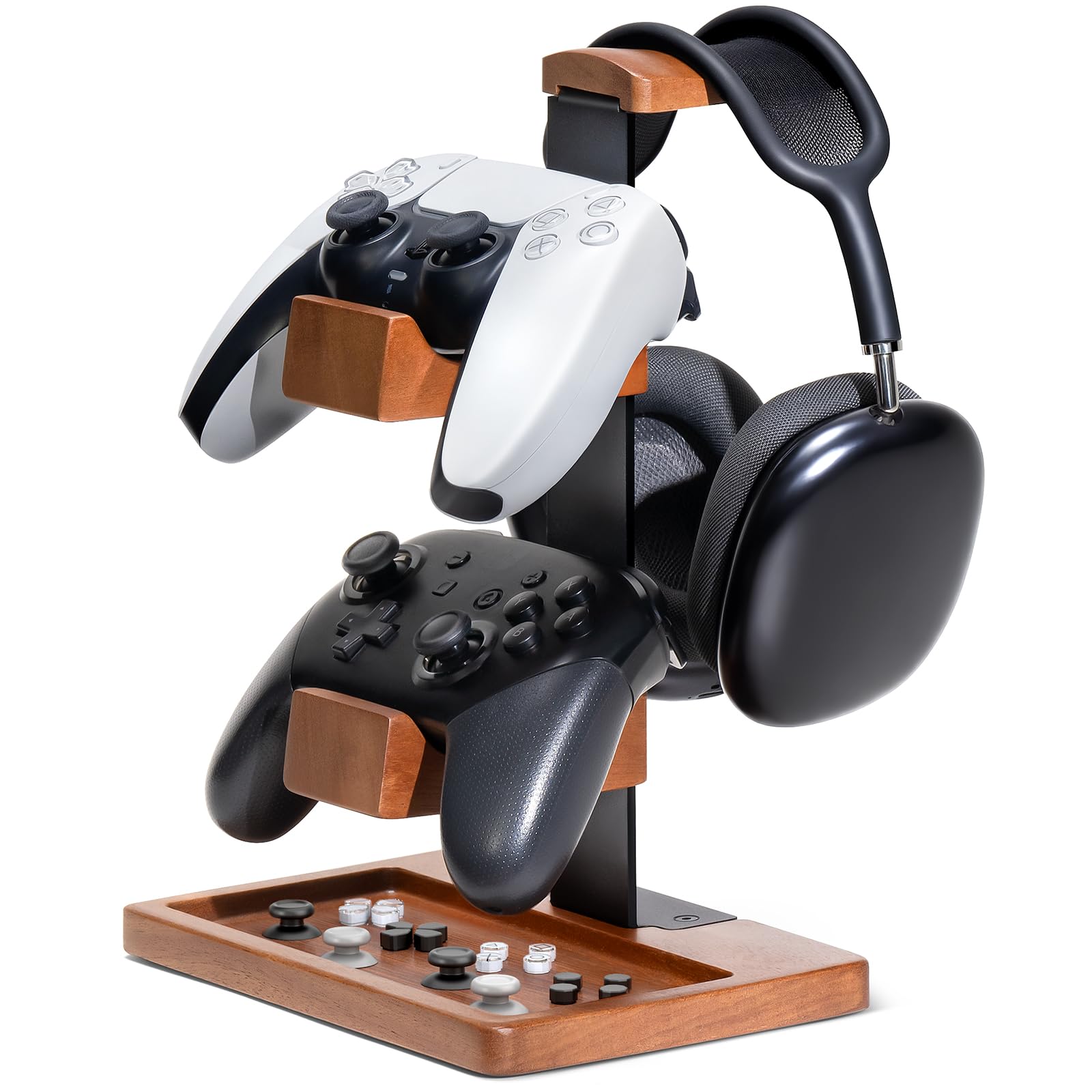
The first thing that registers about the Humancozy stand is the wood-and-metal build: it looks like a small piece of furniture rather than a rack. It holds two controllers and a headset, with a base tray for thumb grips, and tightens together with three screws. If your desk is in a living room or a shared office, that matters more than extra capacity.

We think it is the pick for a two-controller setup that has to look intentional. The dedicated slots keep a PS5 pad and an Xbox pad upright, the headset saddle sits on top, and the tray catches the small stuff that otherwise rolls under the monitor. The 10.2-inch height gives the headset room without turning the stand into a tower, and the 7.6-by-5.1-inch base is a small landing pad on a crowded desk.

What it does not do is scale. There are two controller slots, one headset saddle, and a small tray; a household with four gamepads will need a tower. The three-screw assembly is simple, but it is still assembly, so it is not the instant-out-of-the-box option the Niubixx is. For the right desk, it is the stand you leave out instead of hiding behind a monitor.

Pros

  • Solid wood and metal construction
  • Dedicated slots for two controllers and a headset
  • Base tray corrals thumb grips
  • Small 7.6-by-5.1-inch footprint

Cons

  • Costs more than basic two-controller stands
Our verdict

We choose the Humancozy when two controllers and a headset need to look like part of the room, not a rack beside the monitor.

Check Latest Price
3

Best Minimalist

Niubixx 2-Tier Controller Stand

91 /100
LBD Score Outstanding

Key details

Assembly
None required
Material
Anodized aluminum
Protective Pads
Yes
Controller Capacity
2 controllers
View on Amazon

A controller stand does not need to be complicated, and the Niubixx is the cleanest argument for that: two anodized aluminum tiers, no assembly, and a footprint small enough to sit beside a keyboard. It holds two controllers on padded cradles, and the base is padded too, so it will not skate or scratch. That is a focused brief, and it suits a desk where the controllers are tools rather than a collection.

This is the one we reach for when a desk has exactly two controllers and no room for a tower. The open design makes it easy to drop a pad in and pull it out, and the rubberized pads hold the controller without a latch or strap. The no-assembly part matters more than it sounds: it is ready the moment you unbox it. We also appreciate that the aluminum finish looks more expensive than the stand's budget billing.

If you already have a headset stand, this is the cleaner second piece: it keeps two pads visible without adding another tower. The aluminum also gives it enough weight to stay put when you pull a controller out one-handed. We came back to it because it does not ask for a setup ritual; you set a controller down and go.

Pros

  • No assembly required
  • Padded cradles and base
  • Anodized aluminum build
  • Compact two-tier footprint

Cons

  • Holds only two controllers
  • No headset or cable storage
Our verdict

We recommend the Niubixx for a two-controller desk that wants a clean aluminum perch without assembly or extra bulk.

Check Latest Price
4

Large Collections

Kosker 4-Tier Rotating Stand

86 /100
LBD Score Excellent

Key details

Tiers
4
Rotation
Yes
Dimensions
8.39 x 8.39 x 17.41 inches
Controller Capacity
Up to 12 controllers
View on Amazon

The Kosker four-tier stand is for the collector whose problem is not two controllers but twelve. It uses a rotating vertical frame with a heavy-duty metal base, and the 17.41-inch height gives the tiers room to hold controllers around the column rather than in a single stack. The frame is meant to sit on a desk and make the collection part of the room.

The rotating design is the useful part. Instead of reaching around a fixed tower, you can spin the tier you need toward you, which matters when the stand sits in a corner or beside a monitor. The heavy base gives it a planted feel, and the 8.39-inch square footprint is compact for the capacity. The four tiers hold up to 12 controllers, so a family with multiple consoles can keep PS5, Xbox, and Switch pads separated.

This is more stand than most desks need. If you have two controllers, the Niubixx or Humancozy is the better fit; if you have a dozen, the rotating tiers earn the height. We also like that the open holders make it obvious which controller goes where, so the collection stays a display rather than a pile.

Pros

  • Holds up to 12 controllers
  • Rotating four-tier frame
  • Heavy-duty metal base
  • Simple assembly

Cons

  • Tall frame needs vertical clearance
Our verdict

We recommend the Kosker for a large collection: four rotating tiers hold up to 12 controllers and keep them separated without a wall rack.

Check Latest Price
5

Collector Displays

Exquisite Gaming Monkeybomb Holder

95 /100
LBD Score Outstanding

Key details

Height
8.5 inches
Material
PVC
Phone Support
Yes
Controller Capacity
1 controller
View on Amazon

The Monkeybomb is a controller stand the way a movie poster is wall storage: it does hold the thing, but the reason to buy it is the thing itself. The officially licensed Call of Duty figure stands 8.5 inches tall, weighs 1.3 pounds, and has a clip holder that grips a controller or phone. It is a display piece for a single controller first, and the organizer part is secondary.

The heavy PVC body gives it enough heft to stay upright when you drop a controller in, and the base is broad enough that it does not feel tippy on a shelf. The paint and sculpt are the draw; it is the rare stand that someone can pick up as a gift without knowing the recipient's desk setup. It can hold a phone as well, which makes it useful on a nightstand or beside a console.

What it is not is a multi-controller stand. One controller or one phone at a time, and that is the whole brief. For a Call of Duty fan with a single PS5 or Xbox pad, that is a fair trade for a piece that looks intentional. If you have a shelf of gamepads, this is decoration with a side job.

Pros

  • Officially licensed Call of Duty figure
  • Holds a controller or phone
  • Heavy PVC body stays upright
  • Display-ready gift for fans

Cons

  • Takes some positioning to seat a controller
Our verdict

We recommend the Monkeybomb as a display piece for one controller or phone, especially for a Call of Duty fan who wants the stand to be part of the collection.

Check Latest Price

How We Tested 14 Controller Stands

We built the shortlist by scanning desk-setup guides, gaming forums, and retailer listings, then filtering for controller compatibility, footprint, capacity, materials, and whether the stand could be assembled without extra tools. From that pool, we tested 14 stands over three months, from a single cradle to multi-tier racks with headset hooks and display-style figures. Each one spent at least a week on a working desk, where it held different controller shapes and a headset between sessions.

Assembly was the first checkpoint: we unboxed each stand, followed the instructions solo, and noted whether the steps were clear, the hardware was included, and the finished piece felt tight rather than loose. To judge sturdiness, we loaded every tier with controllers, hung a headset where there was a hook, and bumped the desk at normal sitting height to see if anything rocked, tipped, or slid. We also checked how securely each cradle held a controller—whether a chunky pro-style pad sat down in the grip or leaned, and whether a slim retro-style controller slipped forward when we grabbed it.

For organization, we routed charging cables where the stand allowed it and tracked how many devices came off the desktop versus how much space the base ate up. We lived with each finish for a week, wiped them down, and judged appearance the way you would in your own room: does it look like desk decor or a plastic rack? Value came down to what was included—extra tiers, a headset hook, a phone slot—against the build quality and capacity, not just the tier count.

By the end, the stands that stayed on our desks were the ones we could load without thinking twice, grab from cleanly, and trust not to wobble when a controller was dropped back into place.

How to Choose a Gaming Controller Stand

Match Capacity to the Pile You Actually Own

Start by counting the controllers that live on the desk, then add one for the pad you use with a guest or a second console. A two-tier stand like the Niubixx or Humancozy is enough for a focused setup and keeps the footprint small. Once you are storing four or more pads, a four-tier tower like the Kytok or Kosker makes more sense because the controllers stack upward instead of spreading across the desk.

Prioritize a Stable Base and Padded Cradles

A controller stand has one job it cannot fail: stay upright when you drop a pad into it. We look for a broad, weighted base and padding at every contact point, because bare metal or hard plastic can let a controller slide or pick up scuffs. Aluminum and wood-and-metal stands feel planted; a heavy PVC figure can work too, as long as the base is wide enough. Open cradles are easy to load, but they let a controller rock slightly when you lift it out.

Decide Whether the Stand Also Needs to Hold a Headset

A dedicated headset saddle is different from a hook. If you want the stand to clear both a controller and a headset, choose a model with a shaped rest that keeps the ear cups off the desktop; a simple hook can let the headset swing or slide. Cable organizers are a smaller bonus, but they matter if charging cords tend to disappear behind the desk. The Kytok and Humancozy both make this two-in-one job part of the design.

Choose Between No-Assembly Simplicity and Adjustable Towers

Assembly is not a dealbreaker, but it changes how quickly the stand becomes useful. A no-assembly perch like the Niubixx is ready the moment it leaves the box; a three-screw wooden stand takes a few minutes; a rotating four-tier tower has more parts to align. We prefer the simplest stand that fits the collection. Rotating tiers earn their extra complexity only when the stand holds enough controllers that reaching around it becomes a chore.

When the Stand Is Also a Display Piece

If the stand sits on a shelf or a living-room console, appearance is a real buying criterion. A wood-and-metal design reads as furniture, a plain aluminum rack disappears into a desk, and a licensed figure puts a character on display. Keep the role clear: a collectible figure is usually a one-controller piece, while a multi-tier rack is the better choice for a working collection. Buy the display piece for the controller you show off, not the pile you use every day.

Frequently Asked Questions

Final Verdict

Most gaming desks need one thing from a stand: a place for the controllers that would otherwise pile up beside the monitor. The Kytok delivers that with the most useful balance of capacity, headset storage, and cable control, and it is the one we recommend first. It holds enough for a multi-console household without turning the desk into a rack.

If your desk has to look like furniture, choose the Humancozy; if you have a dozen pads, choose the Kosker. The Kytok remains the default because it covers the middle ground better than either extreme, and it is the stand most people can buy once and stop thinking about.