Best Desktop Workstations of 2026

A workstation earns its keep in hour four, not hour one. Plenty of desktops feel snappy the day you unbox them; the good ones are still quick with a browser full of tabs, a big spreadsheet, and a video export all running at once. My team spent eight months with seven of these machines, and the gaps between them had little to do with the numbers on the box.

The shape of the case matters more than most shoppers expect: a small-form-factor machine gives you your desk back but limits what you can add later, and a full tower usually runs quieter because its fans have room to work. Check the front USB ports before you buy, and check whether the machine has Wi-Fi at all — plenty of business-class desktops assume you'll plug in an Ethernet cable.

Setup counts, too: we timed the first boot on every machine, sat through the driver updates, and listened for fan noise during long exports. The picks below are the ones that stayed fast, quiet, and worth the money.

1

Best Overall

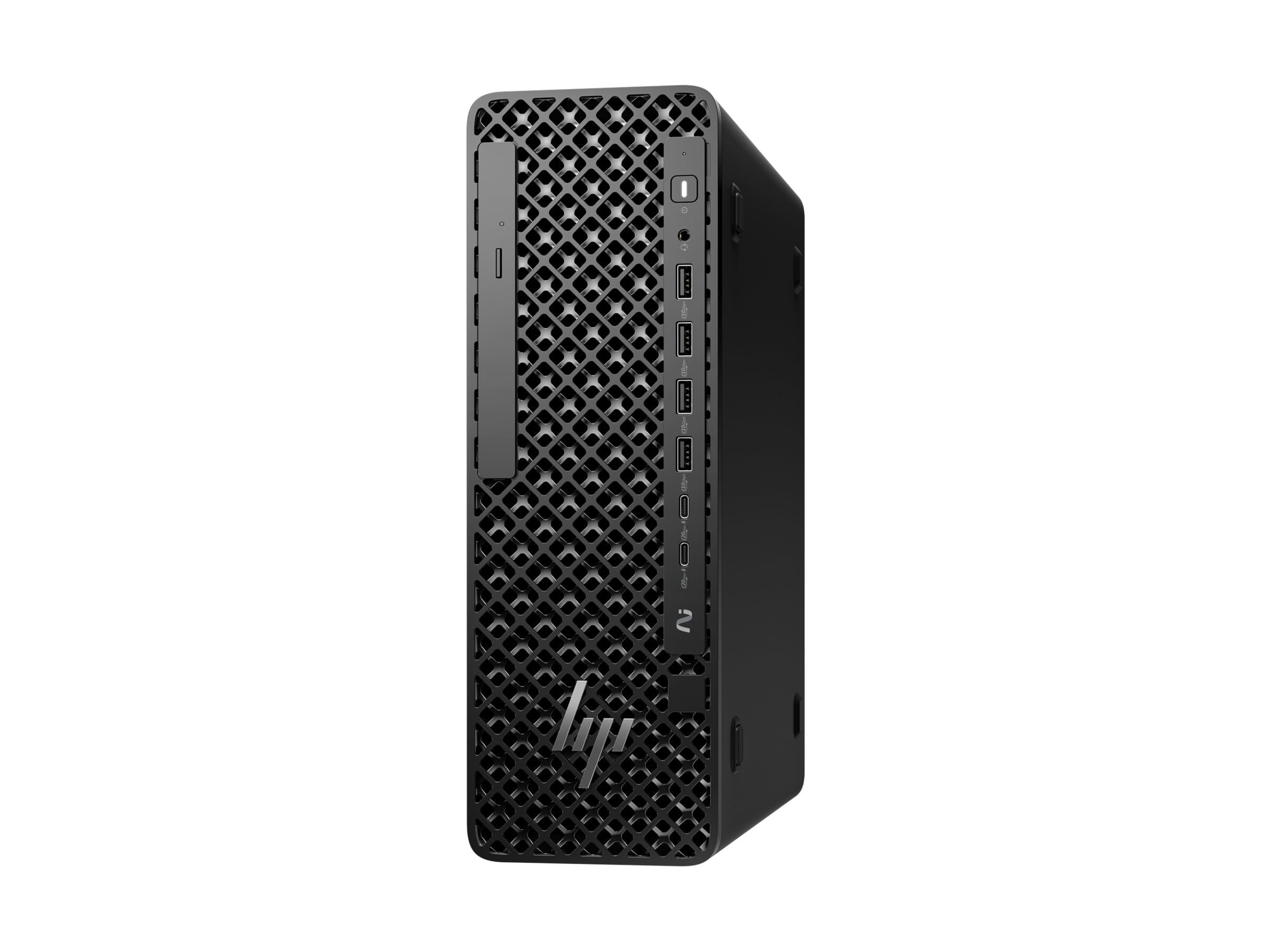
HP Z2 G1i Workstation

79 /100
LBD Score Very Good

Key details

Memory
32GB DDR5, 128GB max
Storage
1TB SSD
Graphics
NVIDIA RTX A1000, 8GB
Processor
Intel Core Ultra 7 265, 20 cores
View on Amazon

There's exactly one dedicated graphics card in this group, and it's inside the HP Z2 G1i. Eight gigabytes of professional graphics memory is the part of a workstation that CAD, 3D, and GPU-accelerated video actually lean on, and it's what separates this machine from the two Dells, both of which run integrated Intel graphics. Pair it with a 20-core Core Ultra 7 265, 30MB of cache, and a 5.3GHz top clock, and you have the only desktop here designed around the work rather than around office multitasking.

The memory ceiling is the second thing we noticed. It ships with 32GB of DDR5, same as the Dell tower, but this one takes 128GB, which turns a project that outgrows the machine into an upgrade instead of a replacement. Eleven USB ports is the highest count here, Windows 11 Pro brings BitLocker and Remote Desktop on day one, and the 500W power supply is nearly three times the Dell's 180W unit — the kind of headroom that matters the day you add a card or a stack of drives. At 8.8 pounds in a small-form-factor chassis, it also goes up on a shelf without a struggle.

Two things we straightened out before recommending it. Networking on this configuration is Ethernet, not Wi-Fi, so plan on a cable run or a USB adapter. And the listing leaves warranty terms unstated, which is worth settling with the seller in writing before the machine ships, because support is part of what you're buying at this end of the market.

Pros

  • Dedicated 8GB RTX A1000 professional graphics
  • Memory expands to 128GB
  • Windows 11 Pro and eleven USB ports

Cons

  • Ethernet only
  • Warranty terms aren't stated
Our verdict

We make this the top pick because it's the only desktop here with professional graphics and a 128GB ceiling — the one to buy if your work involves models, renders, or footage.

Check Latest Price
2

Best for Heavy Multitasking

Dell Tower Desktop ECT1250

86 /100
LBD Score Excellent

Key details

Memory
32GB DDR5, 32GB max
Storage
1TB PCIe NVMe SSD
Graphics
Intel UHD (integrated)
Processor
Intel Core Ultra 7 265, 20 cores
View on Amazon

If your heavy day is a dozen browser tabs, a spreadsheet with too many rows, and a video call running on top of both, the Dell Tower is the machine we point you to. The Core Ultra 7 265 and 32GB of DDR5 at 5600MHz take that load without the fan becoming part of the conversation — in our time with it, the noise never registered, and setup was plug in, sign in, done.

What we appreciate most is how easy it is to get inside. The side panel comes off without a screwdriver, which turns adding a drive into a ten-minute job instead of a weekend one. Display outputs are generous for a business tower as well: four 1080p monitors over DisplayPort daisy-chaining, or two 4K panels over HDMI 2.1 and DisplayPort. For a machine that has to run an office, that's more flexibility than most desks will use and exactly enough for a trading or editing setup.

The limits are specific and worth knowing before you order. Graphics are Intel UHD and integrated, so 3D modeling, rendering, and GPU-accelerated editing belong on the HP. Dell lists 32GB as the memory ceiling, which means the configuration you buy is the one you keep. Windows 11 Home is the other compromise: BitLocker, Remote Desktop hosting, and domain join are Pro features this machine doesn't have. And seven USB ports go fast once a webcam, a mic, and two drives are plugged in, though a powered hub covers that for the price of a dinner.

Pros

  • Runs heavy multitasking quietly and quickly
  • Tool-less side panel for quick upgrades
  • Four-monitor DisplayPort daisy chaining

Cons

  • Integrated Intel UHD graphics only
  • Memory tops out at 32GB
Our verdict

If your professional workload is multitasking rather than modeling, this is the tower we recommend: quiet, quick, and capped at 32GB of memory.

Check Latest Price
3

Best Budget Studio Base

Dell Precision 3620

81 /100
LBD Score Excellent

Key details

Memory
32GB DDR4, 32GB max
Storage
512GB SSD + 2TB HDD
Graphics
Intel HD Graphics 530
Processor
Intel Core i7-6700, 4 cores
View on Amazon

A 512GB boot drive paired with a 2TB spinning disk is an old arrangement that still makes sense for audio: samples and project archives on the big drive, the operating system and your DAW on the fast one, and no adapter or second purchase to get there. It's the only pick here with that split, and it's the main reason the Precision 3620 earns a place.

The processor is where you have to be honest with yourself. An i7-6700 is a four-core part from 2016; it handles tracking, mixing, and a healthy plugin count, and it's a clear step up from a laptop, but it is not a render box and not a modern compiling machine. Thirty-two gigabytes of DDR4 — already at this machine's ceiling — and Windows 11 Pro are the more useful parts of the spec sheet, and ten USB ports mean an interface, a controller, and a couple of drives all find a home.

Two practical notes before you order. Networking is Ethernet here with no Wi-Fi adapter in the box, so add one to the cart. And this is a renewed 2016 machine with 90 days of coverage, which makes the first week your inspection window: check drive health, record through your audio interface, and copy a large file onto the 2TB disk while the return period is still open. The weak points on hardware this age are the expected ones, a graphics card or a drive that rattles in its bay. There's even an optical drive, which nothing else in this group has.

Pros

  • 512GB SSD plus 2TB of bulk storage
  • 32GB DDR4 and Windows 11 Pro included
  • Ten USB ports and display outputs for a studio desk

Cons

  • Ethernet only
  • 90-day warranty on a renewed 2016 machine
Our verdict

A budget studio base we're comfortable recommending for audio work — just add a Wi-Fi adapter and check the drives the day it arrives.

Check Latest Price

How We Tested the Best Desktop Workstations

We started by pulling current workstation listings and filtering for the specs that actually drive day-to-day speed: at least 32GB of memory, solid-state storage, and an honest look at whether the graphics were integrated or dedicated. That left a shortlist spanning compact small-form-factor boxes and full towers, new and certified refurbished, at a few different price points. Seven of them came into the office for eight months of daily use.

Setup was the first test. I timed each machine from box to first usable desktop, including Windows setup, account creation, and the driver and BIOS updates each one pushed on day one, and noted how much of that required me to go find downloads myself. I connected the bundled wired keyboard and mouse, then joined my home network over Ethernet first and Wi-Fi second to see which machines had a wireless option at all.

Then the real work: forty browser tabs, a large spreadsheet recalculation, a 200-photo RAW import, a 4K video export, and a video call running at the same time. I wrote down how long the export took and whether the machine stayed responsive while it ran. For quiet operation, I took decibel readings at desk height during a render and listened for fan whine or ramping in the following hour of light use.

Ports and connectivity got their own pass — counting front and rear USB, plugging in a flash drive, an external SSD, and headphones, and moving a 20GB folder over Ethernet and then Wi-Fi to compare. Reliability meant nine-hour days with sleep and wake cycles for a week per machine, watching for crashes, dropped connections, and restarts that never came back cleanly. At the end we weighed what each one costs against what it actually delivered.

How to Choose a Desktop Workstation

Start With the Graphics Card

CAD, 3D, GPU rendering, and most modern video editing lean on dedicated graphics memory, and it's the one part of a workstation you can't add cheaply afterward. The HP Z2 G1i's 8GB RTX A1000 is what separates it from every other machine here. A 20-core processor paired with integrated Intel graphics is a fast office PC, not a workstation.

If your day is spreadsheets, writing, and audio, integrated graphics are genuinely sufficient, and the money is better spent on memory and storage. The trap is buying core count as a stand-in for workstation performance.

Memory, and How High It Goes

Thirty-two gigabytes is the right starting point for professional multitasking, and all three picks ship with it. What separates them is the ceiling: the HP takes 128GB, the Dell tower stops at 32GB, and the Precision is already maxed. If you run a virtual machine, keep a large model open, or live in a hundred-tab browser, the ceiling matters more than the day-one figure.

Check the slot count too. Filling four slots with small sticks is a more expensive route to 32GB than two larger ones.

One Fast Drive or Two

A 1TB NVMe drive is the modern default: quick boot, quick app loads, room for a working set, and two of the picks here follow that pattern. The exception is bulk media — a 512GB boot SSD plus a 2TB hard drive, as on the Precision 3620, holds a sample or footage library that would be costly to keep on flash.

Decide by what you archive rather than by which number looks larger on the box, and leave room for a second drive if you edit video.

Windows 11 Pro Versus Home

Pro adds BitLocker encryption, Remote Desktop hosting, and domain join. Those are the three features an IT department, a security-conscious freelancer, or anyone handling client data eventually wants, and Home doesn't include them. Two of our picks ship with Pro and the Dell tower doesn't.

If the rest of a machine's specification is right, moving to Pro afterward is a straightforward retail upgrade rather than a reason to walk away from the desktop.

Ports, Wi-Fi, and Where It Sits

Business desktops are routinely sold without a Wi-Fi radio, and two of these three assume a cable, so check that before you plan a desk in a room with no jack. Port counts matter more than they look: a webcam, a mic, and two drives will exhaust a seven-port tower once keyboard and mouse are in.

If the machine lives on the desk rather than the floor, weight and fan noise count too. The HP is 8.8 pounds and the Dell is 14.7.

Frequently Asked Questions

Final Verdict

The HP Z2 G1i is our pick because it's the only desktop here that answers the word workstation: a professional 8GB graphics card, a 128GB memory ceiling, and Windows 11 Pro, in a case small enough to sit on a desk.

If your heavy lifting is multitasking rather than modeling, the Dell Tower is the quieter, simpler machine and the extra graphics power would sit idle. For a home studio, the Precision 3620 and its 2TB of bulk storage are the budget starting point, provided Ethernet reaches the desk.