Best Computer Speakers of 2026

Your laptop's speakers had to fit inside a laptop, which is why a video call can sound like it's happening in a tin can two rooms over. A decent pair of desktop speakers fixes that, though the budget end of this category hides small traps, like sets that distort at half volume and indicator lights bright enough to read by at midnight.

My team and I spent the past four months living with 14 sets, and the differences showed up on day one. The wattage printed on the box told us almost nothing about how loud a set actually plays; the placement of the volume control told us almost everything about whether we'd keep reaching for it. Footprint mattered just as much, since a pair that swallows your monitor stand is a pair you resent.

One thing worth knowing first: Bluetooth is handy for bouncing between a work laptop and a phone, but on inexpensive sets it adds just enough delay that lips drift slightly out of sync on video, so plan to plug in if you game or watch a lot. Beyond that, the picks run from desk-tidy bars to a 2.1 setup with real low end.

1

Best Overall

Creative Pebble V3

89 /100
LBD Score Excellent

Key details

Output
8W RMS
Drivers
2.25-inch full-range, 45° elevated
Connection
USB-C audio and power, Bluetooth 5.0
Dimensions
4.69"D x 4.8"W x 4.61"H
View on Amazon

Creative tilts the Pebble V3's drivers up at 45 degrees, and that angle is the whole idea: the speakers sit low — roughly coffee-cup height — while the sound still arrives at your ears instead of your keyboard. On a desk where the monitor owns the middle and the space underneath is already spoken for, the pair disappears into the layout. A single USB-C cable carries audio and power together, so there's no second lead hunting for a headphone jack that a modern laptop may not even have.

With 2.25-inch full-range drivers and 8W RMS, this isn't a set that fills a room, and it doesn't try to be. What we listened for was speech — video calls, lecture recordings, the long video essays that eat an afternoon — and the Clear Dialog processing genuinely helps at the low volume most of us work at. Setup is one plug and no software at all, which is the least fussy introduction of anything here. Bluetooth 5.0 is the bonus: your phone pairs without anything being unplugged.

Set beside the budget pairs here, the money goes on the aimed drivers, the single cable, and a finish that doesn't read as office surplus. Set beside the wooden OHAYO or the 2.1 Logitech, you give up weight and headroom, which is the right trade when the desk is shared with a monitor, a keyboard, and a mug that's always slightly too close.

Pros

  • One USB-C cable carries audio and power
  • Drivers angled 45 degrees toward your ears
  • Clear Dialog keeps speech intelligible quietly
  • Bluetooth 5.0 for phone listening

Cons

  • Bluetooth can drop mid-session
Our verdict

This is the pair we tell most people to buy: one USB-C cable, drivers tilted at your ears, and speech that holds up at working volume.

Check Latest Price
2

Best Budget

Amazon Basics V620

89 /100
LBD Score Excellent

Key details

Power
2.2 watts RMS
Inputs
USB power, 3.5mm aux
Drivers
2.8-inch woofer, 1-inch tweeter
Dimensions
3.9"D x 2.6"W x 2.8"H
View on Amazon

The V620 pair is small, metal-cased, and finished better than anything else at the bottom of this set, which is why we point to it when someone wants to hear their computer and has no interest in a subwoofer, a light show, or an app. Two point two watts RMS across a 2.8-inch woofer and a 1-inch tweeter per cabinet doesn't sound like much — and at arm's length, for dialogue, podcasts, and the music you half-listen to while working, it's enough.

What we noticed first was the weight. Each cabinet sits on a padded base that keeps it from skating when you knock the desk, and a bottom radiator gives voices a little more body than plastic puck speakers manage. Held up against a laptop's own drivers, the difference lands in the lower half of a voice, which is exactly where laptop audio falls apart.

The in-line volume wheel is the detail we appreciate most. It lives on the cable rather than the cabinet, so you reach for it without looking, and it's a faster fix than a software slider when a video suddenly gets loud. Next to the OHAYO or the Logitech 2.1, this is the set for a small desk and modest ambition — the one that makes a computer audible without asking anything back.

Pros

  • Metal cabinets with a padded, non-slip base
  • Small enough to tuck under a monitor
  • In-line volume wheel within easy reach
  • Bottom radiator adds body to voices

Cons

  • Bright blue LEDs you'll want to cover
  • Failures show up within the first several months
Our verdict

We think it's the right first upgrade from laptop speakers — a small metal pair that makes dialogue and podcasts genuinely listenable.

Check Latest Price
3

Best for Multiple Devices

Logitech Z207

88 /100
LBD Score Excellent

Key details

Controls
On-speaker volume and headphone jack
Connection
Bluetooth 4.2, 3.5mm aux
Dimensions
4.88"D x 1.39"W x 9.49"H
Peak Power
10 watts
View on Amazon

Nine and a half inches is the number to check before anything else: the Z207 is a pair that wants open desk either side of the monitor, not a shelf tucked under it. Buy the height and you get the most versatile set here — Bluetooth 4.2 alongside a 3.5mm cable, with Logitech's Easy-Switch handing audio between your computer and your phone: pause on one, press play on the other, and the sound follows.

We used the headphone jack more than we expected to. It sits on the front of the cabinet beside the volume and pairing controls, so plugging in a headset silences the room without anyone crawling behind the tower — a small thing until you share a room with someone who is also on calls all day.

The sound leans clear and forward rather than warm, which suits speech, games, and video, and a passive radiator in each cabinet gives it more low end than a cabinet this narrow has any right to. Enough, in fact, that we stopped thinking about adding a subwoofer for anything short of a feature film.

Pros

  • Bluetooth 4.2 and a 3.5mm cable on one set
  • Easy-Switch moves audio between computer and phone
  • Headphone jack and volume on the cabinet front
  • Passive radiators give the narrow cabinets low end

Cons

  • Light crackle at maximum volume
Our verdict

Our pick when audio comes from two places: Bluetooth and a cable on the same set, with a headphone jack within reach.

Check Latest Price
4

Best for Bass

Logitech Z313

89 /100
LBD Score Excellent

Key details

Power
25 watts
Inputs
3.5mm aux
Controls
Wired pod with headphone jack
Configuration
2.1 with subwoofer
View on Amazon

A subwoofer on a desk sounds like a bad idea until you hear what a small one does for games and film. The Z313's 25 watts split across two satellites and a compact sub, and the effect isn't boom so much as weight — footsteps, engines, and bass lines arrive with something underneath them. The satellites are small enough to sit either side of a monitor without crowding it.

What earns the set its place is the control pod: a wired puck with a volume dial and a headphone jack, sitting where your hand already goes instead of behind the monitor or inside a system slider. Setup is three labelled plugs and no software, and we had sound on the first try — worth saying, because speaker manuals have a habit of assuming a sound card that no longer exists.

One thing shows up over time: there's no separate bass or tone control. The pod handles volume and nothing else, so a desk that booms stays boomy until you open the computer's equalizer and pull the low shelf down a few decibels. It's a workaround rather than a fix, but it's the difference between living with the Z313 and fighting it.

Pros

  • 25 watts with a subwoofer behind the bass
  • Wired control pod with volume and headphone jack
  • Three labelled plugs and no software

Cons

  • Subwoofer needs floor or shelf space
Our verdict

We suggest it when the desk has floor beside it: 2.1 done simply, with weight behind the bass and a control pod within reach.

Check Latest Price
5

Best for Music

OHAYO C6

87 /100
LBD Score Excellent

Key details

Power
60 watts (30W x 2)
Inputs
Bluetooth 5.3, RCA, aux, USB
Drivers
3-inch carbon fiber, 0.75-inch tweeter
Enclosure
MDF wood
View on Amazon

The C6 is the only set here with wooden cabinets, and that's not a styling note. An MDF enclosure resists the boxy resonance plastic cabinets add, and the parts inside back it up: a 3-inch carbon fiber full-range driver and a 0.75-inch dome tweeter per side, driven at 30 watts each. This is the pair that comes closest to a small bookshelf system sitting on a desk.

We were surprised by how much low end comes from the cabinets themselves — no subwoofer, no floor space, and still something underneath the bass line. The trade is size: these are bookshelf-shaped boxes, deeper than the puck sets, so they want a wider desk or a shelf behind it. The inputs are the generous part, with Bluetooth 5.3, RCA, aux, and USB, which means a turntable, a TV, or a phone all have somewhere to go.

Controls are push buttons on the back, and the set doesn't power itself down when the computer sleeps. We ended up putting it on a switched strip so the whole desk goes dark at once — the kind of small arrangement that decides whether a set lives comfortably on a desk or becomes one more thing to remember at midnight.

Pros

  • MDF cabinets keep the sound out of the box
  • 60 watts across carbon fiber drivers
  • Bluetooth 5.3, RCA, aux, and USB inputs
  • Compact for a bookshelf-style cabinet

Cons

  • Failures to power on around the six-month mark
Our verdict

Wooden cabinets, real power, and inputs for a turntable or a TV — we point to this one when music matters as much as meetings.

Check Latest Price
6

Best for Small Desks

XKX116A Clip-On Speaker

86 /100
LBD Score Excellent

Key details

Mount
Spring clamp, top or bottom
Power
8 watts
Controls
Front volume knob
Dimensions
2.83"D x 9.17"W x 2.13"H
View on Amazon

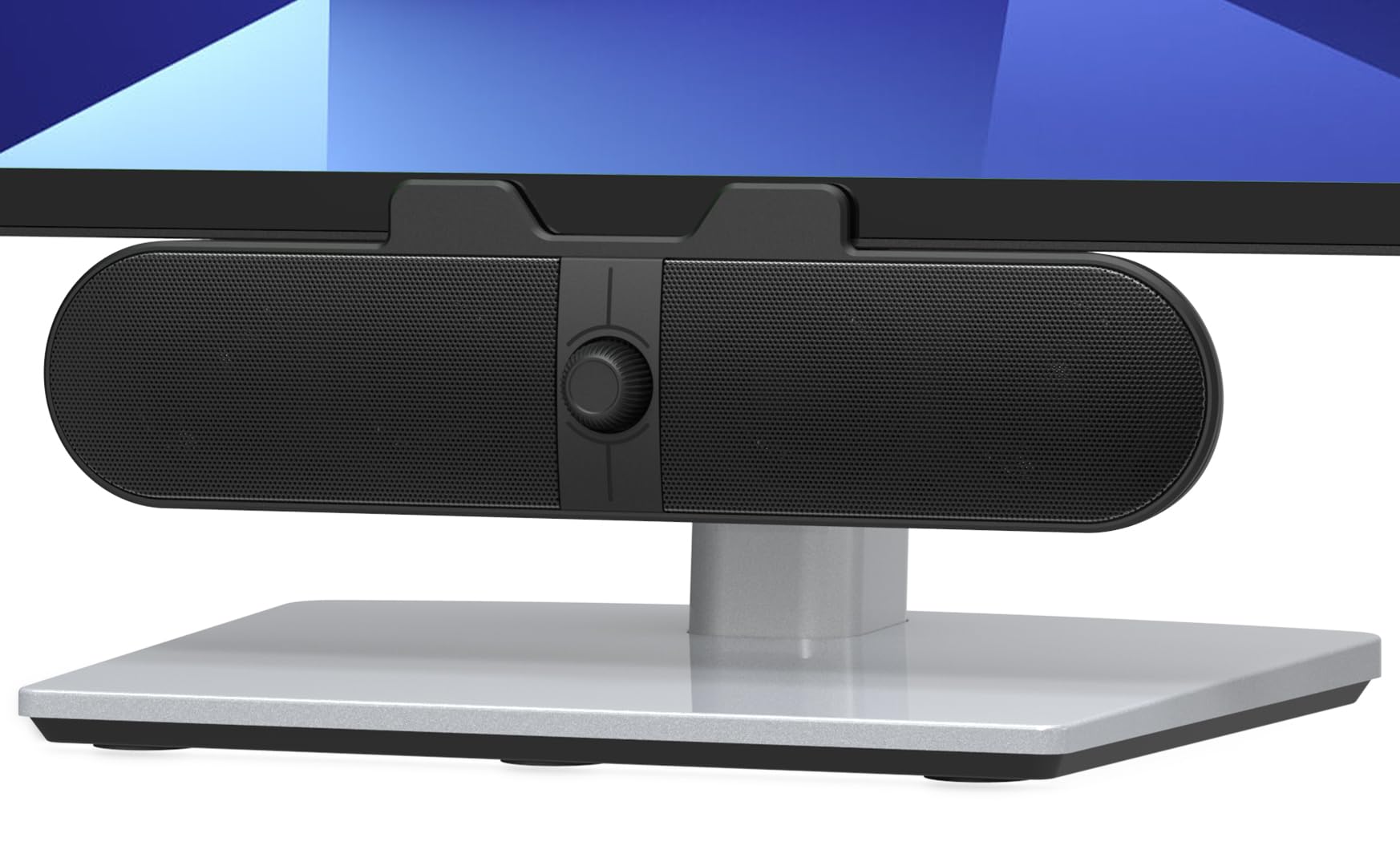
Clamp a soundbar under a monitor and you've mirrored the stereo image — left becomes right. The XKX116A handles that with a built-in G-sensor that flips the channels depending on whether the bar is mounted above or below the screen, and it's the detail that tells you someone actually used the thing. The spring clamp grips the top, bottom, or side of the monitor, and the bar is about nine inches wide, so it costs you no desk at all.

The front volume knob is the other reason this is our pick among the clip-on bars: a rotary dial you can find by feel beats a row of touch buttons you have to look at. Eight watts through two 40mm drivers and a pair of passive radiators is a clear step up from laptop speakers, and USB audio means one cable to the computer, with a USB-C adapter in the box for a laptop that only has the small port.

Against the pairs here, this is the space argument: the desk stays clear, the cable runs along the monitor arm, and nothing gets knocked over. What you give up is stereo separation — two small drivers a few inches apart image narrower than a pair set either side of the screen — and that's the honest trade for a desk with no room to give.

Pros

  • G-sensor keeps left and right correct either way up
  • Front knob you can find without looking
  • Clamps on and frees the whole desk
  • Clear sound well above laptop speakers

Cons

  • Clamp can struggle on thick curved monitors
  • No Bluetooth, so it's wired only
Our verdict

For a monitor with no speakers and no spare desk, we clamp this bar on and forget it — the front knob is what keeps it usable.

Check Latest Price
7

Best for Gaming Setups

OFFSIR GS005

85 /100
LBD Score Excellent

Key details

Power
10 watts (5W x 2)
Design
Two speakers that splice into a bar
Inputs
USB power, 3.5mm aux
Lighting
Touch RGB, four modes
View on Amazon

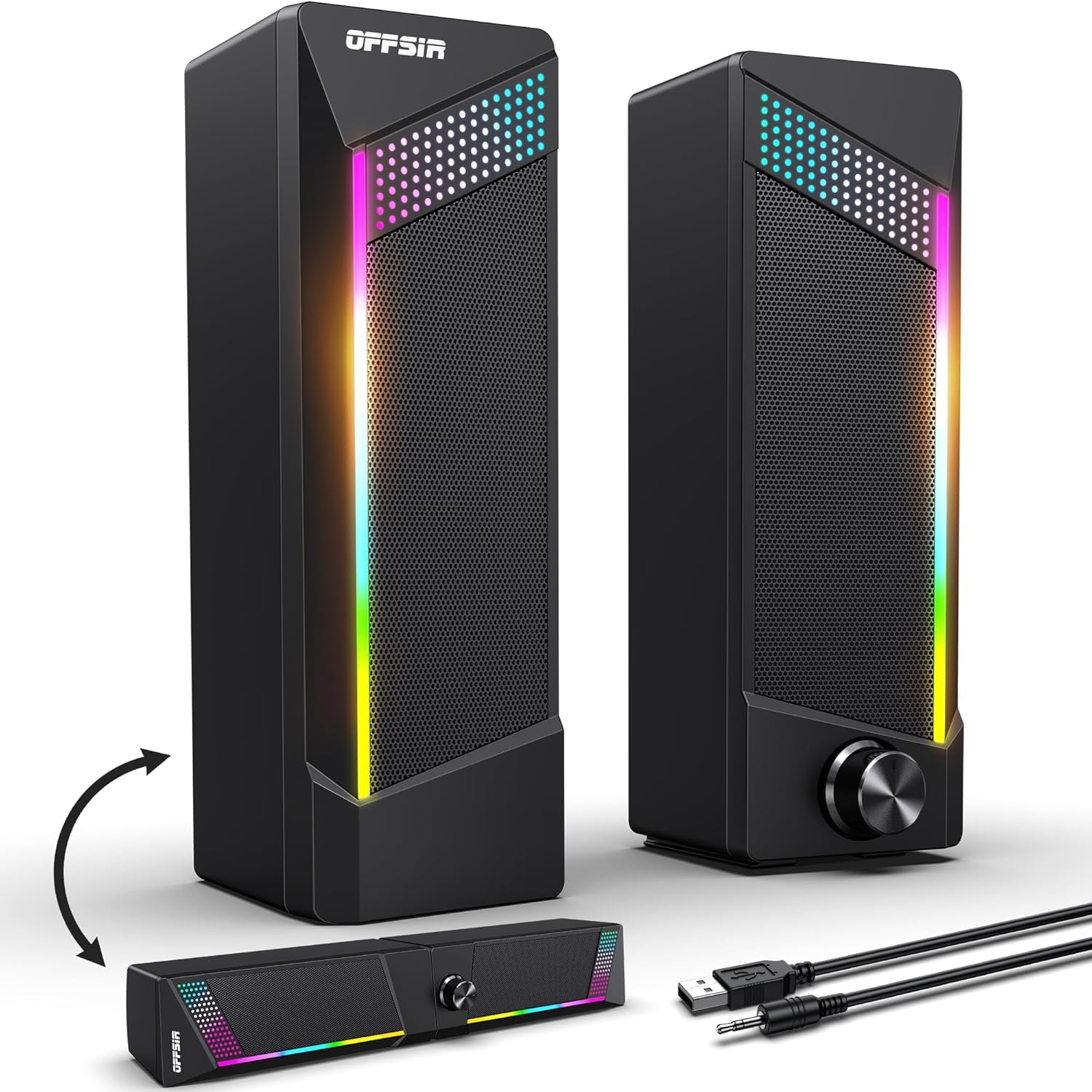
Two speakers or one bar, depending on the day: the GS005's cabinets separate for stereo either side of the monitor and splice back together into a single soundbar when desk space runs out. We like that it doesn't force the choice at checkout — the same set covers a wide desk in the morning and a crowded one after a reshuffle.

The listing opens with a warning that the box contains two speakers and no soundbar, because the product photos show the thing taken apart. That's a fair description of how it works and a decent hint at what you're buying. The RGB runs through four modes, changed by touching the top, and there's an off setting, which not every light-up set here offers.

What it is, is a gaming-desk set: bright, compact, easy to live with. Ten watts across two 5-watt drivers buys clear speech and some atmosphere rather than volume for a room, and on a desk with a mechanical keyboard and a headset on, that's usually the right trade.

Pros

  • Splits into stereo or joins into one bar
  • Touch-controlled RGB with an off setting
  • Clear, bright sound for games and voice

Cons

  • Two cables to route
Our verdict

We keep this one on the gaming desk: split it for stereo, join it into a bar, and change the lights with a touch.

Check Latest Price
8

Clean Setup

ICOREBEI USB-C Soundbar

87 /100
LBD Score Excellent

Key details

Power
6 watts
Lighting
Three RGB modes
Connection
USB-C audio and power, Bluetooth 5.3
Dimensions
16"D x 2.6"W x 2.5"H
View on Amazon

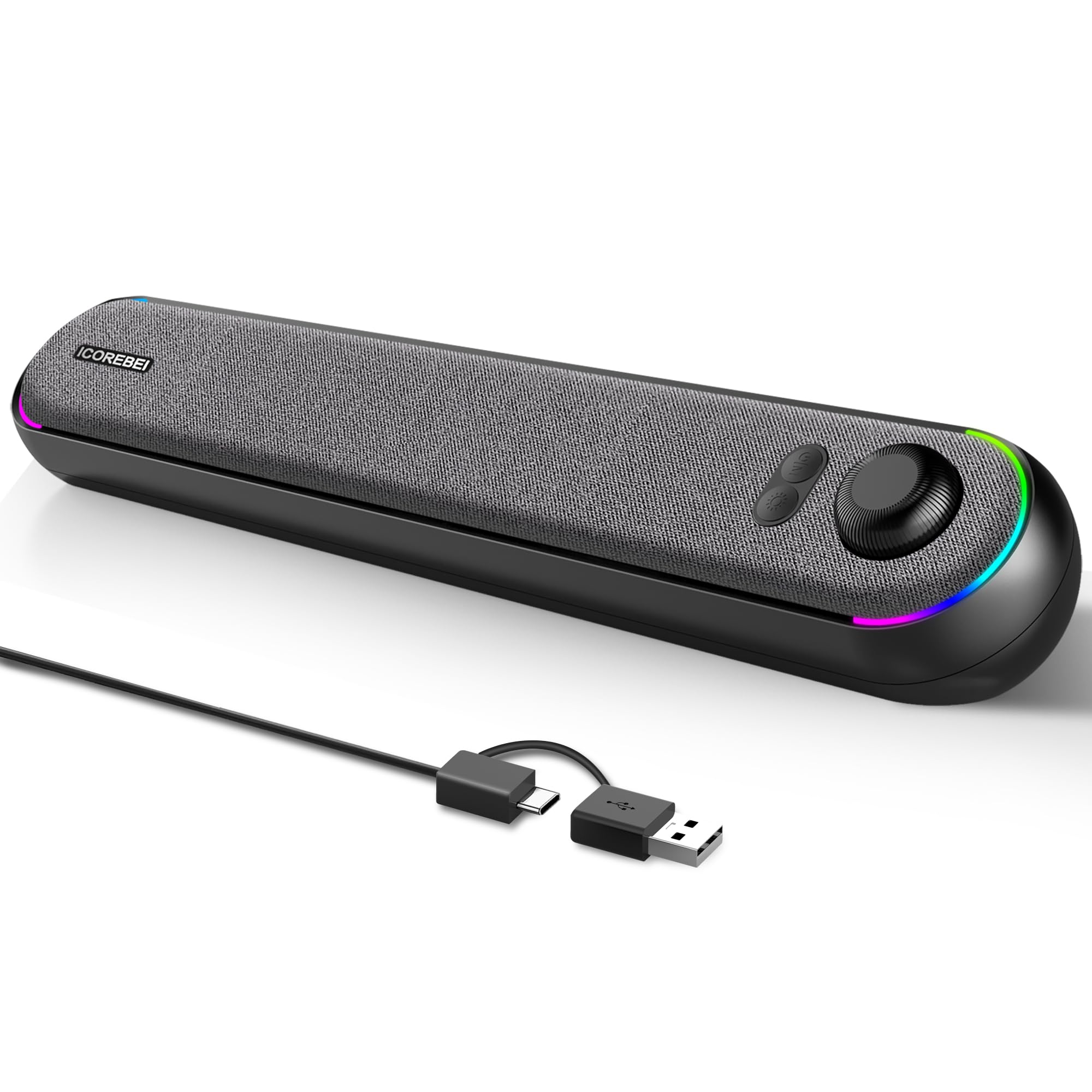
A slim bar roughly sixteen inches wide and two and a half inches tall, angled up toward the listener, with one USB-C cable carrying both audio and power: the S2818 is the tidiest answer here for a monitor with no built-in speakers and a desk with no room to spare. It reads as a piece of monitor hardware rather than a pair of speakers, which is rather the point.

We appreciate the details that usually don't survive at this end of the market. The cable is USB-C to USB-A with an adapter in the box, Bluetooth 5.3 is there for a phone, and the three RGB modes on the sides are subtle enough to leave running. There's no battery, but it will run from a USB power bank, which is a strange and genuinely useful thing to be able to do with a desktop speaker.

The angled front is what makes it work: sitting under a monitor, it fires up at your face rather than into your knees, and dialogue arrives without you leaning in. It's the least fussy upgrade here for a small, quiet office, and it looks like it was designed for the desk rather than dropped on it.

Pros

  • One USB-C cable for audio and power
  • Angled bar fires up at the listener
  • Bluetooth 5.3 for phone pairing
  • Three RGB modes subtle enough to leave on

Cons

  • Six watts limits it to a quiet room
Our verdict

A quiet room and a clean desk are where this bar makes sense to us: one USB-C cable carries power and sound.

Check Latest Price

How We Chose and Tested These Desktop Speakers

We started with research, gathering every 2.0 and 2.1 set sold for desk use, then cutting anything with no reachable volume control, anything too wide to sit beside a standard monitor, and near-duplicates from the same line. That left 14 sets, which we ran for four months on my desk, on two colleagues' desks, and in a shared apartment where the computer lives in the living room.

Every set went through the same day: a morning of video calls at low volume, an afternoon of music, an evening of gaming, a weekend movie. We turned each one up until the sound broke apart and noted where that happened, then sat in a silent room with nothing playing to listen for hiss and hum. Bluetooth pairs were connected to both a phone and a laptop to see how fast they swapped and whether they drifted out of sync, and we re-seated the aux and USB-C connections more times than was strictly reasonable. Before bed we killed the lights and photographed each set's indicator glow.

Controls got tested blind: we reached for the volume without looking, mid-call, and noted whether we found it or grabbed the wrong speaker. Cables were yanked, knobs spun a few hundred times, and each pair spent a week in a backpack to see how it handled being moved around. At the end we set every set next to a monitor and judged the whole object — whether the cabinet felt dense or hollow under a knuckle, whether the finish showed fingerprints, whether the thing earned its space. Three are still sitting on desks now.

How to Choose Computer Speakers

USB Audio or a Headphone Jack

Plenty of sets sold as USB speakers use the USB lead for power only and still need a 3.5mm cable for sound — the Amazon Basics pair works that way. A true USB-audio set, like the Creative Pebble V3 or the ICOREBEI bar, appears in your computer's sound settings as its own output device, carries audio and power down one cable, and works on laptops that no longer have a headphone jack.

If your machine has no 3.5mm port, look for USB audio in the specifications rather than USB power. If it does, either route works, and the 3.5mm sets tend to be the cheaper ones.

Fit the Set to the Desk You Have

A pair needs two footprints plus clearance either side of the monitor, so measure the gap under the screen and the width to each side before you commit. Height is the specification people forget: the Logitech Z207 stands nearly nine and a half inches tall and won't slide under a monitor shelf, while a clip-on bar takes no desk surface at all and a slim soundbar needs an inch or two of clearance.

Add a couple of inches for cables, and factor in floor or shelf space if you're choosing a 2.1 system with a subwoofer.

What Watts and a Subwoofer Buy You

Power is quoted as peak or RMS and the two aren't comparable, so compare like with like before you read anything into a number. Our rule of thumb: a little over two watts handles speech at arm's length, eight to ten fills a room at desk volume, and a 2.1 system such as the Z313's 25 watts with a subwoofer is what puts weight under games and film.

The sub is a third box, though, and it asks for floor or shelf space a 2.0 pair never wants. On a small desk that trade is often not worth it.

Controls, Lights, and Living With Them

Volume is the control you touch every day, and where it sits matters more than how it looks. The cheapest arrangement is a wheel on the cable; the Z313 uses a wired pod that sits by your hand; the XKX bar puts a knob on the front where you can find it blind. Software-only volume is the one to avoid on a shared machine, where someone else's settings become yours.

A headphone jack on the cabinet is a genuine convenience, and if a set has bright LEDs, check that they can be switched off before you park it in a bedroom office.

Frequently Asked Questions

Final Verdict

We tested these at desk distance with speech first and music second, and the Creative Pebble V3 is the set we tell most people to buy. The single USB-C cable removes the headphone-jack problem, the tilted drivers put sound where you actually sit, and dialogue stays intelligible at the volume you work at rather than the volume a demo wants.

If budget is the binding constraint, the Amazon Basics V620 makes a computer audible for very little. If bass or film is the point and the desk has floor beside it, the Logitech Z313's subwoofer earns its space.