Best Bluetooth Computer Speakers of 2026

Bluetooth is supposed to be the easy part of a desktop speaker, and it's usually where things go wrong. A set pairs happily with your laptop, then goes silent the moment your phone rings, and getting it back takes three button presses and some guessing. What you're actually shopping for is a pair that stays connected, switches between devices without a fight, sounds noticeably better than your monitor's built-in speakers, and doesn't claim half your desk.

Over the past six months, my team and I have kept 12 sets on our desks — some for music, some for calls, a couple for late-night gaming. Two things surprised me. Wattage is the least useful number on the box; clean tuning at ordinary volume beats a louder set that turns harsh halfway up. And most setup problems turn out to be cable problems, not Bluetooth ones, so check where the USB power and audio leads will actually reach before you fall for the design.

Looks matter more here than with most audio gear, since these sit in your eyeline all day, and so does value: a compact bar that handles calls and music well can cost less than a single powered monitor. The picks below are the ones we kept plugged in.

1

Best Overall

Edifier M60

90 /100
LBD Score Outstanding

Key details

Power
66W RMS (pair)
Inputs
USB-C, Bluetooth, AUX
Bluetooth
5.3 with LDAC
Size Per Speaker
100 x 168 x 147 mm
View on Amazon

A 1-inch silk-dome tweeter above a 3-inch aluminum mid-bass driver, with 66W RMS shared across the pair — that's the specification that separates the M60 from everything else here, and it's why it's our top pick. Splitting the highs away from the midrange is what stops cymbals, strings and dialogue from smearing into one another at close range, which is the range a desktop puts you in all day.

The cabinets are about the width and height of a phone stood on end — 100 by 168 by 147 millimeters each — so they'll sit either side of a monitor without crowding the keyboard. We were also impressed by the stands: they're included, they angle each speaker up toward your ears, and at desk distance that aiming does more for detail than any equalizer setting. The MDF box helps as well; it's a deader material than the plastic used by most of the pairs here.

USB-C carries power and audio in a single cable, so a computer connection needs nothing else, and Bluetooth 5.3 with LDAC handles phone streaming at up to 990 kbps. It's the most complete input set here, and the touch panel on the master speaker covers volume and source without a remote.

What you pay for is refinement rather than extras. What comes back is the only set here with a dedicated tweeter and a separate mid-bass driver — the pair we kept returning to when a track deserved better than background.

Pros

  • Dedicated tweeter plus a separate mid-bass driver
  • 66W RMS across the pair
  • USB-C audio and Bluetooth 5.3 with LDAC
  • Phone-sized cabinets fit beside a monitor

Cons

  • Costs more than any other set here
  • Some units fail soon after setup
Our verdict

We recommend the M60 to anyone who wants a desk to sound like a real stereo: it's the only set here with a dedicated tweeter, and it still fits beside a monitor.

Check Latest Price
2

Best Value

Creative Pebble V3

89 /100
LBD Score Excellent

Key details

Power
8W RMS (16W peak)
Inputs
USB-C, Bluetooth, 3.5mm
Bluetooth
5.0
Size Per Speaker
4.69 x 4.8 x 4.61 in
View on Amazon

One cable is the whole pitch. The Pebble V3 takes power and audio over a single USB-C connection, and Creative includes a USB-A adapter for desktops that predate the newer port. No power brick, no second lead, no 3.5mm plug fighting for space behind the tower — on a desk, that's a real luxury.

The drivers are 2.25 inches across and set at a 45-degree angle, which points them up toward your head instead of straight ahead. At 8W RMS this is a nearfield speaker in the literal sense. We think that's the right trade for most desks: at arm's length it's clear and surprisingly full, and the further back you sit the thinner it gets.

It's also the best value in this guide and small enough to disappear under a monitor, which is why it's the set we suggest to anyone who wants better desktop sound without thinking hard about it. Bluetooth 5.0 is there for phone streaming when you want it. If you have more to spend, the M60 is a genuine step up; if you have less, the Amazon Basics pair costs less and gives up most of the bass.

Pros

  • One USB-C cable for power and audio
  • 45-degree drivers aim at your ears
  • Small enough to sit under a monitor

Cons

  • Bluetooth drops in some setups
Our verdict

We recommend the Pebble V3 to anyone who wants good desktop sound without spending much: one cable, a tiny footprint, and enough clarity for everything but a big room.

Check Latest Price
3

Best for Gaming Desks

Edifier G2000

92 /100
LBD Score Outstanding

Key details

Power
16W RMS (32W peak)
Inputs
USB, Bluetooth, 3.5mm
Drivers
2.75 in full-range
EQ Modes
Game, Music, Movie
View on Amazon

Plug the G2000 in over USB and the computer sees a new audio device, because the speakers are doing the conversion rather than your motherboard. That's the feature we care most about on a gaming desk: the headphone jack on the back of a tower is usually the noisiest output on the machine, and this takes it out of the chain entirely.

The hardware is a 2.75-inch full-range driver in a 0.65-liter column with a rear bass port, rated 16W RMS and 32W peak, with each cabinet tilted back 10 degrees. Three EQ modes — Game, Music and Movie — retune the speaker from a button on the cabinet rather than a software panel, which on a desk is the difference between a preset you use and one you forget about.

Twelve RGB effects dress the cabinets; the column shape is the more practical detail, a narrow footprint that gets the driver up to ear height without a stand. For a battle station that has to double as a work desk, it's a tidy piece of kit that happens to light up.

Pros

  • USB input bypasses the PC's onboard audio
  • Three EQ modes on the speaker itself
  • Narrow column cabinet with a 10-degree tilt

Cons

  • RGB lighting won't suit every workspace
  • 16W RMS is a desk-level ceiling
Our verdict

We recommend the G2000 for a gaming desk: its USB input takes the PC's noisy headphone jack out of the chain, and the EQ modes are a button press away.

Check Latest Price
4

Best for Bass

Logitech Z407

87 /100
LBD Score Excellent

Key details

Power
40W RMS (80W peak)
Inputs
Bluetooth, micro USB, 3.5mm
Control
Wireless dial, 30 m
Channels
2.1 with subwoofer
View on Amazon

The dial is the reason to look at the Z407. It's a battery-powered puck — two AAAs, included — that sits anywhere within 30 meters of the system and changes volume with a tap or a spin, so it can live where your hand already rests instead of behind a speaker.

Under the desk sits the other half of the argument: a 20-watt down-firing subwoofer in a ported box, part of an 80W peak, 40W RMS 2.1 system. It's the only set here with a real subwoofer, and if your desk doubles as a place to watch films or play games, it's the one that moves air rather than suggesting it. The oval satellites can stand upright or lie flat, which helps on a shallow desk.

Three inputs — Bluetooth, micro USB and 3.5mm — switch between sources, and the bass is what you'll notice first: this is a system that turns a desk into somewhere you want to watch a film. The dial doesn't always respond on the first spin, a small annoyance that's easy to forgive when the alternative is reaching behind a monitor.

Pros

  • Only 2.1 system here, with a 20W subwoofer
  • Wireless dial works up to 30 meters away
  • Satellites stand upright or lie flat

Cons

  • Subwoofer needs floor space
  • Bluetooth needs re-pairing in some setups
Our verdict

We recommend the Z407 to anyone who watches and plays at their desk: the subwoofer is the only one here, and the wireless dial keeps volume within reach.

Check Latest Price
5

Best Under-Monitor Soundbar

Nylavee SK100

87 /100
LBD Score Excellent

Key details

Width
16 in
Extras
Mic and headphone jack
Inputs
Bluetooth 5.0, 3.5mm AUX
Drivers
4 plus 2 bass diaphragms
View on Amazon

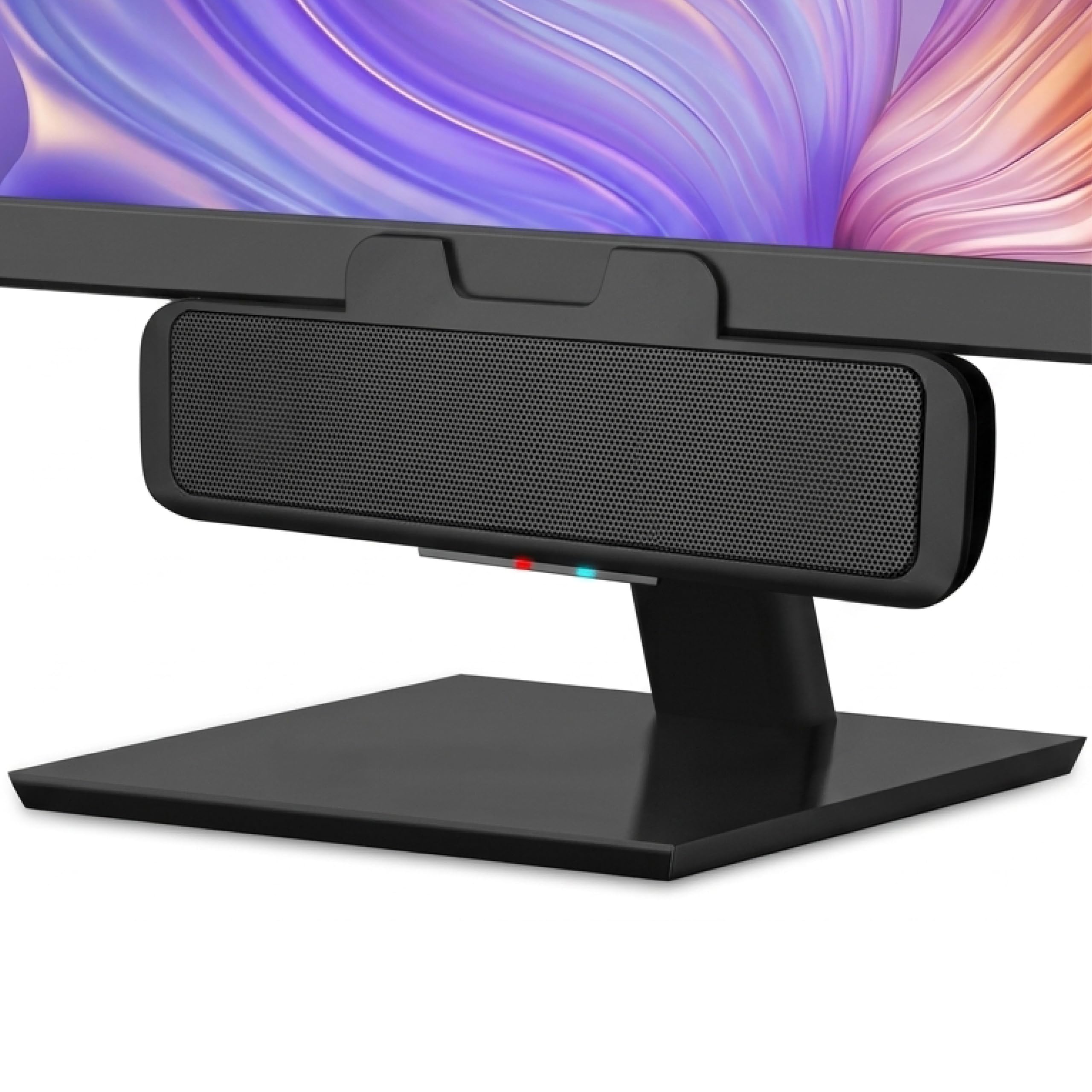
Sixteen inches wide and under three tall, the Nylavee SK100 slides into the gap under a monitor that a pair of speakers can't use. It also carries a built-in microphone and a headphone jack, which is unusual at this size and the reason it stayed in the roundup rather than being treated as another me-too bar.

Inside are four speaker units and two bass diaphragms, powered over USB from a laptop, a PC, a power bank or an adapter. Bluetooth 5.0 handles wireless and a 3.5mm cable handles everything else. One knob runs volume and it's the only control on the bar, so there's nothing to hunt for in the dark.

For a desk with room under the screen but not beside it, this is the bar we point to first. It makes the fuller sound of the two soundbars here, and the headphone jack means you can leave a headset plugged in and switch over without crawling under the desk. It's also the only bar here with a microphone at all, which for a desk that doubles as a meeting station is worth more than a little extra bass.

Pros

  • Fits in the gap under a monitor
  • Built-in mic and headphone jack
  • Four drivers plus two bass diaphragms

Cons

  • No USB audio, so it relies on the PC's 3.5mm jack
  • Bass is modest next to the 2.1 pick
Our verdict

We recommend the SK100 where the desk has room under the monitor but not beside it: it's the stronger of the two bars here for sound, with a mic and headphone jack.

Check Latest Price
6

Best for Video Calls

Cyber Acoustics CA-2890BT

88 /100
LBD Score Excellent

Key details

Mount
Clips to monitor
Power
5W (10W peak)
Inputs
USB, Bluetooth 5.0
Channels
Mono
View on Amazon

This one clips to the bottom edge of your monitor and hangs there: 8.3 inches wide, about 11 ounces, and no desk surface used at all. It's less a speaker system than a monitor accessory, and for the right desk that's exactly the point.

Output comes from a single full-range driver rated 5W, 10W peak. A USB cable connects it to a computer while a Bluetooth 5.0 link can hold a phone at the same time, and a multi-function button handles volume and source. There's a mic mute with an LED indicator, so you can see at a glance whether you're live.

Voice is where it earns its keep: clear, loud enough for meetings, and the mute button is genuinely reassuring in a shared room. Music is a different job, and there are better ways to spend the money if that's what your desk is mostly for.

Pros

  • Clips to the monitor, freeing the whole desk
  • USB to the PC and Bluetooth to a phone at once
  • Mic mute button with an LED indicator

Cons

  • Mono output gives no stereo image
  • Clip doesn't hold a curved monitor
Our verdict

We recommend the CA-2890BT to anyone who lives on video calls: it clips to the monitor, mutes from the bar, and keeps the desk completely clear.

Check Latest Price
7

Under a Monitor

Bluedee BD-SK010

86 /100
LBD Score Excellent

Key details

Power
15W max output
Width
16.45 in
Inputs
Bluetooth 5.0, 3.5mm AUX
Power Source
USB
View on Amazon

The under-monitor bar is a genre now, and the Bluedee is the most straightforward version of it: one piece, one knob, one light strip, powered by USB.

Dual drivers and dual diaphragms do the work, and the whole thing runs from a USB port on a laptop, a PC, a power bank or an adapter, so there's no power brick to hide. Bluetooth 5.0 handles wireless, a 3.5mm plug handles the computer, and a mechanical knob on the cabinet sets the volume.

Sound is clear for speech and casual music, and it runs out of volume in a larger room. Bass is present in outline rather than in weight. The light strip along the front is subtle enough to leave on, which is more than we can claim for every illuminated speaker here.

Where the bar earns its place is a second desk, a bedroom setup or a workshop machine, where you want better sound than the monitor can give and no more clutter. It sits at the same money as the Nylavee and does without the microphone and headphone jack, which is the trade to weigh before choosing between the two.

Pros

  • Slim 16.45 in bar sits under a monitor
  • USB powered from a PC, laptop or power bank
  • Bluetooth 5.0 and 3.5mm inputs

Cons

  • Loudness runs out in a larger room
Our verdict

We recommend the Bluedee bar for a second desk or a workshop PC, where its slim footprint and simple USB power matter more than bass.

Check Latest Price
8

Basic Desktop Audio

Amazon Basics Bluetooth Speakers

87 /100
LBD Score Excellent

Key details

Power
6W max output
Inputs
Bluetooth 5.3, USB, 3.5mm
Control
Separate control pod
Drivers
1.75 in full-range
View on Amazon

Six watts, two 1.75-inch drivers and a set of blue LEDs: the Amazon Basics pair is the least ambitious product here and doesn't pretend otherwise.

Clarity is the strength. Voices come through cleanly for meetings and video, and the bass is essentially absent, because drivers this small can't move enough air to make any. If you want music with weight, this isn't the set; if you want to hear a call, a lecture or a podcast without a headset, it's plenty.

The control pod is the detail worth knowing about: volume, source and the LED switch live on a small puck on the desk rather than on the speakers, so you're not reaching around the monitor. Power comes over USB and there's no power switch, so turning it off means unplugging it.

Where it makes sense is a work desk where speech is most of the job, or a second machine that doesn't need a soundtrack. Just don't expect it to stand in for a proper pair once the music starts.

Pros

  • Cheapest set in this guide
  • Separate control pod for volume and source
  • Blue lights can be switched off

Cons

  • Six watts and small drivers mean no real bass
  • No power switch, so you unplug it
Our verdict

We recommend the Amazon Basics pair for a work desk that mostly handles speech, where clarity and a very small footprint beat bass every time.

Check Latest Price

How We Tested Bluetooth Computer Speakers

We started with a list of roughly 40 sets and cut it down by reading spec sheets and manuals: how many inputs each one offered, whether volume lived on the speaker or buried in software, footprint against a standard monitor stand, and whether owner reports pointed to recurring dropouts or dead channels. That left 12 sets, which lived on our desks for six months.

Each set spent at least a month in daily use — workday music, video calls, evening gaming, a weekend of streaming — and we rotated several between a home office, a shared office, and a living-room shelf to see how they held up in a second room. We paired every set with a laptop, a phone, and a tablet, timed the first pairing, then left them idle for days to see whether they reconnected on their own or needed waking.

For sound, we played the same handful of tracks and a dialogue-heavy episode at low, medium, and near-max volume, noting where bass turned muddy, where voices got thin, and whether the cabinets rattled under pressure. We counted the steps to switch from Bluetooth to a wired input and to change volume without reaching back for the laptop, and we listened for whether a subwoofer under the desk swallowed speech during calls.

Finally, we looked at them the way you will every morning: cable clutter, finish, how much desk the set claimed, and whether the controls were findable in a dim room. Value came down to what you get for the money — a usable mic for calls or a genuinely thoughtful input selection counts for more than a light show.

How to Choose Bluetooth Computer Speakers

Wired First, Bluetooth Second

Bluetooth is why you're here, and it's genuinely handy for a podcast from your phone or music from a tablet. As the daily link to a computer, though, it's the input we trust least: it's where the dropouts and the re-pairing complaints concentrate, and it adds latency that shows up in video and games. Wired is the connection that disappears into the background.

Which wired input you get matters more than the Bluetooth version. A digital USB link — USB-C audio on the M60 and the Pebble V3, the USB sound card in the G2000, USB audio on the Amazon Basics pair — bypasses your PC's headphone jack, usually the noisiest output on a desktop. A 3.5mm-only bar such as the Nylavee or the Bluedee simply inherits whatever your motherboard gives it. If you've ever heard a hum that changed when you moved the mouse, you want the USB option.

Match Power and Driver Size to the Room

A quoted wattage means little until you know which wattage it is. Peak power is a momentary figure, typically about double the RMS rating, so a set advertised at 32W peak is closer to 16W in continuous output. Compare RMS where both numbers are given, and treat anything under about 10W RMS as nearfield: excellent at arm's length, thin across a room.

Driver size tells the same story from the other direction. The 1.75-inch drivers in the Amazon Basics pair can't move enough air for bass, while the 3-inch drivers in the M60 and the G2000 give voices weight. If films and games matter more than desk tidiness, skip the arithmetic and get a subwoofer: the Z407 is the only 2.1 system here, and its 20-watt sub does what no pair of small drivers can.

Choose a Pair or a Bar From Your Desk, Not Your Taste

A pair gives you stereo separation and lets you aim each speaker at your ears, which is why the best-sounding options here are all pairs. A bar gives you one object that fits where a pair can't, and both bars here are around 16 inches wide — so measure the gap between your monitor's feet first, because that's usually the tightest dimension on a desk.

One more decision hides inside this one: mounting. The Cyber Acoustics bar clips to the monitor's bottom edge and uses no desk surface at all, while the Nylavee and Bluedee bars stand on the desk under the screen. If your monitor sits low on its stand, a bar on the desk may not fit underneath it, and a clip-on always will.

Put the Controls Where Your Hands Are

Volume is the control you touch most and the one manufacturers place worst. A knob on the back of a speaker means reaching around the monitor every time. The Z407 solves it with a wireless dial that works up to 30 meters away, and the Amazon Basics pair moves volume, source and light onto a separate pod. The rest here keep their controls on the master speaker, which is fine as long as you can reach it.

Check the extras while you're looking. A headphone jack on the speaker, as on the Nylavee, saves unplugging a headset; a built-in mic turns a bar into a meeting device; a mic mute with an LED is worth more than it sounds if you're on calls all day. None of these is a sound-quality feature, and they're the ones you'll notice every single day.

Frequently Asked Questions

Final Verdict

The Edifier M60 is the set we recommend first. Two drivers per cabinet, USB-C audio for the computer and LDAC Bluetooth for everything else make it the only pick here that behaves like a small hi-fi system rather than a computer accessory, and it does that on a footprint that fits either side of a monitor.

If sound quality is secondary to budget, the Creative Pebble V3 gets most of the way there over a single cable. If you want bass for games and films, the Logitech Z407's subwoofer is the only thing here that genuinely delivers it.