Best 1800 Compact Keyboards of 2026

A number pad is nonnegotiable if you type numbers all day, but full-size keyboards eat a foot of desk. The 1800 layout, sometimes sold as 96%, keeps the numpad, arrows, and function row while folding the navigation cluster inward, so the board ends up barely wider than a laptop. I've spent eight months with 14 of them, and layout is the one thing they all get right.

Sound is the first surprise: two boards with the same switches can clack at different volumes, which matters when you share a wall with a light sleeper. Connectivity comes next. Tri-mode models jump between dongle, Bluetooth, and cable, while others are Bluetooth-only or strictly wired, and that single choice decides whether the keyboard follows you between a work laptop and a desktop.

The rest shows up after a week: whether the case feels solid or hollow, how your wrists sit at the deck's angle, whether the backlight holds up in daylight, and whether the color you want costs extra. Hot-swap sockets are increasingly standard in this range, so switches aren't a lifetime commitment — the picks below are the ones I'd keep.

1

Best Overall

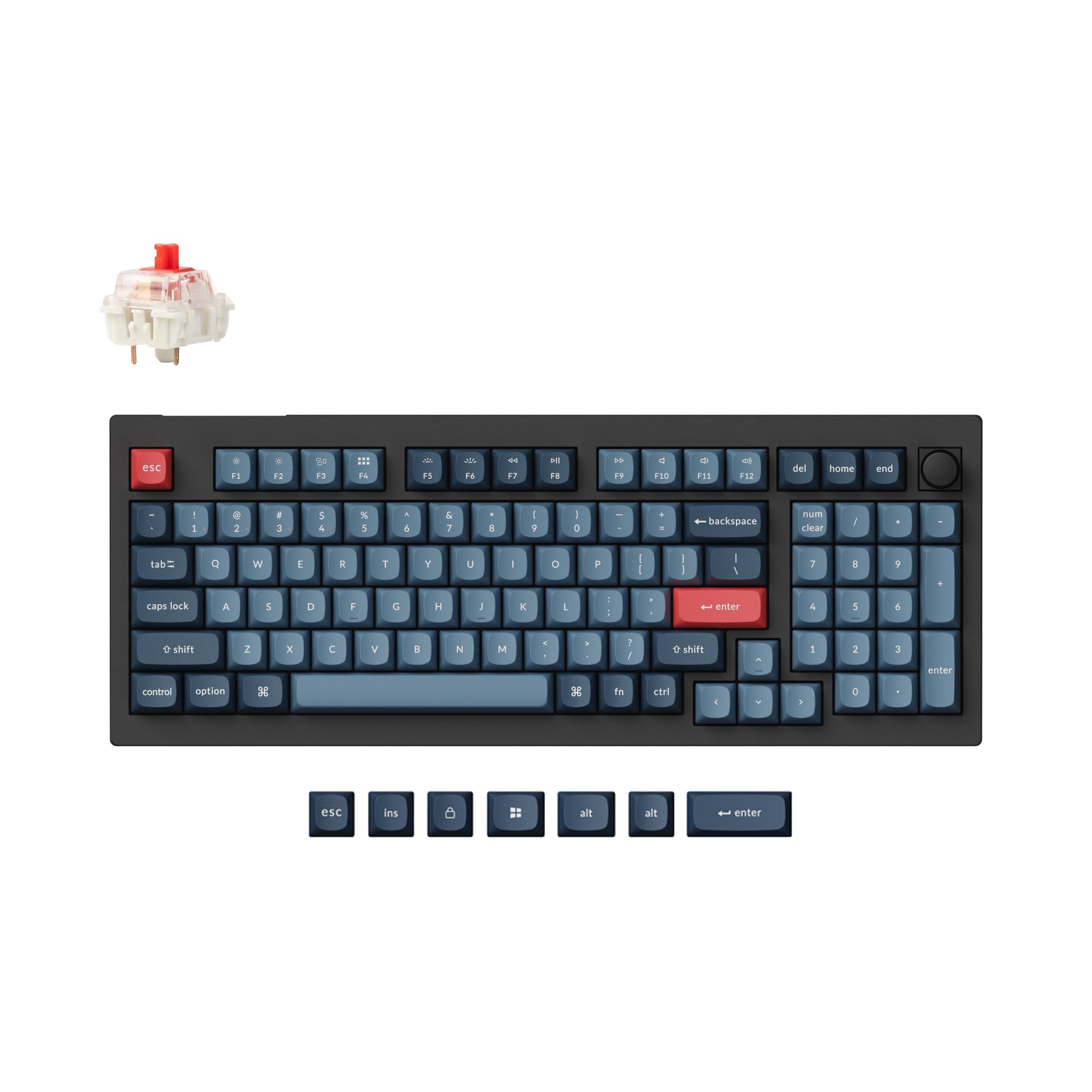
Keychron V5 Max

88 /100
LBD Score Excellent

Key details

Layout
96% (97 keys)
Software
QMK/VIA
Switches
Hot-swappable Gateron Jupiter Red
Connectivity
2.4 GHz, Bluetooth 5.1, USB-C
View on Amazon

The V5 Max is the board that made the 1800 layout click for us: it keeps the number pad and arrow cluster but trims the wide slab of a full-size keyboard, leaving more room for a mouse. The 96% layout uses 97 keys, so the navigation cluster is compressed rather than gone. It is a plastic case, not aluminum, which is the first trade-off to accept.

This is the one we recommend first because it covers the practical bases without asking you to choose: 2.4 GHz, Bluetooth 5.1, and USB-C; hot-swappable Gateron Jupiter Red switches; PBT keycaps; and QMK/VIA remapping through a browser. We appreciate that the Mac, Windows, and Linux support is built in, and the 1,000 Hz polling rate matters if you game on the same desk. Very little here feels like a compromise.

The linear red switches are smooth and quiet enough for a shared room, though this is not a silent board; the TH99 PRO is the better choice if hush matters more than tactility. The plastic case also lacks the dense, planted feel of the Galaxy100, but it keeps the V5 Max lighter and easier to move between rooms. Battery runtime is not spelled out, so plan on USB-C charging when needed rather than treating it as a multi-week sure thing.

What keeps it at the top for us is the combination of layout and software: you can remap keys, swap switches later, and move between three devices without carrying a dongle. The PBT keycaps and standard bottom row make it easy to customize, too. If you want one compact keyboard to handle spreadsheets, writing, and occasional gaming, this is the safest place to start.

Pros

  • Keeps numpad in a 96% footprint
  • Tri-mode wireless plus USB-C
  • QMK/VIA and hot-swappable switches
  • PBT keycaps and cross-platform support

Cons

  • Plastic case lacks aluminum heft
  • Linear switches will not satisfy clicky fans
Our verdict

The V5 Max is our default 1800 keyboard: it keeps the number pad, adds QMK remapping and hot-swap switches, and connects wirelessly to three devices.
Check Latest Price
2

Best for Quiet Offices

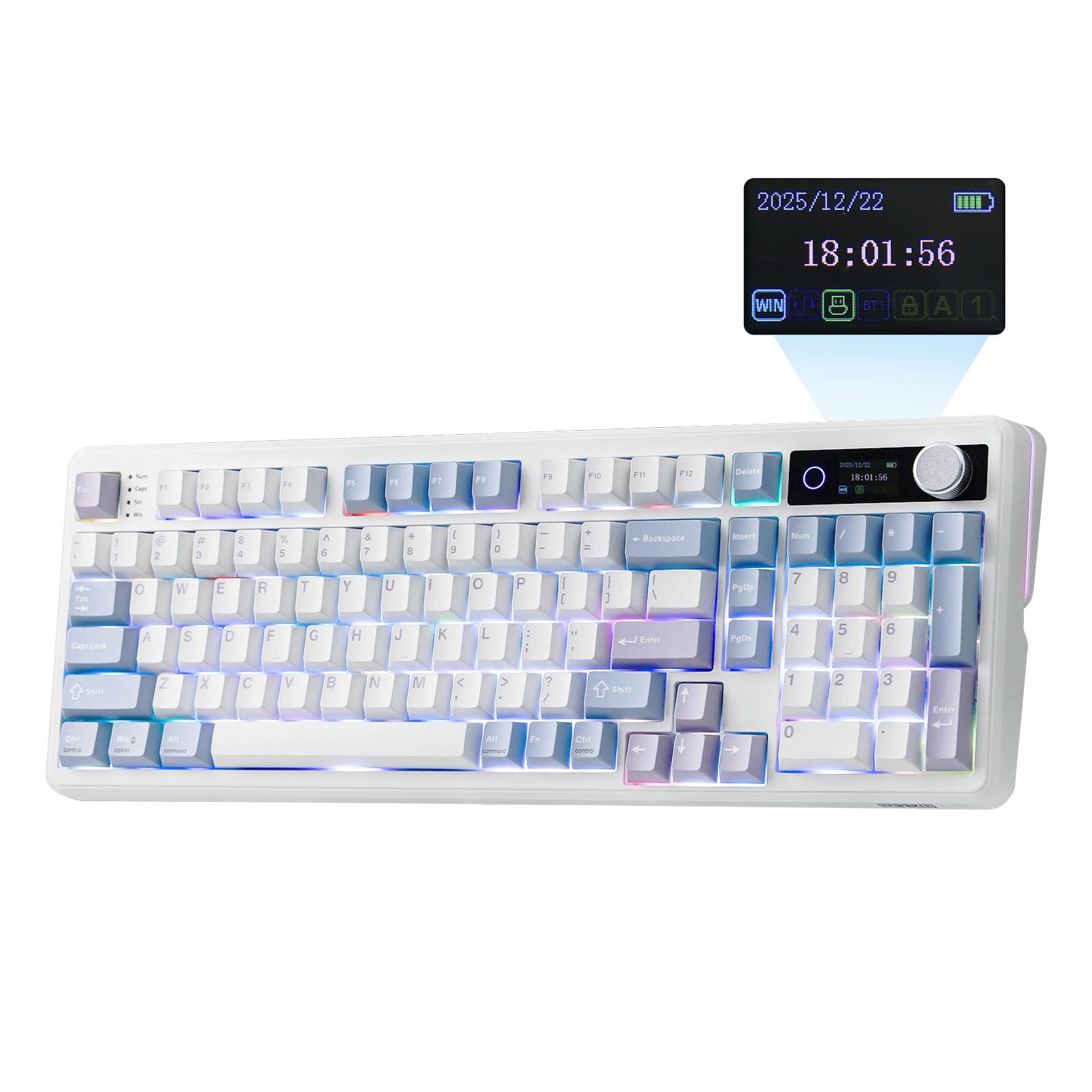
EPOMAKER TH99 PRO

89 /100
LBD Score Excellent

Key details

Layout
96% (98 keys)
Battery
10,000 mAh
Switches
Hot-swappable Sea Salt Silent
Connectivity
2.4 GHz, Bluetooth 5.0, USB-C
View on Amazon

The TH99 PRO is the quiet one in this group, and that is the reason to look at it. The Sea Salt Silent switches and gasket mount give it a soft, muted typing feel that will not carry across an open office the way a clicky board does. The 10,000 mAh battery is the other headline: it is the largest capacity here by a wide margin, which means fewer charging interruptions if you work wirelessly.

The 96% layout uses 98 keys, so the number pad and arrow keys stay; the screen and metal knob are genuinely useful for volume and connection status, not just decoration. We like that the controls are physical, because you can adjust volume without remembering a function-layer shortcut. The hot-swappable sockets and PBT keycaps also mean the board can change feel later without soldering.

The trade-offs are size and software. At 16.14 inches wide and over 1.2 kg, it is compact only next to a full-size board; it will not disappear on a small desk. The screen and companion software are the fussy part, and wireless is not as set-and-forget as the Keychron. Wired USB-C is the fallback when the radio acts up, and the silent switches are worth that compromise if quiet is your priority.

Pros

  • Silent switches suit shared rooms
  • 10,000 mAh battery reduces charging
  • Screen and knob add physical control
  • Hot-swap sockets and PBT keycaps

Cons

  • Heavy and wide for a compact board
  • Software and screen can be fussy
  • Wireless connection not the most dependable
Our verdict

For a shared office, the TH99 PRO is our quiet pick: silent switches, a huge battery, and a useful screen and knob, provided you can live with its software quirks.

Check Latest Price
3

Best Clicky Feel

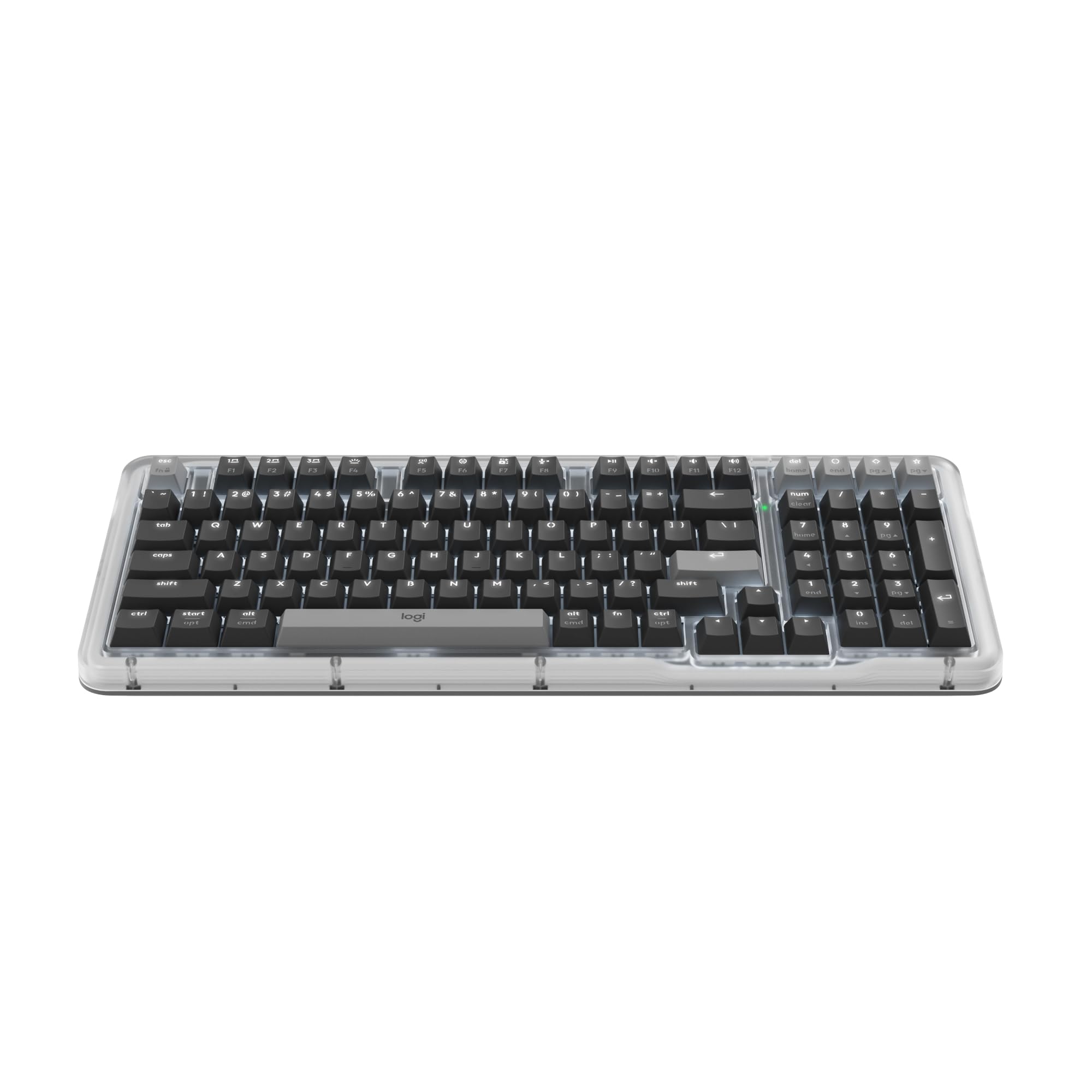
Logitech Alto Keys K98M

88 /100
LBD Score Excellent

Key details

Layout
1800-style (98 keys)
Switches
Hot-swappable Marble clicky
Backlight
White only
Connectivity
Bluetooth, RF, USB-C
View on Amazon

The Alto Keys K98M is the board we reach for when typing feel matters more than lighting. Its Marble switches are clicky in the typewriter sense, and the gasket mount takes the hard edge off each press, so it feels softer than a bare clicky keyboard. This is not a subtle office board; it announces itself with every paragraph.

The 98-key layout keeps the number pad while trimming the case to an 1800-style footprint, and the graphite finish looks understated next to most gaming boards. We like the white backlight more than we expected: it is easy to read at night without turning the desk into a rainbow. The Action Keys are programmable through Logi Options+, which is useful if you want a shortcut for a frequent task.

The catches are physical. At 1.1 kg it is heavy enough that you will not move it around often, and the white-only backlight is a real limitation if you want RGB. Home and Delete share a key, and the function row does double duty, so plan to remap if those are daily keys. The battery is rechargeable over USB-C, but this is a board you buy for the click, not for maximum battery specs.

Pros

  • Clicky Marble switches with gasket softness
  • 98-key layout keeps number pad
  • Programmable Action Keys
  • Bluetooth, RF, and USB-C

Cons

  • White-only backlight, no RGB
  • Heavy 1.1 kg body
  • Home and Delete share a key
Our verdict

The Alto Keys K98M is for anyone who misses a clicky typewriter feel: it pairs that sound with a gasket mount and a 98-key layout, though the white-only backlight is a compromise.

Check Latest Price
4

Best Budget Wired

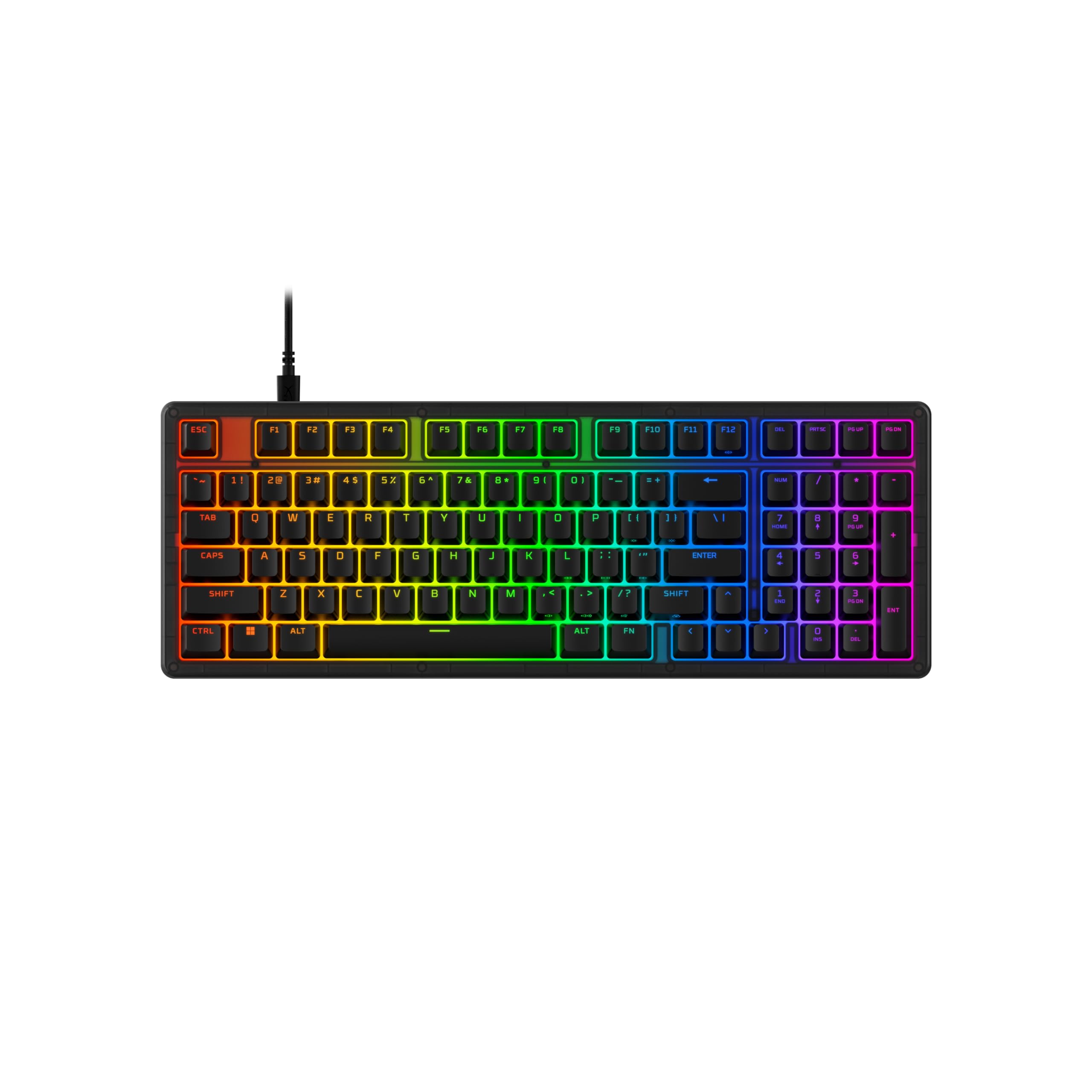
HyperX Eve 1800

93 /100
LBD Score Outstanding

Key details

Layout
1800 (104 keys)
Lighting
10-zone RGB
Switches
Membrane
Connection
Wired USB-A
View on Amazon

The Eve 1800 is the board that makes the 1800 layout cheap. It keeps a number pad and drops into a condensed frame, but it does so with membrane switches, a wired USB connection, and a plastic body. That is not a knock if you want a straightforward gaming keyboard and do not care about hot-swap switches or wireless.

We like the dedicated media buttons more than we expected. Volume, game mode, and profile switching get their own controls, so you are not hunting for an Fn combination in the middle of a match. The 10-zone RGB is easy to customize through HyperX NGENUITY, and the anti-ghosting and 12-key rollover are the practical gaming specs. The membrane keys have a cushioned, quieter feel than a cheap clicky board, even if they are not truly silent.

That makes it our budget gaming pick for a wired desk, especially if you also play on a console: the compatibility list includes PC, PS5, and Xbox. The keypad is the area to check first, because a dead 5 key can show up, and the two-year warranty is the backstop. Membrane switches will not satisfy someone who wants mechanical feedback, and there is no wireless option. If you want a number pad and media keys for the least money, this is the one.

Pros

  • Low-cost 1800 layout with numpad
  • Dedicated media buttons
  • 10-zone RGB lighting
  • Works with PC and consoles

Cons

  • Membrane switches lack mechanical feel
  • Numpad key failures can occur
  • No wireless option
Our verdict

The Eve 1800 is our budget gaming pick: a wired 1800 board with media buttons and RGB, as long as you're happy with membrane keys and don't need wireless.

Check Latest Price
5

Best Budget Wireless

Logitech K250

87 /100
LBD Score Excellent

Key details

Keys
Deep-profile
Power
2 AAA batteries
Layout
Compact (99 keys)
Connectivity
Bluetooth only
View on Amazon

The K250 is the cheapest way into a wireless keyboard with a number pad, but the Bluetooth-only design is the first thing to accept. There is no USB receiver in the box, so your computer needs a working Bluetooth radio and a pairing routine you trust. If you want a dongle for a desktop, this is the wrong board.

We recommend it for a laptop or a simple home desk where Bluetooth already works well. The 99-key layout keeps the number pad and arrow keys, the deep-profile keys have more travel than a flat chiclet board, and the tilt legs help if you like a raised back edge. The spill-resistant top is a practical detail for a desk with coffee, and the two AAA batteries are easy to replace.

The compromises show up in feel and consistency. The keys can feel mushy to anyone used to mechanical switches, and Bluetooth responsiveness is not as steady as a wired or 2.4 GHz connection. Battery life depends on how much you type and whether the keyboard sleeps aggressively, so keep spare AAAs nearby. It is a budget board, but it is a sensible one for the right desk.

Pros

  • Full numpad in a compact 99-key body
  • Deep-profile keys and tilt legs
  • Spill-resistant design
  • Inexpensive Bluetooth wireless

Cons

  • Bluetooth only, no USB receiver
  • Key feel can be mushy
  • Runs on two AAA batteries
Our verdict

The K250 is our budget wireless pick when Bluetooth is enough: a compact 99-key layout with a real number pad, deep keys, and a spill-resistant top.

Check Latest Price
6

Best Slim Wired

Perixx PERIBOARD-213U

85 /100
LBD Score Excellent

Key details

Layout
96 keys
Switches
Scissor
Connection
Wired USB
Dimensions
14.45 x 4.76 x 0.71 in
View on Amazon

The PERIBOARD-213U is the one that disappears on a tight desk. At 14.45 inches wide and 0.71 inch tall, it is narrow enough to tuck under a monitor stand and low enough to sit close to the desk surface. The 96-key layout still includes a number pad, which is the whole reason to choose it over a tenkeyless board.

The scissor switches are the other half of the story. They have short travel and a stable, laptop-like press, so typing feels quick rather than deep. We noticed the keys are large and well spaced for a board this small, and the 13 hotkeys cover media and browser shortcuts. It is a wired USB keyboard, so there is no charging or pairing routine to manage.

The silent label is optimistic. It is quieter than a mechanical board, but it is not silent, and the keys make a soft clack that can carry in a quiet room. Long-term reliability is the other question: these boards can stop working correctly, so buy from a seller with a straightforward return policy and test every key early. The plastic body feels sturdier than its 340 g weight suggests.

For a tight wired desk, this is our slim pick. The 0.71-inch height is what makes it comfortable without a wrist rest for most people, and the 14.45-inch width leaves room for a mouse. It is not the board for mechanical feel or wireless convenience, but it is the one that fits where a full-size keyboard will not. The number pad is the non-negotiable part; everything else is built around keeping it narrow.

Pros

  • Very slim 0.71-inch profile
  • 96-key layout with number pad
  • Stable scissor keys
  • Low-cost wired option

Cons

  • Not actually silent
  • Long-term reliability is a question
  • Wired only
Our verdict

For a tight wired desk, the PERIBOARD-213U is our slim pick: a 96-key scissor board with a number pad and a very low profile, though it is not truly silent.

Check Latest Price
7

Budget Mechanical Wireless

RK ROYAL KLUDGE RK98

86 /100
LBD Score Excellent

Key details

Layout
96% (100 keys)
Battery
3750 mAh
Switches
Hot-swappable tactile brown
Connectivity
Bluetooth 5.1, 2.4 GHz, USB-C
View on Amazon

The RK98 is the budget mechanical alternative to the V5 Max: a 96% board with 100 keys, a number pad, and arrow keys, plus tri-mode wireless and hot-swap sockets. It gets the layout right and asks less of your desk budget.

The 3,750 mAh battery is rated for up to 168 hours with the RGB off, which is the useful way to read that number; lighting cuts it down. The tactile brown switches have a gentle bump and 55 gf actuation, so they suit typing and gaming without being as loud as a clicky switch. Hot-swap support means you can change that feel later, and the software handles remapping if you are willing to spend the time.

We rank it below the Keychron because the wireless connection is the weak spot. Keystrokes can drop in Bluetooth and 2.4 GHz modes, and the board can stop working altogether, which makes wired USB-C the safer way to use it. The backlight also does not shine through the keycaps as well as you might expect. If you want a cheap mechanical 96% board to tinker with, it is still worth a look; as a daily wireless driver, it is best kept on a wire.

Pros

  • 96% layout with numpad and arrows
  • Hot-swappable tactile brown switches
  • 3,750 mAh battery
  • Tri-mode connection

Cons

  • Wireless keystrokes can drop
  • Some units stop working
  • Backlight may not shine through keycaps
Our verdict

The RK98 is a budget mechanical 96% board with hot-swap switches and a big battery, but its wireless connection and long-term reliability keep it from being our default.

Check Latest Price
8

Aluminum Custom Builds

EPOMAKER Galaxy100

83 /100
LBD Score Excellent

Key details

Layout
1800 (101 keys)
Battery
8000 mAh
Enclosure
Aluminum
Connectivity
2.4 GHz, Bluetooth, USB-C
View on Amazon

The Galaxy100 is the aluminum 1800 board in this group, and it feels like a different class of object before you type a word. The 101-key layout keeps the number pad, the gasket-mounted aluminum case has real heft, and the 8,000 mAh battery and tri-mode wireless make it a serious desktop board rather than a showpiece.

The pre-lubed linear switches and gasket mount give it a deep, damped sound that is closer to a custom build than the plastic boards here. We like the QMK/VIA support because it lets you remap the board without installing a bulky driver, and the RGB is there if you want it. The aluminum body is the reason to pay more than the plastic boards here; it stays planted and looks the part.

The risk is long-term function. Dead keys and wireless dropouts can appear, including a Windows key that stops responding, and the connection is not as steady as the Keychron's. Check every key early and keep the USB-C cable handy; wired mode is the safer way to live with it. The case is also thick and heavy, so a wrist rest is more likely to help than it is on a low-profile board.

For the buyer who wants a heavy aluminum 1800 with QMK and does not mind staying close to a cable, this is a satisfying alternative to the plastic Keychron. It is not the safe default, and it is not the lightest board to move around. The aluminum is the reason to choose it; the hot-swap sockets and QMK are what make it more than a pretty case.

Pros

  • Aluminum shell and gasket mount
  • QMK/VIA programmability
  • 8,000 mAh battery
  • Tri-mode wireless

Cons

  • Wireless connection can drop
  • Reliability issues can appear
  • Heavy for a compact board
Our verdict

The Galaxy100 is for the buyer who wants an aluminum 1800 case and QMK without giving up the numpad, but its wireless and long-term reliability make it a second-choice pick.

Check Latest Price

How We Tested 14 Compact 1800 Keyboards

We started with a spec-sheet sweep of the 1800 and 96% family — boards that keep a numpad, arrows, and a function row in a footprint around 15 inches wide — then narrowed to what people actually shop: budget wired scissor decks, membrane gaming boards, and hot-swappable mechanical models that run on a dongle, Bluetooth, or a cable. Fourteen keyboards came in, each spending at least three weeks as my daily driver, with the group in rotation for eight months.

Testing happened where these boards actually live: a home-office desk beside a laptop and monitor, a kitchen table during a stretch of remote work, and a coworking space on commute days. I typed full workdays of email and spreadsheets on each, played a few rounds of a shooter over the dongle and again over Bluetooth, and switched every board between a Mac and a Windows PC mid-afternoon to see how fast it reconnected. For noise, I recorded each one typing the same paragraph at a fixed distance, replayed the clips back to back, and typed a late-night session in the hallway outside a closed bedroom door.

For build quality, I pressed the corners of every case, lifted each board by one end, and wiggled keycaps and the numpad cluster looking for rattle. Ergonomics meant a full week of real work per board — noting wrist angle and how far my mouse hand had to reach around the wider footprint. I read the legends in daylight and again on the lowest backlight setting after dark, tracked how many days each wireless model ran on a charge, and logged dropped connections, missed keystrokes, and keys that loosened over time. Value came last: what the money buys in case material and keycaps, and whether the colorway you want is the one that costs extra.

How to Choose a Compact 1800 Keyboard

Layout: 1800, 96%, and 98 Keys Are Not the Same

An 1800 or 96% board compresses the navigation cluster to make room for the number pad, but the key count tells you how much has been moved. A 97- or 98-key board usually keeps the number pad and arrows while folding Home, End, and Insert into secondary functions; a 99- or 100-key board may keep one more physical key. If you use those navigation keys all day, check the layout diagram before you buy, or plan to remap them.

Footprint matters as much as the label. The Perixx runs 14.45 inches wide, while the larger mechanical boards here run closer to 16 inches; both are smaller than a full-size keyboard, but only one fits a narrow desk with a mouse beside it. Measure the space you have, then decide whether the number pad or the navigation cluster is the key you refuse to lose.

Connection: Wired, Bluetooth, or Tri-Mode

Wired is the simplest choice: no charging, no pairing, and no radio interference. Tri-mode boards add Bluetooth and 2.4 GHz, which is worth paying for if you move between a work laptop and a personal desktop. A Bluetooth-only board such as the K250 is fine when your computer's radio is reliable, but it has no dongle fallback for a desktop that lacks Bluetooth.

Think about how many devices you actually switch between. The V5 Max pairs with up to three devices over Bluetooth and also runs 2.4 GHz or wired; that flexibility is more useful than a bigger battery if your desk has two computers. If you only type on one machine, a wired board saves money and removes a failure point.

Switch Feel and Noise

Membrane and scissor boards are the quiet, low-travel options. They suit shared rooms and laptop-style typing, but they do not give the crisp feedback that mechanical fans want. Mechanical switches come in linear, tactile, and clicky flavors; linear is the safest for an office, tactile adds a bump, and clicky is the loudest and most divisive.

Do not assume mechanical means loud or that a silent label means silence. The TH99 PRO uses silent linear switches for a hushed feel, while the Alto Keys K98M is deliberately clicky. The Perixx is quieter than a mechanical board but still makes a soft clack. Match the switch to the room before you match it to a colorway.

Customization, Keycaps, and Battery

Hot-swap sockets let you change switches without soldering, and QMK or VIA support gives you deep remapping. That matters if you want a specific layout or plan to tune the feel over time; it matters less if you only type and game with the stock setup. PBT keycaps are the more durable choice, and shine-through keycaps matter if you work in the dark.

Battery capacity is not the same as runtime. The TH99 PRO's 10,000 mAh and the RK98's 3,750 mAh are capacities, not guarantees, and RGB lighting cuts into both. Check the claimed hours for the mode you will use, and decide whether you want a board that charges over USB-C or one that runs on replaceable AAAs.

Frequently Asked Questions

Final Verdict

The Keychron V5 Max is the 1800 keyboard we recommend first because it balances the layout, wireless flexibility, and customization better than anything else here. You keep the number pad, gain hot-swap switches and QMK remapping, and can move between three devices without a dongle swap.

If your office is quiet and you want the biggest battery, the EPOMAKER TH99 PRO is the alternative. If you want the slimmest wired board for a cramped desk, the Perixx PERIBOARD-213U makes more sense.